
- Site menu:
- Latest Discussions
- Latest Newswire
- Archives
- Submit Story
- Story HOWTO
- Syndicate
- E-mail Alerts

GNOME 3 vs Unity: Which is right for you?
|
|
|
Comments (43)
23 earlier comments in the full thread.
Quoting:Quoting:I'm loving Gnome 3 not sure why everyone is so up in arms about it, you can always use the fallback mode.
Quoting: For myself, because it doesn't deliver what I need, even in fallback mode.
Does anybody have a firm grasp on whether either "fallback mode" is even intended (ie. "officially declared") to remain available for the foreseeable future -- let alone how reliable that will be?
I haven't been paying close attention, but my impression is that at least one of these two projects (Gnome3 and/or Ubuntu-Unity) is clearly planning for "fallback mode" to be a distinctly short-lived option.
@BernardSwiss "....to be a distinctly short-lived option."
That was my impression.
That was my impression.
Although very slightly off-topic, it is true that very slight changes to a UI experience can have a devastating effect on the usability of it for a single user when they are used to a particular work pattern.
I have recently had the misfortune to find that CTRL-Tab in Visual C++ - Express Edition is now broken.
For many years it was the standard for CTRL-Tab (in Windows) to cycle you through the tabs in a Window. CTRL-Tab to the right, SHIFT-CTRL-Tab to the left. CTRL-Tab now takes you to a menu presented in what appears to be a random order, and that order changes everytime you change a tab selection! This is appallingly bad. If you wish to use the shortcut to get the next tab on the right, you have to search for it in a pop-up list. It makes it entirely useless for me. It is now quicker to use the mouse. So what on earth was the point of changing it?
This is kind of the point of why Unity and Gnome Shell are useless for development users. We are high performance users with a well defined work pattern that works well for us. We tend to use a combination of mouse and key shortcuts. We don't have time to read pop-up windows. Key gestures should be predictable and consistent.
@skelband. While it's true that, shall we call them power users, have their own peculular work patterns, the older desktops GNOME2,KDE3 enabled one to configure the desktop easily to enable the work pattern. What the new desktops, and especially Unity and GNOME3 seem to be doing is disabling that configurability. As things stand I can can configure a Windows desktop much closer to my preferred work pattern than either of Unity or GNOME 3.
The thing about Unity and GNOME3 and to a lesser extent KDE4, is I can't see that I will ever get to a point where I can have "My" desktop back, at least not without the ability to completely rebuild the UI.
The thing about Unity and GNOME3 and to a lesser extent KDE4, is I can't see that I will ever get to a point where I can have "My" desktop back, at least not without the ability to completely rebuild the UI.
Quoting:The thing about Unity and GNOME3 and to a lesser extent KDE4, is I can't see that I will ever get to a point where I can have "My" desktop back, at least not without the ability to completely rebuild the UI.What is the difference that you find with fall back mode and gnome 2.x? only thing I can I can tell is the 'system' menu.
I always loved fluxbox you made your own shortcuts or symbolic links to everything and or alias in your bashrc file. You will become a better user on all machines and won't be crippled by a gui. But for being a modern gui this one is far more to my liking then any other newer D/E. It does have a couple things you need to add/do when you first install but there are in the repositories and are very easy to do.
This is the first release of the new interface and tools will be added, just as they were added with gnome 2.x over time. (just crazy to think they won't or 3rd party apps to do it, with it being css and all)
I love the fact that the desktops are dynamic I don't have to have a crazy number of desktops predetermined before I start, but if you want your 3x3 config you can still use it and see all your apps just use the fallback that you love.
Quoting:What is the difference that you find with fall back mode and gnome 2.x? only thing I can I can tell is the 'system' menu.
Well for one thing I can't move or make hide the d@mn top panel, which also doesn't work well with my multi monitor set up.
 Click on the image a couple times to see it in full size.
My desktop in fallback mode with the 3x3 window running dual monitors (yeah they are different sizes I prefer to use 2 computers with synergy sharing the keyboard and mouse then dual monitors but I will keep it this way and have all 3 monitors on 2 computers sharing the same k/b & mouse for a while until I need the space on my desk back.
and this is my multiple monitor set up.
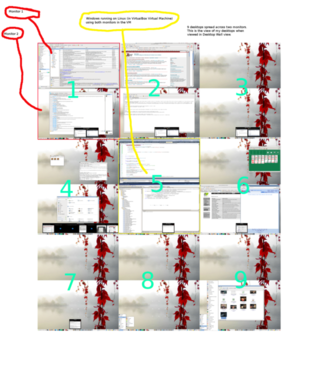
Click on the image for a larger view. As you can see the monitors are stacked one above the other. I'm using Linux Mint, but not the Mint Menu, instead the GNOME Menu, I don't give a rats that System menu has been removed on GNOME 3, that doesn't bother me I often use that styoe of menu anyway.
The bottom panel auto hides when not in use, I've replaced the GNOME Window List with the DockbarX panel applet for multiple previews. There are no desktop icons.
Mouse to rH side of screen + left mouse click reveals all windows on current desktop. Mouse to RH side of screen + right mouse click reveals all windows on current monitor. Mouse to rh side of screen + middle button click shows all open windows on all desktops
Mouse to left side + left mouse click reveals all desktops. Mouse to bottom reveals bottom panel mouse over DockbarX icons reveals all windows of all instances of given application. click on the preview takes you to the desktop where that instance of the application is running.
I'm running Windows on Virtual box and have seamless integration between Windows and Linux.
It's taken me nearly 10 years and several desktop UIs to arrive where I am. I was almost there on KDE3.5.x, then the KDE4 folks decided I needed a semantic desktop. Thankfully with GNOME 2.x and Compiz I was able finally get there. Now it seems the GNOME folks have decided I need a different sort of desktop again.
Now, if or when GNOME 3 can give me all of that exactly as I currently have it, and it looks like the Linux Mint folks may be able to deliver, I'll be happy with GNOME 3. I'm currently looking at XFce, but it too has it's short commings, mostly in the default applications area.
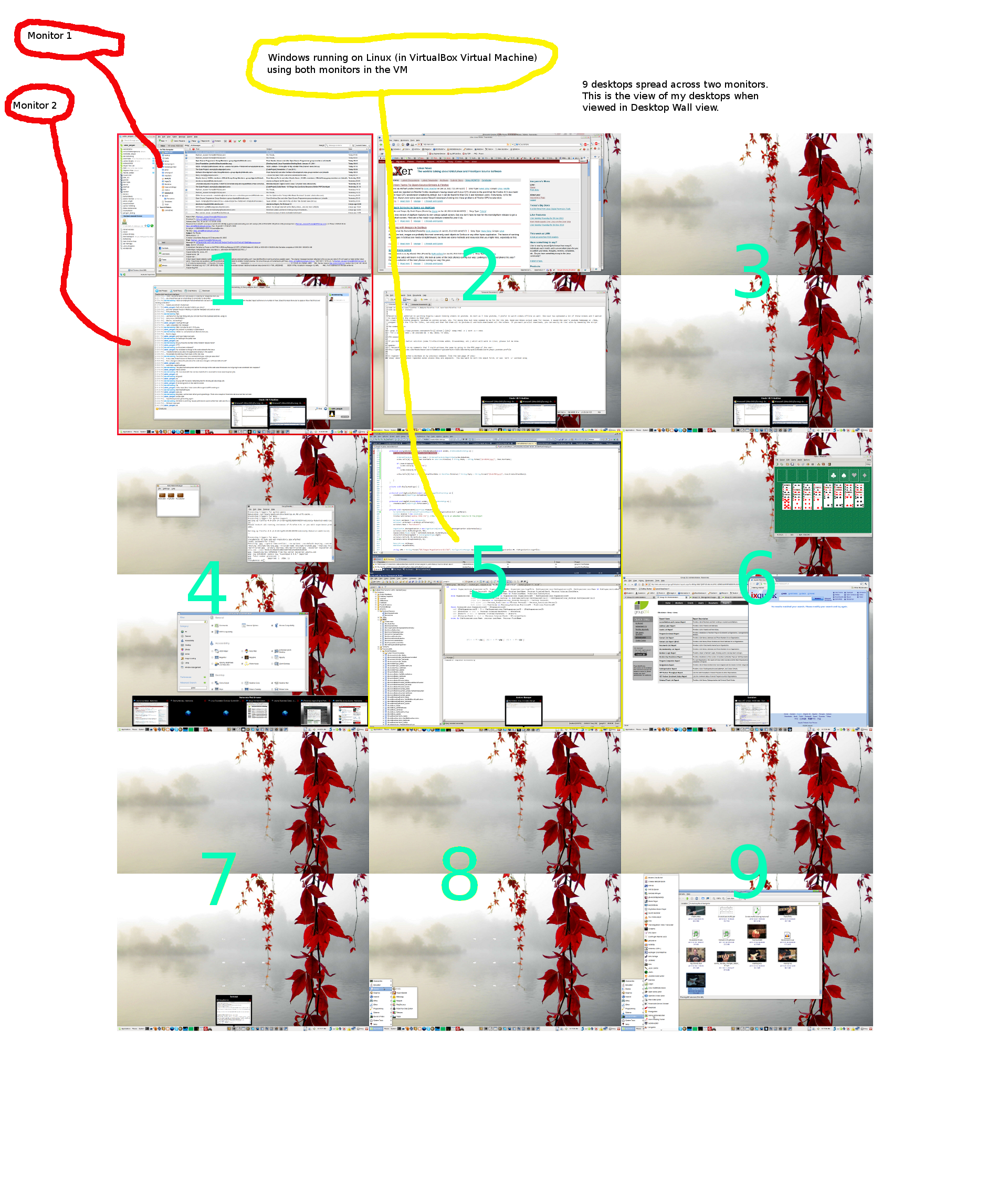
Click on the image for a larger view. As you can see the monitors are stacked one above the other. I'm using Linux Mint, but not the Mint Menu, instead the GNOME Menu, I don't give a rats that System menu has been removed on GNOME 3, that doesn't bother me I often use that styoe of menu anyway.
The bottom panel auto hides when not in use, I've replaced the GNOME Window List with the DockbarX panel applet for multiple previews. There are no desktop icons.
Mouse to rH side of screen + left mouse click reveals all windows on current desktop. Mouse to RH side of screen + right mouse click reveals all windows on current monitor. Mouse to rh side of screen + middle button click shows all open windows on all desktops
Mouse to left side + left mouse click reveals all desktops. Mouse to bottom reveals bottom panel mouse over DockbarX icons reveals all windows of all instances of given application. click on the preview takes you to the desktop where that instance of the application is running.
I'm running Windows on Virtual box and have seamless integration between Windows and Linux.
It's taken me nearly 10 years and several desktop UIs to arrive where I am. I was almost there on KDE3.5.x, then the KDE4 folks decided I needed a semantic desktop. Thankfully with GNOME 2.x and Compiz I was able finally get there. Now it seems the GNOME folks have decided I need a different sort of desktop again.
Now, if or when GNOME 3 can give me all of that exactly as I currently have it, and it looks like the Linux Mint folks may be able to deliver, I'll be happy with GNOME 3. I'm currently looking at XFce, but it too has it's short commings, mostly in the default applications area.
Looks like you want KDE 4.x you can exactly match that Desktop layout and mouse movement with it, just install KDE version of Mint. Yeah, I hate the stock Mint panel in gnome as well.
I quit running Windows and its programs a long time ago, but it is nice how easy it is to install in a VM. I did the same for a computer I set up for my father years ago, so he could still use the programs that he was used to, had the gnome bar up top and the xp menu on the bottom.
Quoting:Looks like you want KDE 4.x you can exactly match that Desktop layout and mouse movement with it, just install KDE version of Mint.
Tried it. Doesn't work for me.
@TA,
Since nothing stays the same, nothing is going to keep you happy but your own Distro.
Since nothing stays the same, nothing is going to keep you happy but your own Distro.
@Fettoosh It may yet come to that. However I'm not asking for things to stay the same. If I had wanted that I would not have configured my desktop as it is. What I am asking for is for a desktop that I can work with so I can work more efficiently, not one where I'm expected to change to suit some arbitrary developer's idea of how I should be working.
What I'm asking for is that FOSS UI developers keep the d@mn desktop flexible, so it doesn't have to stay the same.
So far the developers of all the new UIs have thrown out everything that was good about the UI, replaced it with something inflexible and cumbersome, and labeled it as great.
I'll wait until the Linux Mint people show us what they can do with GNOME 3.
Or its time for a totally new shell for gnome, for the people that want to be productive.
I've been thinking for some time to start on one, but I just don't have the time right now. And I'm also wondering if I switch to E instead.
I've been thinking for some time to start on one, but I just don't have the time right now. And I'm also wondering if I switch to E instead.
What I am asking for is for a desktop that I can work with so I can work more efficiently, not one where I'm expected to change to suit some arbitrary developer's idea of how I should be working.
That pretty much sums up the entire kerfuffle with clarity and efficiency.
Somehow, I am picturing all of this as an art exhibit, where we stand around commenting on our impressions and ideas about what is hanging on the wall. Maybe the Devs involved are trying to create art instead of a desktop. It just seems that way to me.
tracyanne,
The image that you posted above is apparently too wide for this
forum's format, and is making every comment in this thread
unreadable for me.
I had to add hard returns to this message's lines, to make
them readable.
forum's format, and is making every comment in this thread
unreadable for me.
I had to add hard returns to this message's lines, to make
them readable.
Quoting:tracyanne, The image that you posted above is apparently too wide for this
This is happening more and more recently and the way I have been able to read the text is to Ctlr- multiple times in Chrome/FIreFox until it is visible. It gets so small but still able to read it.
I think the table column needs to be set to not exceed a certain width and to wrap text instead when it exceeds the limit. Or change it it to <div> tag with auto scroll. I am not sure who handles that.
Quoting:tracyanne, The image that you posted above is apparently too wide for this
One other option to read the text is, when using Chrome, right click on picture element, then select inspect element, in the window that comes up, right click on the highlighted element and delete it. You may have to delete multiple picture if they exist. Chrome will refresh the page automatically and if you refresh (Ctrl R) you will get the original display.
Or simply, turn off images auto-loading
@ComputerBob, is that better bob
Quoting: is that better bob
Now it is scan2006's turn to fix the image.
Post a comment
A free account is needed to post. Write your comment here first: your text is kept in this browser while you sign up or log in, and is waiting for you when you come back.
Your message:Markdown: **bold**, *italic*, [text](https://link), - lists, > quotes, $x^2$ for math. Formatting help
Sign up and post (it is free) or Log in and post
For myself, because it doesn't deliver what I need, even in fallback mode.
You see I don't. Additionally the virtual desktop previews show only 1 of my Monitors, not both, which means I can't rely on the previews to determine which desktop I need. Also the desktop previews are not fixed, so I lose track of where I am, I use nine virtual desktops in a 3 by 3 grid. I know exactly where my applications are, I don't need to search for them.
I don't. I never have and I dislike having to remember a bunch of k/b short cuts. My desktop is setup so I can use a mouse for all desktop navigation.
I might point out here that people with arthritis or other physical conditions that make using keyboard shortcuts [difficult] are not going to like this dependence on kb shortcuts, and the menu system being as convoluted as it is won't help either.
I dislike that. I dislike that the virtual desktop is destroyed when you move the last window application from it. I dislike that the vitual desktops shuffle around (aren't fixed).
I doubt it.