
- Site menu:
- Latest Discussions
- Latest Newswire
- Archives
- Submit Story
- Story HOWTO
- Syndicate
- E-mail Alerts

4 things you (probably) didn't know you can do with Chrome for Linux
|
|
|
Comments (50)
30 earlier comments in the full thread.
> First page of Google searches for "Install Linux Acer C720" -> http://www.enlightenment.org/ss/e-54ff58237167f8.48552292.pn...
And unless they know they're going to get an Acer C720, why would they include that in their search, Jeff?
I used the more generic "installing Linux on a Chromebook". I also tried the more specific "installing Slackware on a Chromebook", since that's the distro I would probably be using.
Most of the hits involved using Crouton, not installing to the hardware.
And unless they know they're going to get an Acer C720, why would they include that in their search, Jeff?
I used the more generic "installing Linux on a Chromebook". I also tried the more specific "installing Slackware on a Chromebook", since that's the distro I would probably be using.
Most of the hits involved using Crouton, not installing to the hardware.
Since ChromeOS doesn't exist on system ROM, it would be hard to reinstall it from there. If you lose your ChromeOS installation for any reason, you have to download a recovery image from Google to re-install it.
The reason to search on Acer C720 is because pretty much all Chromebooks with SeaBIOS built in have an identical install procedure, and the C720 is the most popular of these. If you're getting a Chromebook with the intent to install Linux directly to hardware, I'd strongly recommend getting that type. Slackware would definitely include extra work (unless there's a pre-tweaked image of it somewhere that I've not seen) because of the drivers for the touchpad, and because of keyboard oddities on Chromebooks.
The reason to search on Acer C720 is because pretty much all Chromebooks with SeaBIOS built in have an identical install procedure, and the C720 is the most popular of these. If you're getting a Chromebook with the intent to install Linux directly to hardware, I'd strongly recommend getting that type. Slackware would definitely include extra work (unless there's a pre-tweaked image of it somewhere that I've not seen) because of the drivers for the touchpad, and because of keyboard oddities on Chromebooks.
@All:
http://www.chromium.org/chromium-os/chromiumos-design-docs/security-overview
Emphasis mine.
Coreboot is a low level OS fully capable of executing code, applications, initiating downloads. The user 'OS', ChromeOS, GNU/Linux, Windows, is a guest OS. Coreboot, UEFI, and company are fully capable of running all hardware on the machine.
https://brmlab.cz/_media/event/coreboot_cisl2012.pdf
Chromium / ChromeOS boot process:
http://www.chromium.org/chromium-os/chromiumos-design-docs/firmware-boot-and-recovery
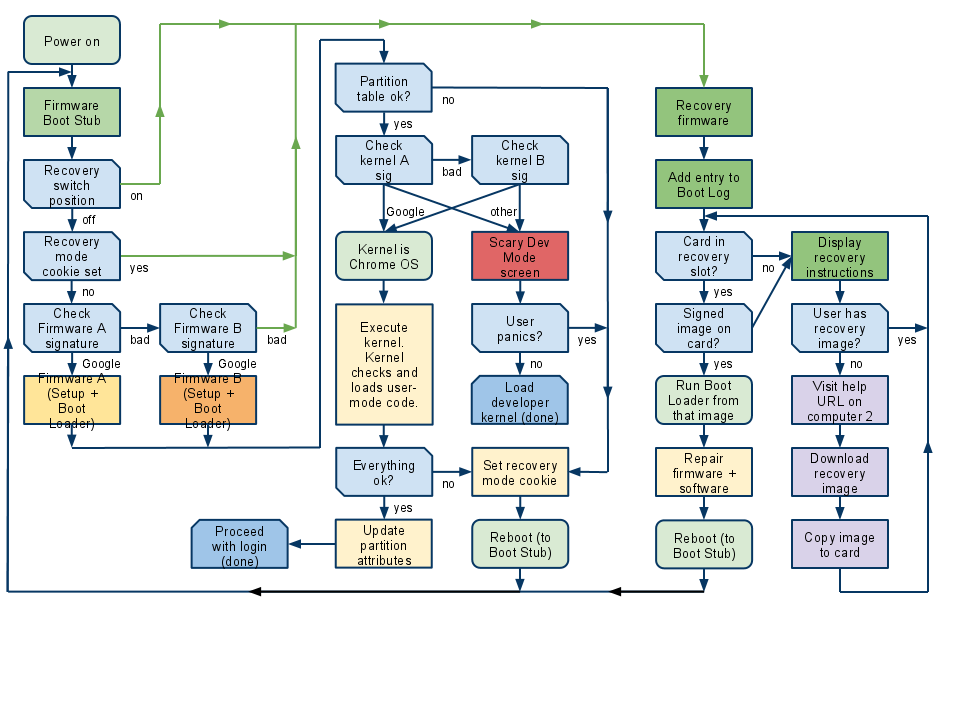
Coreboot Etherboot:
http://www.coreboot.org/Etherboot
Boot and install OS from etherboot: http://www.etherboot.org/wiki/appnoted
All the pieces are there in a Chromebook to support Google remotely modifying, bricking, or installing software or firmware. The only visible missing piece is the etherboot module in the coreboot menu. But there's no technical reason to prevent ChromeOS from having the necessary pieces in place. Perhaps, the current crop of Chromebooks are not remote brickable in this way -- but there's no reason to suspect they aren't. And perhaps when Google gets tired of 'developers' installing insecure code and damaging the Chromebook brand image - Google will remotely turn off developer mode until serious developers pay a modest fee. Again, there's no reason to suspect that Google is going to do this at some time in the future - or that they have 'baked' in the necessary components with an eye to future remote recovery... but there's no way to ensure that they haven't -- and, yes, it is possible that they have.
http://www.chromium.org/chromium-os/chromiumos-design-docs/security-overview
Quoting:Rendering pwned devices useless: We do not intend to brick devices that we believe to be hacked. If we can reliably detect this state on the client, we should just initiate an update and reboot. We could try to leverage the abuse detection and mitigation mechanisms in the Google services that people are using from their Chromium OS devices, but it seems more scalable to allow each service to continue handling these problems on its own.
Emphasis mine.
Coreboot is a low level OS fully capable of executing code, applications, initiating downloads. The user 'OS', ChromeOS, GNU/Linux, Windows, is a guest OS. Coreboot, UEFI, and company are fully capable of running all hardware on the machine.
https://brmlab.cz/_media/event/coreboot_cisl2012.pdf
Chromium / ChromeOS boot process:
http://www.chromium.org/chromium-os/chromiumos-design-docs/firmware-boot-and-recovery
Coreboot Etherboot:
http://www.coreboot.org/Etherboot
Boot and install OS from etherboot: http://www.etherboot.org/wiki/appnoted
All the pieces are there in a Chromebook to support Google remotely modifying, bricking, or installing software or firmware. The only visible missing piece is the etherboot module in the coreboot menu. But there's no technical reason to prevent ChromeOS from having the necessary pieces in place. Perhaps, the current crop of Chromebooks are not remote brickable in this way -- but there's no reason to suspect they aren't. And perhaps when Google gets tired of 'developers' installing insecure code and damaging the Chromebook brand image - Google will remotely turn off developer mode until serious developers pay a modest fee. Again, there's no reason to suspect that Google is going to do this at some time in the future - or that they have 'baked' in the necessary components with an eye to future remote recovery... but there's no way to ensure that they haven't -- and, yes, it is possible that they have.
> The reason to search on Acer C720 is because pretty much all Chromebooks with SeaBIOS built in have an identical install procedure, and the C720 is the most popular of these....
And how would someone just doing "a quick Google search" know this?
> Slackware would definitely include extra work...
Well, duh. It's Slackware. :) Slackware users take that as a given.
And how would someone just doing "a quick Google search" know this?
> Slackware would definitely include extra work...
Well, duh. It's Slackware. :) Slackware users take that as a given.
@jdixon How do you know installing Linux will work on any hardware XYZ?
You search specifically for the particular hardware you want to install on. You don't search for "Linux Asus" and expect to find detail information about getting things working on a specific Asus model do you?
Don't hold the Chromebook to a double standard. You want to find out information about a particular Chromebook - you search for that model.
You search specifically for the particular hardware you want to install on. You don't search for "Linux Asus" and expect to find detail information about getting things working on a specific Asus model do you?
Don't hold the Chromebook to a double standard. You want to find out information about a particular Chromebook - you search for that model.
@ljmp:
It's not that a lot of what you're talking about isn't possible. It's just that it's just as possible with other computers. UEFI is actually more of a complete system than Coreboot. Also, using SeaBIOS on a SeaBIOS enabled machine isn't considered a "hack" by Google. It's an option. No actual "hacks" are involved in booting a SeaBIOS enabled Chromebook directly to Linux.
The flowchart you posted doesn't include the SeaBIOS option. It's what happens assuming you're booting to the default firmware for loading ChromeOS. SeaBIOS would be in an alternate choice box right after "Power on." Still, notice that a recovery image in an SD or USB drive is required for actual ChromeOS recovery. Otherwise, assuming you don't have a good installation to boot to, you get stuck in an endless reboot loop until you power off or insert a recovery drive.
Most Chromebooks don't support Etherboot because they have no Ethernet. I don't think that most Chromeboxes support it either, even though they do have Ethernet. However, Etherboot, like similar Ethernet boot methods that have been available on a lot of hardware since the 90's, requires assistance from a DHCP and an FTP server on your local subnet in order to work. I used to use a similar scheme at my workplace to load Windows on computers with no optical drive from 1999 to sometime in the early 2000's, and the hardware I used was at least two years old when I started.
Yes, it's possible in theory to put all sorts of things into the firmware of a device (though network traffic will generally give efforts like this away). If you want to be paranoid, there's no motherboard manufacturer that is safe.
It's not that a lot of what you're talking about isn't possible. It's just that it's just as possible with other computers. UEFI is actually more of a complete system than Coreboot. Also, using SeaBIOS on a SeaBIOS enabled machine isn't considered a "hack" by Google. It's an option. No actual "hacks" are involved in booting a SeaBIOS enabled Chromebook directly to Linux.
The flowchart you posted doesn't include the SeaBIOS option. It's what happens assuming you're booting to the default firmware for loading ChromeOS. SeaBIOS would be in an alternate choice box right after "Power on." Still, notice that a recovery image in an SD or USB drive is required for actual ChromeOS recovery. Otherwise, assuming you don't have a good installation to boot to, you get stuck in an endless reboot loop until you power off or insert a recovery drive.
Most Chromebooks don't support Etherboot because they have no Ethernet. I don't think that most Chromeboxes support it either, even though they do have Ethernet. However, Etherboot, like similar Ethernet boot methods that have been available on a lot of hardware since the 90's, requires assistance from a DHCP and an FTP server on your local subnet in order to work. I used to use a similar scheme at my workplace to load Windows on computers with no optical drive from 1999 to sometime in the early 2000's, and the hardware I used was at least two years old when I started.
Yes, it's possible in theory to put all sorts of things into the firmware of a device (though network traffic will generally give efforts like this away). If you want to be paranoid, there's no motherboard manufacturer that is safe.
jdixon wrote:And how would someone just doing "a quick Google search" know this?
I didn't mean to imply that you should know this beforehand. I was just providing the information. I'm sorry if it seemed otherwise. I would look up information for a specific model before I purchased it if I were intending to use it for Linux (as I did for the HP Chromebook 14).
It's definitely more trouble to get a Chromebook working with Linux just the way you want it than with a lot of more conventional machines, but it can be nice when it works. My Chromebook has kind of an ultrabook feel at a much lower price. Of course, you miss the aluminum or carbon fiber construction and the high resolution screen, but you get the battery life and light weight. Now I see Windows 8 computers that are reminiscent of Chromebooks (because of the success of Chromebooks no doubt), and it's possible that they would be more practical to install Linux on (though I'd definitely check them out before purchasing also).
@CFWhitman:
Yes it does. SeaBIOS sits in the dark blue "Load Developer Kernel" box near the center of the chart. The chart is not mine, it's directly from the Chromium website as indicated by the link above the chart. The point of the chart is that SeaBIOS is not 'replacing' the coreboot 'stuff', it's being loaded as a plug-in instead of the default plug-in. This is a significant difference. The only reason SeaBIOS is present is to enable 'developers' to load unsigned kernels.
Sure. However, with a Chromebook there is a cryptographically locked permanent backdoor: Google's key placed in non-writable ROM space. Or at least I believe it's non-writable. Although I seem to remember reading somewhere that 'developers' can install their own keys somehow... Also, if I build my own computer from consumer hardware - I can choose particular components which allow me to install my own keys in the optional TPM.
The network traffic can be hidden from the Guest OS, and activated passively through browsing webpages.
http://www.etherboot.org/wiki/wirelessboot
Of course the Summer of Code is the 'Google' Summer of Code.
Again, I'm not saying that Google does, has, is going to xyz whatever... just that it's possible -- and those who claim it's categorically impossible are just plain wrong.
Quoting:The flowchart you posted doesn't include the SeaBIOS option.
Yes it does. SeaBIOS sits in the dark blue "Load Developer Kernel" box near the center of the chart. The chart is not mine, it's directly from the Chromium website as indicated by the link above the chart. The point of the chart is that SeaBIOS is not 'replacing' the coreboot 'stuff', it's being loaded as a plug-in instead of the default plug-in. This is a significant difference. The only reason SeaBIOS is present is to enable 'developers' to load unsigned kernels.
Quoting:It's just that it's just as possible with other computers.
Sure. However, with a Chromebook there is a cryptographically locked permanent backdoor: Google's key placed in non-writable ROM space. Or at least I believe it's non-writable. Although I seem to remember reading somewhere that 'developers' can install their own keys somehow... Also, if I build my own computer from consumer hardware - I can choose particular components which allow me to install my own keys in the optional TPM.
Quoting:though network traffic will generally give efforts like this away
The network traffic can be hidden from the Guest OS, and activated passively through browsing webpages.
CFWhitman wrote:Most Chromebooks don't support Etherboot because they have no Ethernet
http://www.etherboot.org/wiki/wirelessboot
Quoting:Thanks to some work done during Summer of Code 2009, gPXE supports the 802.11 protocol for accessing Wi-Fi wireless networks.
Of course the Summer of Code is the 'Google' Summer of Code.
Again, I'm not saying that Google does, has, is going to xyz whatever... just that it's possible -- and those who claim it's categorically impossible are just plain wrong.
Quoting:those who claim it's categorically impossible are just plain wrong.
Stop speaking in absolutes. Something doesn't have to be "categorically impossible" to be extremely improbable.
Besides, how can Google reset my Chromebook if I have it wrapped in tinfoil?
@Jeff91:
I didn't bring out my tinfoil hat for this party. I save that the Microsoft rants...
However, improbability is not what you claimed. You claimed impossibility...
And I refute that, hopefully well enough to convince even you that it's not impossible that Google has the ability to remotely turn off 'developer mode' regardless of the Guest OS installed.
I didn't bring out my tinfoil hat for this party. I save that the Microsoft rants...
However, improbability is not what you claimed. You claimed impossibility...
Jeff91 wrote:Actually isn't possible.
And I refute that, hopefully well enough to convince even you that it's not impossible that Google has the ability to remotely turn off 'developer mode' regardless of the Guest OS installed.
Would that flowchart would make an interesting wallpaper?
Ljmp just saying that this means ANY bios you don't have full access to you better not be using.
Which is insane.
Which is insane.
> You search specifically for the particular hardware you want to install on.
That's the whole point of a generic search, Jeff. I don't know in advance what hardware it will work on.
I do more specific searches based on the information I find, but those aren't "quick Google searches". They're more detailed and in depth searches. There is no double standard involved.
That's the whole point of a generic search, Jeff. I don't know in advance what hardware it will work on.
I do more specific searches based on the information I find, but those aren't "quick Google searches". They're more detailed and in depth searches. There is no double standard involved.
@Jeff91:
No, not insane - just Stallman-like freedom loving. However, isn't that one of the reasons coreboot exists to begin with? To provide computing end-users with a FOSS BIOS option?
yup...
Chrome OS is almost there -- but they foobarred the last step...
I would 'improve' Google's Chromebook security structure by allowing end-users to generate and install their own keys -- sign their own kernels with those keys -- and if the user wishes to use Chrome OS, give those users a pathway by allowing them to present Google with the user's public key... This would reverse the security process, and give end users full control over their own security options. However, this is very improbable [but not impossible]
No, not insane - just Stallman-like freedom loving. However, isn't that one of the reasons coreboot exists to begin with? To provide computing end-users with a FOSS BIOS option?
yup...
coreboot wrote: http://www.coreboot.org/Welcome_to_coreboot
coreboot is an Open Source project aimed at replacing the proprietary BIOS (firmware) found in most computers. coreboot performs a little bit of hardware initialization and then executes additional boot logic, called a payload.
Chrome OS is almost there -- but they foobarred the last step...
I would 'improve' Google's Chromebook security structure by allowing end-users to generate and install their own keys -- sign their own kernels with those keys -- and if the user wishes to use Chrome OS, give those users a pathway by allowing them to present Google with the user's public key... This would reverse the security process, and give end users full control over their own security options. However, this is very improbable [but not impossible]
ljmp wrote:Yes it does. SeaBIOS sits in the dark blue "Load Developer Kernel" box near the center of the chart. The chart is not mine, it's directly from the Chromium website as indicated by the link above the chart. The point of the chart is that SeaBIOS is not 'replacing' the coreboot 'stuff', it's being loaded as a plug-in instead of the default plug-in. This is a significant difference. The only reason SeaBIOS is present is to enable 'developers' to load unsigned kernels.
No, it doesn't. I know where the flowchart came from. You cited the source in the post. The flowchart is a flowchart for the Chromium OS firmware only (From the page: "The boot loader is only designed to load Chromium OS. We can go directly from firmware bootstrap to the kernel in the file system."). SeaBIOS is not a "Developer Kernel" it's a different firmware bootstrap. Coreboot hands off either to the Chromium/Chrome OS bootstrap or to SeaBIOS. There is an 'OS verification is turned off' warning screen before it hands off to either the Chrome OS firmware bootstrap or to the SeaBIOS firmware bootstrap. The "Scary Dev Mode screen" referred to here is another warning, something like 'Your computer is not running Chrome OS.' I've never actually seen it on my Chromebook because I've never tried to boot an alternate Chromium OS kernel.
Edit: Just for the sake of completeness the box that reads "Firmware Boot Stub" could cover everything that happens before this flowchart cares about what's happening. That is, it might include Coreboot setting up hardware (and all that entails), followed by a check to see if OS verification is turned on, including a 'no' branch that checks/waits for a decision about whether to go to SeaBIOS or whether to rejoin this branch and check if it should go into recovery. Regardless, the Chromebook firmware decides whether to boot to SeaBIOS before it decides whether to boot to recovery.
Quoting:The network traffic can be hidden from the Guest OS, and activated passively through browsing webpages.
It can theoretically be hidden from the 'guest OS', but it can't be hidden from other machines on the network.
Wireless booting requires a lot of cooperation from the user under the best of circumstances. There are few supported chipsets (which do not appear in any Chromebook I am familiar with, though I'm not familiar with the wireless hardware of nearly every Chromebook out there) and you need to supply information in real time for it to work at all. There is no practical way it could be used reliably for remote boot from the outside.
@CFWhitman:
I believe you are incorrect in your understanding of the diagram. The SeaBIOS 'firmware' is loaded as payload from the coreboot system already running. That statement can be found in coreboot's documentation as well as Google's. The coreboot system is unmodified when the SeaBIOS payload is selected versus the U-Boot payload that would boot the ChromeOS kernel. Of course, the precise location is irrelevant beyond the order of loading -- because the coreboot system could still very easily contain code that intercepts packets off the network interface without alerting the Guest OS. There is no requirement to enable etherboot as a whole system -- just the ability to capture network data... The fact that coreboot could enable more capability than is necessary does not mean that the 'extra' code need be included to enable network packet capture and hiding. Again and Again -- I'm definitely *not* saying that Google does this - just that it is possible that Google does this.
By the way, since starting this thread, I become interested again in how it works... and found this guy's website...
https://johnlewis.ie/custom-chromebook-firmware/faq/
You'll find some really interesting reading - if you're interested... in the 'Scary Dev Mode Screen' and other fun things...
I believe you are incorrect in your understanding of the diagram. The SeaBIOS 'firmware' is loaded as payload from the coreboot system already running. That statement can be found in coreboot's documentation as well as Google's. The coreboot system is unmodified when the SeaBIOS payload is selected versus the U-Boot payload that would boot the ChromeOS kernel. Of course, the precise location is irrelevant beyond the order of loading -- because the coreboot system could still very easily contain code that intercepts packets off the network interface without alerting the Guest OS. There is no requirement to enable etherboot as a whole system -- just the ability to capture network data... The fact that coreboot could enable more capability than is necessary does not mean that the 'extra' code need be included to enable network packet capture and hiding. Again and Again -- I'm definitely *not* saying that Google does this - just that it is possible that Google does this.
By the way, since starting this thread, I become interested again in how it works... and found this guy's website...
https://johnlewis.ie/custom-chromebook-firmware/faq/
You'll find some really interesting reading - if you're interested... in the 'Scary Dev Mode Screen' and other fun things...
ljmp wrote:The SeaBIOS 'firmware' is loaded as payload from the coreboot system already running. That statement can be found in coreboot's documentation as well as Google's. The coreboot system is unmodified when the SeaBIOS payload is selected versus the U-Boot payload that would boot the ChromeOS kernel.
This is all true. However, you seem to be proceeding under the impression that the flowchart is a flowchart for Coreboot. That is not the case. The flowchart is only covering what happens after you pick the Chrome/Chromium OS firmware payload (which is now derived from U-boot for all architectures it seems). The documentation included with the flowchart makes this pretty clear if you read it.
The place in the flowchart where it loads either "Firmware A (Setup + Boot Loader)" or "Firmware B (Setup + Boot Loader)" is it actually loading the firmware bootstrap payload, and the whole center section is the payload executing. Everything that happens before the selection of the Chrome OS firmware bootstrap payload either is not included or is covered by that second box called "Firmware Boot Stub." This flowchart is correct whether you are using a model that includes SeaBIOS or not. In fact, I'm not sure that it wouldn't still be correct for a pre-Coreboot Chromebook (that may even be what it was written for) since the only part of the process it covers is the same either way. In fact, the more I think about it, and as I look back through the documentation, the more likely it seems it was written for the pre-Coreboot models (that would explain a lot, including the lack of a mention of Coreboot anywhere in the document). There would be no pressing need to update it since it's still relevant to Coreboot models because it's only covering what happens after Coreboot chooses the Chromium/Chrome OS firmware bootstrap payload.
Edit: At this point, as I look over the whole document, including the way out of date EEPROM map, I'm convinced that this document only covers the pre-Coreboot plans for firmware, and has never received any adjustments related to the change to Coreboot.
Also, if you actually have a Chromebook/Chromebox and are familiar with what happens during boot when you do certain things, you can see the order of what occurs in this flowchart only fits with what happens after the payload for Coreboot is selected.
@CFWhitman:
You might be correct... I still claim, that Google could pull back developer mode remotely -- obstinately so...
In any case, my curiosity is getting the better of me and I may need to run out and get a Chromebook to find out who's right.
You might be correct... I still claim, that Google could pull back developer mode remotely -- obstinately so...
In any case, my curiosity is getting the better of me and I may need to run out and get a Chromebook to find out who's right.
Well, I think actually removing developer mode would be like shooting themselves in the foot since that is what allows developers to reliably create new Chrome OS applications. However, if they wanted to remove the ability to boot to SeaBIOS instead of the Chrome OS firmware, the most effective way would probably be, first, stop putting this on new models, and second, update all the recovery images that they host so that they update the Chromebook firmware without this feature.
It really is rather flexible of them, and not something they needed to do, to make SeaBIOS an option on these machines. Of course, they know that this makes them much more appealing for developers, and it also makes alternative firmwares from third parties not nearly as necessary, which helps avoid problems with people bricking their Chromebooks.
It really is rather flexible of them, and not something they needed to do, to make SeaBIOS an option on these machines. Of course, they know that this makes them much more appealing for developers, and it also makes alternative firmwares from third parties not nearly as necessary, which helps avoid problems with people bricking their Chromebooks.
Post a comment
A free account is needed to post. Write your comment here first: your text is kept in this browser while you sign up or log in, and is waiting for you when you come back.
Your message:Markdown: **bold**, *italic*, [text](https://link), - lists, > quotes, $x^2$ for math. Formatting help
Sign up and post (it is free) or Log in and post
Actually isn't possible.
I'm done pointing out that your links about bricking hardware have absolutely nothing to do with SeaBIOS Chromebooks.