
- Site menu:
- Latest Discussions
- Latest Newswire
- Archives
- Submit Story
- Story HOWTO
- Syndicate
- E-mail Alerts

KMail Complexity - and a little Patience
Summary This article considers some problems I had when I tried to set up and use the latest version of what I still consider is a superb email client: KMail. My experiences suggest to me that KMail is no longer primarily directed at the single, stand-alone user and instead it has been changed into a complex, integrated and interdependent package (composed of KMail, KWallet, Akonadi and Nepomuk) which the KDE KMail team has developed for use in large scale, multi-user, business and/or government networks. I also believe this increased KMail complexity makes it less suitable for use by the stand-alone user who requires a simple, dedicated email client without any other imposed software, and I suggest that Thunderbird has become a better option for that purpose. A "KMail - Light" is suggested as another alternative. Attention is also drawn to another far less important but still extensively used KDE4 package, the patience card-game software which I believe has been degraded due to over-development. Ridcully. Introduction As many LXer readers know, my preferred OS/DE package is KDE running on openSUSE and I have rarely employed anything else since I began to use Linux seriously in 2000. So far, openSUSE remains (in my opinion) as well engineered as its SuSE predecessor. I also think KDE has progressed in a mostly positive direction, although I use only a tiny part of the software package functions. I found KDE4 very complex after the comparative simplicity of KDE3.5, but the folder view of KDE4 gives me a desktop that resembles KDE3.5 and so, with some "tweaks", my "comfort zone" remains. Apart from file management, my normal daily requirements are rather simple: email, web browsing, document preparation and finally, the playing of movies and a few simple games. Not much is it ? However, each of the first three items is crucial to my daily work. Browsing is done with Chrome or Firefox as the occasion demands, while document preparation is done with either Libre Office or Apache Open Office (with occasional drops into Microsoft Office running on Crossover Office - when I check a .doc(x) document). Movies are played with either VLC or Xine and the games are simple: mostly freecell or other card patience games. All of these are done on an HP Compaq 6710b dual core laptop which is certainly now showing its years (the "A" is totally worn off the surface of the key on the keyboard), but I prefer its excellent screen dimensions. KMail and its Changes The remaining requirement is email, and for the past 12-13 years my email needs have been more than adequately met using KMail. In KDE3.5, KMail was a relatively simple and stand-alone piece of very good software for composing/sending/receiving emails (and attachments) and the displays were intuitive. It's installation and setup were straightforward. You could use the account wizard to set the package up, but in later years my familiarity meant that I rarely did and I inserted my mail server address, email address, user name and password using the menu system. KMail was simple, fast and very effective. Other "tweaks" allowed you to set the displays to your liking, the length of the script line (out to at least 200 characters), printing parameters, composing templates, and so forth. Because no database software was involved, you could also "mass-copy" all your previous emails across to their location in .kde during an upgrade. As a stand-alone client, KMail stored your ISP server access password in its own internal location......Never, in all my years of usage of this earlier version of KMail, have I ever felt that my server account password was insecure through saving it within KMail itself, nor have I any evidence to show that my password may have been compromised. My use of KMail was strictly that of an email client and I have never used or needed the services of the Kontact software. KMail began to alter once KDE4 was implemented. At first these changes were minimal and you could disregard them up to, and including, the release of openSUSE 11.4 which came with KDE4.6 and version 1.13.6 of KMail. Certainly, the Akonadi system had now been implemented and the Nepomuk file sharing system was present, but you could cheerfully ignore Akonadi and disable Nepomuk without any problems, and finally, you could STILL store your password inside KMail. KMail 1.13.6 remained a superb email client, simple to install and set up, the settings were inserted in the usual way and the software continued to operate (more or less) in its traditional "stand-alone" manner. That changed considerably with the next version release of KMail in openSUSE 12.1 . It is for the above reason I am still running openSUSE 11.4, as my only operating system, under the Evergreen project, and the included KMail 1.13.6 runs simply and easily. However, Evergreen support for openSUSE 11.4 will end at the middle of this year, and so it has become imperative that when I upgrade to openSUSE 13.1, I will still have an email client that gives me the same simple operational abilities as my present version of KMail. I'd even make a heartfelt plea to the Evergreen group to continue to support openSUSE 11.4 for another year purely because openSUSE 11.4 is such a good, reliable version of the OS, KMail works very acceptably as far as I am concerned, and KDE4.6 is relatively simple and effective. Wizards Both my present version (1.13.6) of KMail and the latest version (4.11.3) use "wizards" to help you set the program up when you start it for the first time. These wizards are very useful to a newcomer and they can also be accessed via the menu bar if it is wished to set up additional accounts. The wizard in my present KMail 1.13.6 is very straight forward to use and there are no hidden traps. From my very frustrating experiences, the wizard for KMail 4.11.3 is also "apparently simple" provided you have KWallet enabled - and that is a very nasty hidden trap. The first time I tried to use a later version's wizard (in openSUSE 12.1), I had previously disabled KWallet because I could not see why I needed the security software as a single user and I was unaware that the KMail developers had set a mandatory dependency upon KWallet if it was wished to store the ISP server account password permanently. This led me into all kinds of Catch22 problems with the wizard, the account settings and KWallet itself, but the upshot was that I found that my password could no longer be stored in KMail and to my knowledge, that remains the present situation. I have discussed KWallet's apparent security and its mandatory aspects for KMail at a later point in this article. Changes to KMail's Internal Settings To show how KMail has altered in its internal account settings, I have provided three images that show a data window called the "Modify Account - KMail" window in the earlier versions of KMail and the "POP3 Account Settings" window in the later versions. To reach it, the following menu selections are made but as will be seen, the later version of KMail changes its displays when the Accounts step is reached: Menu Bar - Settings - Configure KMail - Accounts - Receiving tab - Modify. KMail 1.13.6 The image shows that the server Account name (my ISP is Bigpond) is inserted as well as its incoming address, the user's login name is inserted (blanked out with x's to preserve anonymity) and the password to the server has been accepted and stored by KMail. If the POP settings tab is selected, the only thing required is to ensure that the box that allows messages to remain on the server is ticked or not (depending on your requirements) and for the Security tab, the appropriate buttons are "None" and "Clear text". 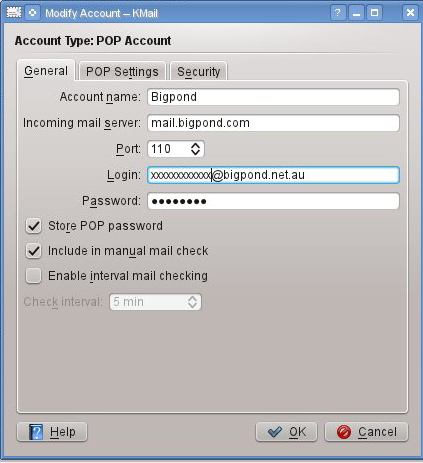 You also need to put the Outgoing mail server address in the outgoing box accessed by the Sending tab, but that is identical to the Incoming mail server address shown in the image below. And that is all that is required. Once these very simple procedures are completed, KMail can send and receive emails. If required, this particular menu tree and sub-window set can be used to set up new accounts rather than going through the wizard and my experiences are that it is extremely fast and simple to do so. KMail 4.11.3 The same set of menu procedural steps also commences in openSUSE 13.1 with KDE 4.11.13 and running KMail 4.11.3, but the procedures diverge once the "Accounts" step is reached. Instead of the above window showing the user account information, a very different window ("Setup for Sending and Receiving Messages") is reached which indicates there are two incoming accounts active because that is the title of the Receiving sub-window tab; the first account is at Bigpond and the second at a "KMail Folder" destination. The next image shows this sub-window. 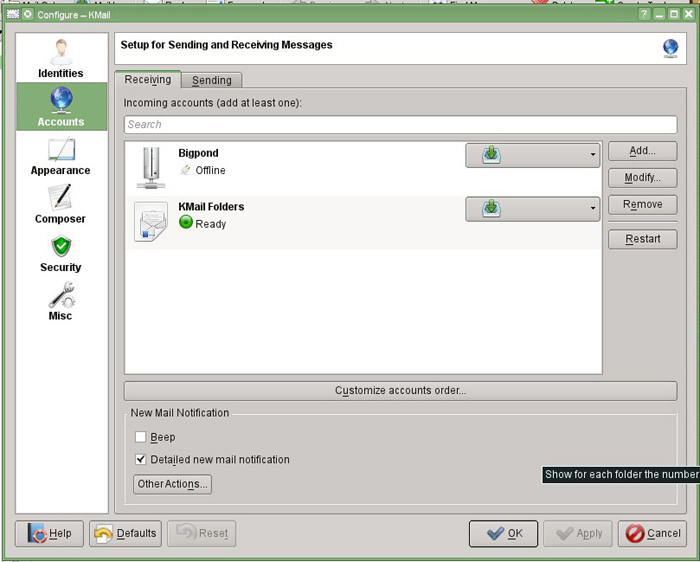 When I captured the above image, I was using an offline test machine, and by sheer accident I believe this has allowed me to understand the significance of the "green button" that sits on the KMail Folders line and which would normally also appear in the same location on the Bigpond line. The presence/absence of the green buttons indicates whether that the relevant server or filing system is either on line and/or ready - or not. It says much for the increased complexity of this version of KMail that prior to this image the buttons meant nothing to me, because my computer was always "on-line" when I was working with KMail in an attempt to set it up and so both buttons merely indicated "Ready". To a newcomer, those two lines would be very confusing, and they certainly were to me.....From past experience, the KMail setup should only have a single incoming account dedicated to the user's ISP - in my case, Bigpond. So the obvious question arose: What is meant by the fact that "KMail Folders" is designated as an "Incoming account" ? Originally, I was unable to understand how my own computer filing system had become an "Incoming account", let alone why I needed to know my own computer filing system was "Ready" because it had to be ready if my computer was operating. However, given the "Offline/Ready" evidence of the green buttons, I believe I now know the reasons for this situation and it requires a paradigm shift from "stand-alone" concepts to networked concepts. If you select the KMail Folders line and then "Modify", you will get a very small window which displays an editable and therefore changeable location of the KMail Folder files. This makes no sense to a stand-alone user, because it is NOT an account - it is simply a filing location for KMail's email files on the user's own computer and why would you want to shift the files internally in the first place ? However, it does make sense from a multi-user/networking position. Suppose that KMail is running on a networked computer and the location of the KMail Folder files is on the principal server of that network or at least on the computer of another member of the network. The KMail Folder location will then have to be altered to match that new location and now it is quite possible for that new location to be "offline" while Bigpond is "online" - or vice versa. Assuming this hypothesis to be true, it begins to suggest that KMail has now been redeveloped for large-scale, multi-user networks, not single users, and that KMail is no longer a simple and elegant "stand-alone" email client but instead an integrated networking email package of considerable complexity with its main development objective being to provide multi-user support on a network. To continue a setup via this procedure, the next step is to select the Bigpond line and then "Modify". If you do that, you will get the window in the following image. I have deliberately left the background windows in place so that an exact idea of where the user is on the menu tree can be easily obtained but, as can be seen, a window that is "similar" to the earlier version of KMail has now been reached. 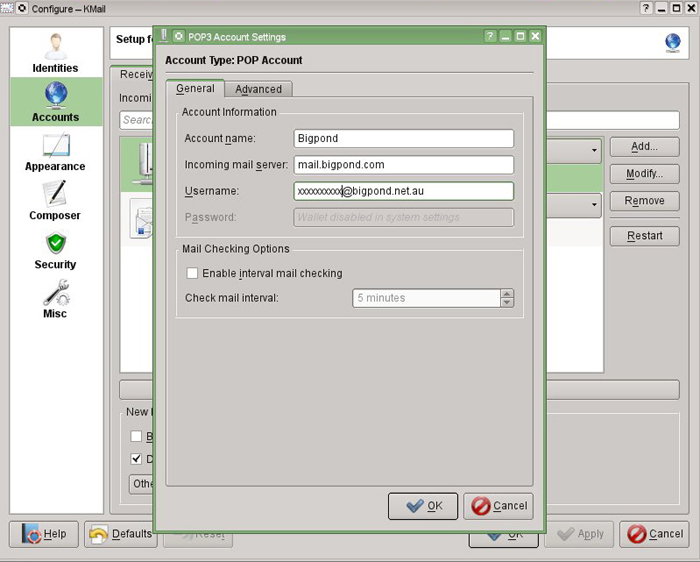 The Effects of KWallet There is however, one very large difference: the Password area has been greyed out and it is thus impossible to store the ISP password in KMail. This is because this latest version of KMail now has mandatory dependency on a totally separate software package: KWallet, and there is no other option if you wish to store an ISP/server password. Unless you use KWallet, KMail will insist that you insert your password each time you log onto the ISP/server that holds your emails in order to receive them. The first time I managed to get this later version of KMail actually sending and receiving, I became very frustrated at the way I had to constantly insert my password to obtain any inwards email transmissions, purely because it had been unnecessary in the past. I should like to record that somewhere in either 2011 or 2012, I managed to contact the KMail team and had limited correspondence with one of the members. I suggested that there was no reason to change this particular aspect of the password for KMail and that it should be a choice of the user as to whether or not they used KWallet or inserted a password as usual at this location on the entry window. I was told very bluntly that this aspect had been changed and there was no possibility that the original easy method of storing the password in KMail would be restored to the software package. The team member gave me no reasons for their decision to make KWallet mandatory for all users who wished to store their ISP/server access password. Whilst at the time I was very irritated at what I saw as a removal of choice (and the abrupt dismissal without reason by the KMail team member), the answer I was given makes complete sense if you consider the situation from a multi-user, networking perspective, not a stand-alone perspective. Mandatory use of KWallet is, I think, security overkill on a grand scale for a stand-alone user, but for a multi-user network, it makes complete sense, and again one is left with the impression that KMail's principal development direction is aimed at such a multi-user network. When I last managed to run KWallet in a test mode, I inserted the KMail ISP password into the Wallet, but I then set the Wallet password to a single Enter/Return key stroke in both the first and second entry locations. This meant that KWallet automatically opened for KMail when Receive Mail was requested and of course, I totally nullified KWallet security by my pursuit of ease of use. Another problem was that KWallet seemed to link itself into my web browsers. I began to find that unless I used the "open KWallet" method described above, the browsers were beginning to demand passwords from KWallet at various points of operation and that is something that has never happened to my computer use previously. As a "stand-alone" user, I personally found KMail's dependency on KWallet overly complex, clumsy, very frustrating to use and intrusive on my daily work. Akonadi and Nepomuk Whenever this later version of KMail is now started, there is a fleeting information window which indicates that the Akonadi/Personal Information Manager is starting. If Akonadi is turned off, my experience thus far is that KMail then refuses to start because it is so closely integrated with and dependent upon the Akonadi software. The services offered by Akonadi, as far as I am able to assess, are all involved with Kontact and its attributes of a calendar, diary and personal contacts. I have never used Kontact and never will, and while its services might be useful to a stand-alone user, I think they would be more or less indispensable to users on a large-scale, multi-user network. Unlike earlier versions of KMail, I also found that this latest version of KMail complains and warns you of difficulties if you turn off Nepomuk (the desktop data sharing program) which is also involved with the calendar and diary structures. While this is only "oblique evidence", cumulatively I once more am led to the feeling that the direction of KMail's development design has leaned very strongly towards the needs of the networked user. Conclusions and a Solution The most frustrating part of all of this is that when considered strictly on its own, the KMail software package remains superb as an email client. If it wasn't for the introduced dependencies, the complexity of KWallet and password storage, and finally Akonadi and Nepomuk and their associated integration into KMail, I'd be delighted to remain on this exceptionally good email client. I'd also like it stressed that I am in no way against the development of KMail for the use of multi-user networks, it's a great idea. Conversely, I am somewhat dismayed because I think that for the stand-alone user, KMail has been made over-complex and more difficult to use with it's associated software packages and excessive security requirements. Personally, I do not wish to leave KMail, but I am no longer comfortable with its operational processes as a stand-alone user. My current perception is that KMail is no longer a piece of software dedicated to easy reception and transmission of emails by a "stand-alone" individual; instead, KMail has become an integrated, business package with attached data base software and security measures that are designed to facilitate the diary, calendar and personal contacts of a person who is part of a large, multi-user, computer network . KMail is now aimed at such places as government, education and commercial enterprise. Well, right or wrong, that's how I see it anyway. I would very much like to see a separate and simpler version of KMail (KMail Light ?) which is able to run wholly by itself as a stand-alone email client without any other software package dependencies and I invite the KMail development team to re-consider the simple, stand-alone elegance of KMail in its earlier versions up to and including version 1.13.6. Any extras should be "add-ons" made by choice of the user. Note that I do not imply that version 1.13.6 is perfect, it isn't, and there are some small things that need fixing, like where each directory folder opens, but these problems are relatively trivial. The solution I am very strongly leaning towards is Thunderbird. It has a wizard that allows the software to be set up and running within two minutes - I have trialled the wizard setup. Thunderbird's layout can be structured to resemble KMail virtually completely, and it saves its password internally (the same system rejected by the KMail developers) so that no "Catch22 situations arise with KWallet". In any event, Thunderbird is wholly independent of KWallet, Akonadi and Nepomuk, all of which can be disabled without affecting any aspect of its operations. My experience so far is that Thunderbird so closely provides/resembles the layout, operations, simplicity, speed and intuitive nature of the earlier, stand-alone versions of KMail that there will be no difficulty at all in using Thunderbird as an alternative email client and I candidly admit that the Thunderbird option looks very attractive. Currently, I'd be happy to suggest KMail as a good email client for a multi-user network; but I cannot and would not recommend the present versions of KMail to anyone who requires a simple, stand alone, email client, solely dedicated to email transmission and reception - because in my personal view, KMail no longer fits that description. I would however, even from the brief trials I have given to the software, suggest that Thunderbird be considered for that purpose. In the Introduction, I mentioned in the second paragraph that one of the things I enjoy is playing card patience games. (Oh, alright, I also have Shisen-Sho and Mahjong solitaire - what utter decadence ! And I must admit, the KDE4 versions are very, very good.) The first game I enjoy is Freecell and I prefer the Redmond version which I have running in Wine.....But the other game set I really like is the KDE patience package which comprises a large group of solitaire games including Freecell, Klondike, Simple Simon and Spider. In my opinion the patience package currently found in KDE4 ("kpat") has now been degraded by over-development. The patience package that I prefer came with KDE3.5. The card decks are crisply displayed, and the in-game animations are minimal; the cards are dealt almost instantly (to any columns being built) as and when required. When a number of cards reach a column, the column simply remains static on a plain green background and if you want a larger playing area because you cannot see some of the cards, you drag the boundaries of the software window or you scroll....Experience showed that rarely happened. It's "hint" services to see what optional moves are available during a game are also excellent and relevant to the state of the particular game being played. The Degradation of "kpat" The latest versions of patience that come with KDE4 are now "developed" to the point where using them is a "turn-off", not a "turn-on". If you distribute a number of cards to a column, the column wiggles and readjusts itself as regards its length, and you find yourself irritated and distracted as you watch these maneuvres. Dealing a new set of cards during a game is distracting when the cards "ooze"out in a fan over the playing area, and thus far I have found no way to speed up this slow process and make a new deal instant. The game seems to emphasise slowness, not speed. The display crispness of the original game's card decks also seems to have been lost with the latest kpat card decks appearing to me to be slightly "blurred". The "hint" services supplied by the KDE4 patience package seem to have lost the accuracy of the earlier KDE3.5 version and often they appear irrelevant to your proposed moves. Whatever, even though you can get the same card deck and background as the KDE3.5 patience software, I do not like the "kpat" patience package as it is presented with KDE4. Cue Gallop fanfare from "The William Tell Overture" at this point. http://www.youtube.com/watch?v=4JC8_vuFaRw OpenSUSE Cavalry to the Rescue However.......openSUSE has apparently realised that others feel the same way as I do, and in the latest openSUSE 13.1 repository you will find in the games section, a listing for the card games of KDE3.5 (as well as the KDE4 version). Select the KDE3.5 package and all the necessary library adjustments required to play this earlier version of patience will be made and the package installed on your computer. Now that's really nice for me (and others of my style of thought), but it should spell something out to the KDE4 patience developers: "Additional complexity is not always the way to go; why break something if it is working perfectly ?". The KDE3.5 patience package remains superb, and for sheer pleasure of playing a game with a crisp, clear and simple display, this earlier patience package beats the KDE4 "kpat" package very solidly as far as I am concerned. Try it and see. (Note: Always start it from the Application Launcher Menu where under Games, it will be clearly shown as the KDE3 Patience card game. If you don't, you will end up with the unwanted KDE4 package, if it is installed. Once I have the KDE3 package installed, I always remove the KDE4 "kpat" package - it's redundant - and then you can put a starting icon on the desktop if that's your pleasure.) A very cynical thought for the day. The average person says: "If it ain't broke, don't fix it." The software developer says: "If it ain't broke, add 'improvements' until it is !" Funny........but I think I may have just described exactly that. |

|
Comments (52)
32 earlier comments in the full thread.
nmset, ever since the first KD4 release we've been hearing "But but the current release fixes stuff and it's better!" Which is partly true. It's also used as an excuse to dismiss user's concerns over core architecture, such as we've been discussing in this thread, and which is not going to be changed or made more user-configurable. You can like it all you want-- what you can't do is make excuses for it, or hope to persuade knowledgable users what we like and don't like.
>persuade knowledgable users what we like and don't like
No, every one is free. Free to mislead too ? ...
I, and the final user, don't care about the core architecture, good or bad. I just want it to do the job and from my observations, it does it nicely.
No, every one is free. Free to mislead too ? ...
I, and the final user, don't care about the core architecture, good or bad. I just want it to do the job and from my observations, it does it nicely.
> Please note http://userbase.kde.org/Nepomuk/RemovableMediaHandling refers to KDE 4.10, and I'm on 4.12.
You are misinformed, the page refers to the latest and any previous release of KDE. Dream on...
You are misinformed, the page refers to the latest and any previous release of KDE. Dream on...
Funny. We can read on this page :
last edited 15 February 2013 at 13:56 (translated)
"With the 4.10 release, Nepomuk does not offer a public way to disable this. With 4.11 we plan to include more user visible options and a better interface. For now, however, you can..."
The latest to which it allegedly refers is ... 4.10.
(:-
last edited 15 February 2013 at 13:56 (translated)
"With the 4.10 release, Nepomuk does not offer a public way to disable this. With 4.11 we plan to include more user visible options and a better interface. For now, however, you can..."
The latest to which it allegedly refers is ... 4.10.
(:-
> Free to mislead too ?
Like the KDE devs who released 4.0 as usable software? And 4.1, and 4.2, and 4.3? It wasn't until 4.4.x that KDE 4 became remotely usable.
Like the KDE devs who released 4.0 as usable software? And 4.1, and 4.2, and 4.3? It wasn't until 4.4.x that KDE 4 became remotely usable.
Right on, jdixon.....and I feel that KDE4 reached its zenith with KDE4.6 and has gone backwards ever since.
> last edited 15 February 2013 at 13:56 (translated)
> "With the 4.10 release, Nepomuk does not offer a public way to disable this. With 4.11 we plan to include more user visible options and a better interface. For now, however, you can..."
This is the main KDE documentation on the subject, and I would say it is very accurate. In Feb. 2013 when the page was written, nepomuk was flooding your network with unwanted traffic. Today it does exactly the same. They didn't fix the problem, they just promised to include "more user visible options and a better interface". I don't even think they recognize it as a problem.
I've looked in the release notes also, there is nothing about fixing the network traffic. Your nepomuk 4.12 is the same old garbage, and a waste of time.
> "With the 4.10 release, Nepomuk does not offer a public way to disable this. With 4.11 we plan to include more user visible options and a better interface. For now, however, you can..."
This is the main KDE documentation on the subject, and I would say it is very accurate. In Feb. 2013 when the page was written, nepomuk was flooding your network with unwanted traffic. Today it does exactly the same. They didn't fix the problem, they just promised to include "more user visible options and a better interface". I don't even think they recognize it as a problem.
I've looked in the release notes also, there is nothing about fixing the network traffic. Your nepomuk 4.12 is the same old garbage, and a waste of time.
Well, there are more user visible options. And away from paper evidence, I could not find any concerning increased network traffic in 4.12.
Ridcully, really enjoy your articles. I am actually trying Kmail now in an attempt to see if it works for me as a viable email client going forward.
I guess the reason I've not been having any problems with kmail on my Slackware 14.0 (yeah, I should upgrade it one day) system is that I've got Nepomu[c]k turned off, all of my incoming mail is handled by a fetchmail / procmail combination, and outgoing is done via a 'smart host' entry in sendmail. Kmail is basically just a reader for me, easily replaced with 'mutt'.
I dropped KDE4 at 4.0 after being a KDE user since version 1.0 because it was simply a buggy piece of cr@p and moved my mail to Thunderbird and my desktop to XFCE.
At around about version 4.5 I took a look at KDE4 again and it was a far better experience and I was sure the devs were starting to get things just right and starting to take on aboard what users were telling them. Sadly this turned out to be short lived as after 4.6 the Nepomuk/Akonadi stuff they started to introduce with a vengeance became incredibly intrusive and chewed up my old machines limited cpu resources so I dropped it again and went back to XFCE and havent been back to KDE since. From what ive heard those features just became even more invasive and no I don't want to have to go through the hassles of turning them off when it should be off by default and then turned on by a user if he needs it, in fact just the some of the same reasons I dropped windows so long ago in the dim and distant past.
I also can't ever see the attitude of the KDE devs changing, im just glad their is a desktop like XFCE available that suits my functional needs perfectly, although it could stand to have some (but keep em lite) visual improvements such as vsynching.
I do use one KDE app and thats Kwin so I can get tear free compositing but that will also be dropped once either the XFCE devs get vsynching fixed and I do believe that they are working on it for 4.12, compton works as well but it has other issues when used with Xfce but im sure this will get fixed by the compton dev in time to.
At around about version 4.5 I took a look at KDE4 again and it was a far better experience and I was sure the devs were starting to get things just right and starting to take on aboard what users were telling them. Sadly this turned out to be short lived as after 4.6 the Nepomuk/Akonadi stuff they started to introduce with a vengeance became incredibly intrusive and chewed up my old machines limited cpu resources so I dropped it again and went back to XFCE and havent been back to KDE since. From what ive heard those features just became even more invasive and no I don't want to have to go through the hassles of turning them off when it should be off by default and then turned on by a user if he needs it, in fact just the some of the same reasons I dropped windows so long ago in the dim and distant past.
I also can't ever see the attitude of the KDE devs changing, im just glad their is a desktop like XFCE available that suits my functional needs perfectly, although it could stand to have some (but keep em lite) visual improvements such as vsynching.
I do use one KDE app and thats Kwin so I can get tear free compositing but that will also be dropped once either the XFCE devs get vsynching fixed and I do believe that they are working on it for 4.12, compton works as well but it has other issues when used with Xfce but im sure this will get fixed by the compton dev in time to.
If you disable nepomuk's drive scanning, you'll pretty much nip the thing in the bud on KDE 4.8 & +... I too abandoned KDE from 4.0 until the version that shipped with Kubuntu 12.04.
Thankyou _slacker_mike. Right now I am writing up getting Thunderbird running on openSUSE 13.1 with Nepomuk/Strigi disabled via the Configuration Desktop menu and Akonadi disabled via the "akonadiserverrc" file in the akonadi folder in .config of the home user desktop filing system. (What a mouthful !) And "jazz", I also want to thank you for your helpful comments in the past as well - they've been very useful to me.
This is gonna be a long post, but it says and summarises a lot of things about this semantic desktop saga.
I will candidly admit there have been some errors in my description of what the "semantic desktop" components are. The whole thing is so complex that this has been a "voyage of discovery" for me as well. For the record and at this stage and as I currently understand the "beast", it boils down to this:
1. Nepomuk/Strigi is the semantic part of the desktop; Akonadi is an sql server which sets up an intermediary cache containing the information held in the kmail data folders, kontact data folders and in fact the diary, emails and personal contacts of the user in what could be called the PIM (personal information management) cache.
2. Strigi, assuming it is still around, is a "spider" that trawls your desktop and fires back info to Nepomuk which is an "ontological dictionary" which allows it to effectively collate all this information and put it together coherently when you ask it a search question. (This is rough, but it's better than I started out with.) It needs to be stated bluntly here that nmset is dead right in this part: you can disable Nepomuk and Strigi and KMail will still run happily. KMail will whinge that you have turned off Nepomuk, but it certainly will not stop running. And here's the extra thing, you can disable Strigi separately and Nepomuk will still happily go on with what it's doing. Strigi is very useful to Nepomuk but it is NOT indispensable.
3. KMail and its PIM cluster of software are no longer designed to operate from their individual data files.....instead, they are now designed to look ONLY into the information stored in the Akonadi cache and so if Akonadi is disabled, then (to put it very bluntly) "KMail is shot"......it can do nothing. This is why when I broadly described the situation as KMail wholly dependent on the semantic desktop for operation, "nmset" got all upset ......and strictly in one sense, he's (she's ?) dead right. KMail isn't dependent on the semantic desktop by strict definition, it's dependent on the Akonadi cache and again (to belabour the point) Akonadi isn't part of the semantic desktop sensu stricto......but loosely defined, the three software packages, Akonadi, Nepomuk and Strigi are three strands of a package that loosely form what I would call a "semantic cluster" and which work with KMail and the other PIM components. Right, so far so good. Whew !! :-)
Now I am sure you can pick holes in that explanation, but it's much better than I started out with and it's taken fights with my own concepts to get there.
The next bit as someone has pointed out to me, is that the KDE4 semantic desktop is a work in progress. Its earlier versions were rather similar to the first release of KDE4.0 which upset everybody. What happened after my present version of KDE4.6 was very like that. I will be continuing with my article on using Thunderbird, but what I do want to do is not shut my mind off permanently......Has the KDE4 team in opensuse 13.1 and with KDE4.11.2 managed to get hdd usage down and CPU activity reduced ? I don't know and I'd like to. Is KMail more user friendly ? I don't know and I'd like to. Is KWallet still as intractable as when I first encountered it ? I don't know and until I put my toes in the water, I really don't know if I am going to be scalded or enjoy the results. I'll be keeping an open mind on this one, but the toes will be very, very tentative, given previous experiences..
Finally, as Koriel has aptly implied, we live in the "bazaar" not the "cathedral"......we can shop around and if KDE4 gives us indigestion, then there are other options readily available to be sampled. Even with KDE4, there are options on how you deploy it, although my understanding at the moment is that Akonadi and KMailPIM are welded as a dependency.....But, you could remove both of those packages and shift to the KMailPIM package now developed for Ubuntu which is Akonadi independent..........OR.........you could move to the Trinity desktop which is definitely Akonadi, Nepomuk/Strigi independent.....The choices are incredible and the KDE4 development may or may not suit any given user. I note a recent FOSSWorld poll indicated that 70% of its respondents preferred KDE4......I'd love to know if they are using the desktop with everything enabled or not, and exactly which version of KDE4 they are using.....
Thankyou everybody for your inputs.....and don't stop either......This steady uncovering of how KDE4 works with its semantic structures has been one heck of a learning experience and I wouldn't have missed it for worlds....even if many of my original concepts have been altered or shattered.
This is gonna be a long post, but it says and summarises a lot of things about this semantic desktop saga.
I will candidly admit there have been some errors in my description of what the "semantic desktop" components are. The whole thing is so complex that this has been a "voyage of discovery" for me as well. For the record and at this stage and as I currently understand the "beast", it boils down to this:
1. Nepomuk/Strigi is the semantic part of the desktop; Akonadi is an sql server which sets up an intermediary cache containing the information held in the kmail data folders, kontact data folders and in fact the diary, emails and personal contacts of the user in what could be called the PIM (personal information management) cache.
2. Strigi, assuming it is still around, is a "spider" that trawls your desktop and fires back info to Nepomuk which is an "ontological dictionary" which allows it to effectively collate all this information and put it together coherently when you ask it a search question. (This is rough, but it's better than I started out with.) It needs to be stated bluntly here that nmset is dead right in this part: you can disable Nepomuk and Strigi and KMail will still run happily. KMail will whinge that you have turned off Nepomuk, but it certainly will not stop running. And here's the extra thing, you can disable Strigi separately and Nepomuk will still happily go on with what it's doing. Strigi is very useful to Nepomuk but it is NOT indispensable.
3. KMail and its PIM cluster of software are no longer designed to operate from their individual data files.....instead, they are now designed to look ONLY into the information stored in the Akonadi cache and so if Akonadi is disabled, then (to put it very bluntly) "KMail is shot"......it can do nothing. This is why when I broadly described the situation as KMail wholly dependent on the semantic desktop for operation, "nmset" got all upset ......and strictly in one sense, he's (she's ?) dead right. KMail isn't dependent on the semantic desktop by strict definition, it's dependent on the Akonadi cache and again (to belabour the point) Akonadi isn't part of the semantic desktop sensu stricto......but loosely defined, the three software packages, Akonadi, Nepomuk and Strigi are three strands of a package that loosely form what I would call a "semantic cluster" and which work with KMail and the other PIM components. Right, so far so good. Whew !! :-)
Now I am sure you can pick holes in that explanation, but it's much better than I started out with and it's taken fights with my own concepts to get there.
The next bit as someone has pointed out to me, is that the KDE4 semantic desktop is a work in progress. Its earlier versions were rather similar to the first release of KDE4.0 which upset everybody. What happened after my present version of KDE4.6 was very like that. I will be continuing with my article on using Thunderbird, but what I do want to do is not shut my mind off permanently......Has the KDE4 team in opensuse 13.1 and with KDE4.11.2 managed to get hdd usage down and CPU activity reduced ? I don't know and I'd like to. Is KMail more user friendly ? I don't know and I'd like to. Is KWallet still as intractable as when I first encountered it ? I don't know and until I put my toes in the water, I really don't know if I am going to be scalded or enjoy the results. I'll be keeping an open mind on this one, but the toes will be very, very tentative, given previous experiences..
Finally, as Koriel has aptly implied, we live in the "bazaar" not the "cathedral"......we can shop around and if KDE4 gives us indigestion, then there are other options readily available to be sampled. Even with KDE4, there are options on how you deploy it, although my understanding at the moment is that Akonadi and KMailPIM are welded as a dependency.....But, you could remove both of those packages and shift to the KMailPIM package now developed for Ubuntu which is Akonadi independent..........OR.........you could move to the Trinity desktop which is definitely Akonadi, Nepomuk/Strigi independent.....The choices are incredible and the KDE4 development may or may not suit any given user. I note a recent FOSSWorld poll indicated that 70% of its respondents preferred KDE4......I'd love to know if they are using the desktop with everything enabled or not, and exactly which version of KDE4 they are using.....
Thankyou everybody for your inputs.....and don't stop either......This steady uncovering of how KDE4 works with its semantic structures has been one heck of a learning experience and I wouldn't have missed it for worlds....even if many of my original concepts have been altered or shattered.
Just a quick follow up, I don't want to be misinterpreted.
I do like KDE4 and think its an excellent desktop especially for businesses but its just not functionally suitable for my needs while this semantic stuff is enabled by default and so heavily intertwined with what really should be a standalone independent app like kmail which is why I have opted for a light desktop option of XFCE and standalone email of Thunderbird.
I will keep checking back on KDE on the chance that the situation changes or the stuff becomes very easy to completely disable and not lose the functionality of basic apps which have functioned perfectly well in the past without them, and done through highly visible options in settings and not hidden away or having to modify startup scripts etc.
As a KDE user from version 1.0 to 3.5 and intermittently 4.5,4.6 im fairly sure I can't be considered a KDE hater, I just hate to see what was once a great personal desktop just become great for business/corporate users only as I think both sets of users can be catered for and thus make it an exceptional desktop for everyone.
Cheers
I do like KDE4 and think its an excellent desktop especially for businesses but its just not functionally suitable for my needs while this semantic stuff is enabled by default and so heavily intertwined with what really should be a standalone independent app like kmail which is why I have opted for a light desktop option of XFCE and standalone email of Thunderbird.
I will keep checking back on KDE on the chance that the situation changes or the stuff becomes very easy to completely disable and not lose the functionality of basic apps which have functioned perfectly well in the past without them, and done through highly visible options in settings and not hidden away or having to modify startup scripts etc.
As a KDE user from version 1.0 to 3.5 and intermittently 4.5,4.6 im fairly sure I can't be considered a KDE hater, I just hate to see what was once a great personal desktop just become great for business/corporate users only as I think both sets of users can be catered for and thus make it an exceptional desktop for everyone.
Cheers
No problems Koriel, I was simply looking at the fact that you had made various choices to get what you want and that to me is "the bazaar".......the terrific Linux world in which you really CAN choose and select to get exactly what YOU want......nothing else. I hope my comments didn't upset you in any way, it's simply that they fitted my ideas so very well. :-)
Oh, and one last thing Koriel, is that right now as I compose this, I am using KDE4.6 which to me is a superb DM. I like KDE immensely.....just didn't like what happened after 4.6, and I suspect a lot of others were in the same boat.
Oh, and one last thing Koriel, is that right now as I compose this, I am using KDE4.6 which to me is a superb DM. I like KDE immensely.....just didn't like what happened after 4.6, and I suspect a lot of others were in the same boat.
@JaseP.......What you have said is exactly what I was getting at in my long post above and "should I dip my toes in the water again" ? Spot on.......and it may be that the worst parts of KDE4 "semantic cluster" have been ironed out.....be interesting to see.
I think there are a couple of misunderstandings or misinterpretations in the article and the discussion of it so far, e.g. confusing semantic desktop with PIM infrastructure. Concentrating on the latter since I have followed the development there more closely.
I didn't quite get the single user vs multi-user/networked user piece as KMail is always only run by each user individually and receiving and sending email almost always requires some for of network access.
Decisions made for KDE PIM might not make sense for all users, but they are all based on quite some thinking :)
One of the goals of KMail (and KDE PIM in general) has for a long time been the possibility to work in environment where servers cannot always be accessed. For example KMail very early added support for what it called "disconneted IMAP", the ability to work with IMAP based email even when not connected. Other email clients now support this as well.
That mode of operation became increasingly important with people moving some or all data onto servers, moving beyond just email but also including calendar and contacts, etc.
Such a feature may or may not be important for users depending on how their setups are. People with laptops or other form of mobile computing equipment or off-premises servers will likely want that, people with fixed workstations and on-site servers will not.
The architectural decision on local caching was based on the assumption that most users would not have LAN access to their server, but of course that could have changed since then, i.e. most people nowadays might run their own servers built-into some appliance in their homes.
The archtectural decision on component separation was based on the observation that more than one application needed access to certain functionality.
For example some people using calendar needed to have access to the address book for adding attendees to events, needed to be able to send emails to attendees when event details changed. Non-PIM application developers showed interest in being able to access contact data, people receiving events through email wanted to be able to add then to their calendar etc.
This form of multi application access was first attempted by each application accessing the same files, but file locking turned out to be highly unreliable. File access through an arbiter, on the other hand, removes the need to locking. Basically taking inspriation at Evolution Data Server, whiich has been doing that for contacts and calendar for quite some time already, just extending it to emails.
Obviously none of that matters of people who only use email, but since that kind of interaction was already a supported use case, it seemed better to improve it. One of the deciding factors being that there were, at the time, quite a wide range of email-only programs but almost no other PIM suite.
I didn't quite get the KWallet thing since KMail has been using that as its primary credential storage for more than a decade. Is there a special need in having the credentials stored in an INI based config file? Some form of scripting access?
I didn't quite get the single user vs multi-user/networked user piece as KMail is always only run by each user individually and receiving and sending email almost always requires some for of network access.
Decisions made for KDE PIM might not make sense for all users, but they are all based on quite some thinking :)
One of the goals of KMail (and KDE PIM in general) has for a long time been the possibility to work in environment where servers cannot always be accessed. For example KMail very early added support for what it called "disconneted IMAP", the ability to work with IMAP based email even when not connected. Other email clients now support this as well.
That mode of operation became increasingly important with people moving some or all data onto servers, moving beyond just email but also including calendar and contacts, etc.
Such a feature may or may not be important for users depending on how their setups are. People with laptops or other form of mobile computing equipment or off-premises servers will likely want that, people with fixed workstations and on-site servers will not.
The architectural decision on local caching was based on the assumption that most users would not have LAN access to their server, but of course that could have changed since then, i.e. most people nowadays might run their own servers built-into some appliance in their homes.
The archtectural decision on component separation was based on the observation that more than one application needed access to certain functionality.
For example some people using calendar needed to have access to the address book for adding attendees to events, needed to be able to send emails to attendees when event details changed. Non-PIM application developers showed interest in being able to access contact data, people receiving events through email wanted to be able to add then to their calendar etc.
This form of multi application access was first attempted by each application accessing the same files, but file locking turned out to be highly unreliable. File access through an arbiter, on the other hand, removes the need to locking. Basically taking inspriation at Evolution Data Server, whiich has been doing that for contacts and calendar for quite some time already, just extending it to emails.
Obviously none of that matters of people who only use email, but since that kind of interaction was already a supported use case, it seemed better to improve it. One of the deciding factors being that there were, at the time, quite a wide range of email-only programs but almost no other PIM suite.
I didn't quite get the KWallet thing since KMail has been using that as its primary credential storage for more than a decade. Is there a special need in having the credentials stored in an INI based config file? Some form of scripting access?
@Alcibiades
> Which might not matter to a user, but when you try to import to it using the Thunderbird import tool, at least in my experience it doesn't get all the info properly. You then think OK, I'll just fix this in a text editor or something... and you discover that what you are trying to do is import into a basically unusable file format.
What are you talking about -- "abook.mab" file? Why you need to deal with it directly? You can export/import in LDIF just fine.
> Which might not matter to a user, but when you try to import to it using the Thunderbird import tool, at least in my experience it doesn't get all the info properly. You then think OK, I'll just fix this in a text editor or something... and you discover that what you are trying to do is import into a basically unusable file format.
What are you talking about -- "abook.mab" file? Why you need to deal with it directly? You can export/import in LDIF just fine.
@anda_skoa. May I respectfully suggest you go to this thread:
https://dot.kde.org/2014/02/24/kdes-next-generation-semantic...
You will find that precisely the things I have been writing about are being exposed in this actual KDE thread this year by others.....and some pretty "high powered others" at that. As for KWallet, exactly what I have detailed has been found from experimental evidence and confirmed by at least one other editor for this LXer site.
You should also examine this thread on LXer: http://lxer.com/module/forums/t/35214/ and scroll down to the post by RollMeAway on July 14 this year.......and then read the successive posts.
Finally, you should always remember that what I wrote in my articles was ALWAYS as a result of actually trialing the procedures out with a computer and the software. You simply cannot damage experimental evidence that is open to anyone else to confirm and anyone can duplicate what I did simply by following the same steps. Frankly, as a scientist, I get a little tired of having to say: "What I wrote is what I did, and it is also what I obtained from those experimental procedures." End of story.
https://dot.kde.org/2014/02/24/kdes-next-generation-semantic...
You will find that precisely the things I have been writing about are being exposed in this actual KDE thread this year by others.....and some pretty "high powered others" at that. As for KWallet, exactly what I have detailed has been found from experimental evidence and confirmed by at least one other editor for this LXer site.
You should also examine this thread on LXer: http://lxer.com/module/forums/t/35214/ and scroll down to the post by RollMeAway on July 14 this year.......and then read the successive posts.
Finally, you should always remember that what I wrote in my articles was ALWAYS as a result of actually trialing the procedures out with a computer and the software. You simply cannot damage experimental evidence that is open to anyone else to confirm and anyone can duplicate what I did simply by following the same steps. Frankly, as a scientist, I get a little tired of having to say: "What I wrote is what I did, and it is also what I obtained from those experimental procedures." End of story.
Post a comment
A free account is needed to post. Write your comment here first: your text is kept in this browser while you sign up or log in, and is waiting for you when you come back.
Your message:Markdown: **bold**, *italic*, [text](https://link), - lists, > quotes, $x^2$ for math. Formatting help
Sign up and post (it is free) or Log in and post
Outdated binaries won't perform as good as latest ones, old bugs or malfunction or dysfunction have been corrected. I would be happy to read from one who uses ARCH with latest KDE. We are just speaking of uncomparable software, nothing holds. I tried on 3 different hosts !
N.B.
I'm not after silly things like having the last word or whatever related to pride. But my user experience on that question is in contradiction with the article's content. Had it been on par with the message, I would have approved.