
- Site menu:
- Latest Discussions
- Latest Newswire
- Archives
- Submit Story
- Story HOWTO
- Syndicate
- E-mail Alerts

Raspberry Pi 3 Released
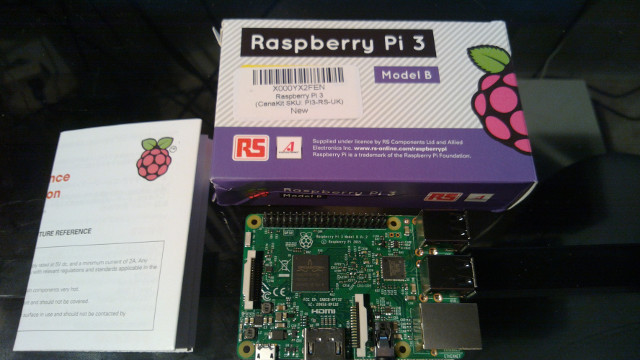
Exactly four years ago, on 29 February 2012, we unleashed the original 256MB Raspberry Pi Model B on a largely unsuspecting world. Since then, we’ve shipped over eight million units, including three million units of Raspberry Pi 2, making us the UK’s all-time best-selling computer. The Raspberry Pi Foundation has grown from a handful of volunteers to have over sixty full-time employees, including our new friends from Code Club. We’ve sent a Raspberry Pi to the International Space Station and are training teachers around the world through our Picademy program. |

|
|
Comments (34)
14 earlier comments in the full thread.
Exactly. I spend a lot of time protecting my right to privacy, and it was very refreshing finally moving away from proprietary media solutions over to a FOSS solution. No more wasted time with Wireshark trying to determine which apps were not calling home so that I could safely open my firewall to them.
To me a "smart TV" is not an marketing advantage. A vendor controlled closed proprietary smart TV is a liability, it just means more work for me before I could deploy and use it.
Firewall your TV and replace the "smarts" with an RPi (or an Odroid-C2).
I don't like systems that have an unchangeable default root password.
I guess I'm going to have to "unsquash" the thing like this:
https://www.dustpla.net/howto-update-openelec-root-ssh-password/
For video on a Pi in desktop mode (or from the command line) I've always used omxplayer.
I'm not really concerned with 2160p video. To me, it doesn't seem worth the file size and bandwidth it uses. Some of my Blu-Rays are ripped to 720p just because it takes up less space. I still have more movies at 480p than at higher resolutions, and I don't really feel deprived when I watch them (of course, quite a number of them don't have a release at higher resolution).
- Just unplugging an sdcard from a working RPi2 doesn't bring up an RPi3. A download of the current Raspbian and a fresh dd to an sdcard was what it took to bring it up.
- The on-board Wifi came right up with a WPA2 login screen and the association was quick with no fuss, however, dhcp was not invoked correctly and an incorrect IP address was assigned to the wlan0 interface. I had to configure IPV4 settings manually in order to place it in the local network. This was not really a big deal and I'm sure this will be quickly worked out, but it is likely to cause some beginners some trouble getting started.
Other than those two points, the RPi3 is performing as expected.
I'm not asking you to post the errant IP address... However, I'm very curious as to how the address was 'incorrect'.
What do you mean by incorrect?
- Wrong address pool within the correct DHCP network.
- Wrong Class A net.
- Wrong Class C net.
- 192.168.0.25 vs. 192.168.0.180
- 10.0.0.5 vs. 192.168.0.5
- 192.168.10.5 vs. 192.168.5.5
The initial address assignment after wifi association was
169.254.225.46/16
with a gateway assignment of:
169.254.0.0
There are six RPis (RPi1 and RPi2 models, all running Raspbian Wheezy) on this wlan all of which are successfully fetching a dhcp assignment on bootup, so there is some sort of weirdness going on with the RPi3 or more likely with the Raspbian Jessie (Feb 29, 2016) software configuration.
I didn't spend a lot time on this issue since it was easy to manually configure the settings and then just move on.
That's a default IP when it can't get a dhcp address. So yes, there's something strange going on.
This is the 'link-local' address range:
https://en.wikipedia.org/wiki/Link-local_address
I've seen this pop up on my network when I was figuring out how to disable the ISP dhcp server on the LAN side... my guess is there is some sort of contention between the ISP router and perhaps your own internal wireless router DHCP. If that's the way you have it setup..
I've noticed that the on-board wifi antenna needs to be oriented just right, otherwise we get some packet loss. We could go on the theory that we had packet loss during the dhcp handshake which resulted in the failed IP assignment. In this case the wifi box is located on the other end of the house from the RPi3 although some of the other RPis on this network are solid with their usb wifi adapters.
that's an interesting thought.
I bet you could test that using the iw utilities on the client [RPi] and looking through the DHCP and other logs on the router...
***
It wouldn't be surprising to find out that the RPi 3 wifi has a signal problem versus the USB dongles. Is there an antenna connection on the board? I haven't looked through the RPi 3 docs yet...
First impressions:
- The download of a 1.2GB Ubuntu image for this device took about 6 hours to complete. The servers are evidently being hit pretty hard right now.
- Odroid-c2 supports 4K/2160p at 60Hz. I don't have a 60Hz monitor, but I was able to verify it on my 4K 30 Hz monitor and it worked fine, no complaints. The hardware accelerated driver is not yet complete, so the screen is currently being updated with software (too slow for movies) but the driver is being actively worked and I'm looking forward to testing it when it comes out. The performance right now is fine for desktop use but we'll need the hardware acceleration before we have a viable media box solution.
- Ethernet at 1 Gbps was a joy to use. Transferring big files from my media storage server over to this device runs really fast. I'm thinking that this network performance will permit playing videos directly over an nfs connection without use of a local disk.
- This device supports both an sdcard and an emmc card. I'm using the sdcard right now and the speeds are quite comfortable, however the vendor claims 120MB/s speeds when running on an emmc card. That would be incredible. I just may order an emmc card so that I can check this out.
- There are some minor software stability issues, like Firefox crashes (Chromium is stable), but the vendor seems to be active in working the issues as fast as they can.
All in all, I think the odroid-c2 will be a device to watch over the weeks ahead. The specs on this device are ahead of the pack, and the developers seem to be on the right track with the software.
(This post was written using an Odroid-c2 running Ubuntu64 16.04lts-mate with the Chromium browser.)
One of today's NewEgg ShellShockers is a 4K UHD 28" LED 3840x2160 60Hz monitor for $279. Of course, it's a brand I've never heard of, but if you're looking for a 60Hz 4K display, now might be a good opportunity.
http://www.newegg.com/Product/Product.aspx?Item=9SIA90V3V039...
My apologies to the moderators for posting a sale link.
NoDough
P.S.: To add a little humor, here's a line from the manufacturer: "4K UHD resolution has over than 800M pixel, so it is shown the objects close to real."
That is indeed interesting. The claim is that this is a 4K monitor with support for 60Hz, and the price is right. But on a closer read of the specs we see that this monitor supports hdmi 1.4a which limits performance over hdmi to 30Hz frame rates. The odroid-c2 supports hdmi 2.0 which is what we need to get true 60Hz updates. I notice also that this monitor supports DisplayPort 1.2a, and it is with DisplayPort that it reaches its 60Hz potential. But the odroid-c2 does not support DisplayPort so that would be a disconnect for us. So I'm still hunting for my hdmi2.0 / 4k / 60Hz display upgrade.
On another topic, I've been closely following the software side of the odroid-c2 and there continues to be some good work in the direction of harnessing the mali-450 hardware accelerated gpu. Right now there is a hardware accelerated framebuffer driver and there is active work to run the kodi media app on it. I've tested it and have found that it will drive 4k/30Hz (sorry I don't have a 4k/60Hz display yet) with acceleration, however there are still issues with the kodi integration, so odroid-c2 is very close to supporting 2160p/60Hz in a media center application but it's not quite there yet.
I've been testing the 4K hardware accelerated Kodi (formerly xbmc) on the C2, and it is starting to look pretty good. The C2 can now play 4K video with reasonably good quality. The C2 supports 60Hz but my monitor is limited to 30Hz so I can't test it at full speed, that will need to wait for a monitor upgrade. The video shows no sign of tearing or other anomalies, and is basically "watchable" right now.
The only issue I can see is that I'm getting some minor jerkiness on fast moving scenes (unnoticable on slower moving scenes). It's quite possible that the cause of this is not the C2's GPU/driver but the bandwidth limitation of the sdcard I'm using to store the video file. I have an emmc card on order which should give me a way to eliminate storage bandwidth as the cause.
All in all, I'm pretty pleased with what we have. It's time to start looking for a large screen 2160p@60Hz hdmi 2.0 tv for my next entertainment center upgrade.
On the downside, this Kodi implementation is based on fbdev framebuffer display, so we can't run a full desktop accelerated yet. That part is still in the works, but if you are happy with a dedicated Kodi system, that part seems to be in our hands.
Post a comment
A free account is needed to post. Write your comment here first: your text is kept in this browser while you sign up or log in, and is waiting for you when you come back.
Your message:Sign up and post (it is free) or Log in and post
just did...
I agree. OpenElec is the way to go for a media center. It connects to my DLNA server and is much faster than my 'smart TV.' I suppose now, every TV will be a smart TV with a $35 RPi box.
No more hidden ad networks or weird open ports.