Advanced

From the Camera to the Web With Konqueror

Posted by dcparris on · 18 comments
LXer - Tutorial; By D.C. Parris (Charlotte, USA)
Mail this story
Print this story

LXer Feature: 14-June-2007

There are plenty of ways to transfer photos from your digital camera to the World Wide Web. Here's how I took my photos straight from my camera to my website with Konqueror.

I have been tracking my vegetable garden's progress via a webified gallery this year. That way, I can share the photos - now over 160 - with friends, family and even strangers. Ordinarily, I simply transfer my photos from the camera with Digicam, renaming the files in the process. I then upload the photos to the website via FTP and use Gallery2's utility to import the files from the local server. Today, though, I was in a bit of a hurry, and needed to do that last part a little later on. Konqueror is quite the handy little tool. I also have to wonder how easy it is to do the same thing with Windows? No special hardware or software involved - just a camera, USB cable, laptop and Konqueror.


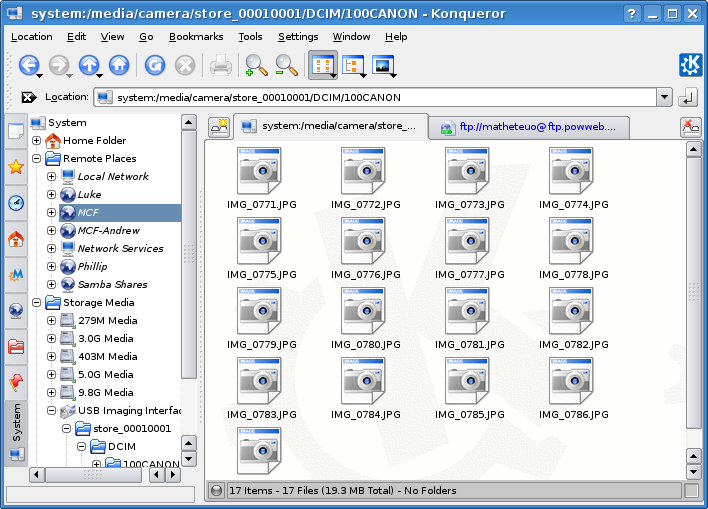
After plugging the camera into the laptop via USB, and turning it on, you get a pop-up asking how to handle it. I chose to open in a new (Konqueror) window. In my Konqueror setup, I have an FTP connection rigged, so all I have to do is click the connection icon, and it pops up the password dialog as it opens the connection. In this case, I right-clicked on the icon to use the "Open in new tab" feature. I simply click "O.k.", and I'm logged in.


Here's the slick part. Just highlight all the files (hint: try [Ctrl]+A), drag them up to the tab showing the FTP connection, and hold the mouse there for a second or two. The tab will become active, and you can drop the files right into the FTP location. O.k., I navigated to the location first, then went for my photo files. I walked the dog and showered while the files uploaded. Everything was done before I had to leave. All that was left was to import the files into Gallery2.


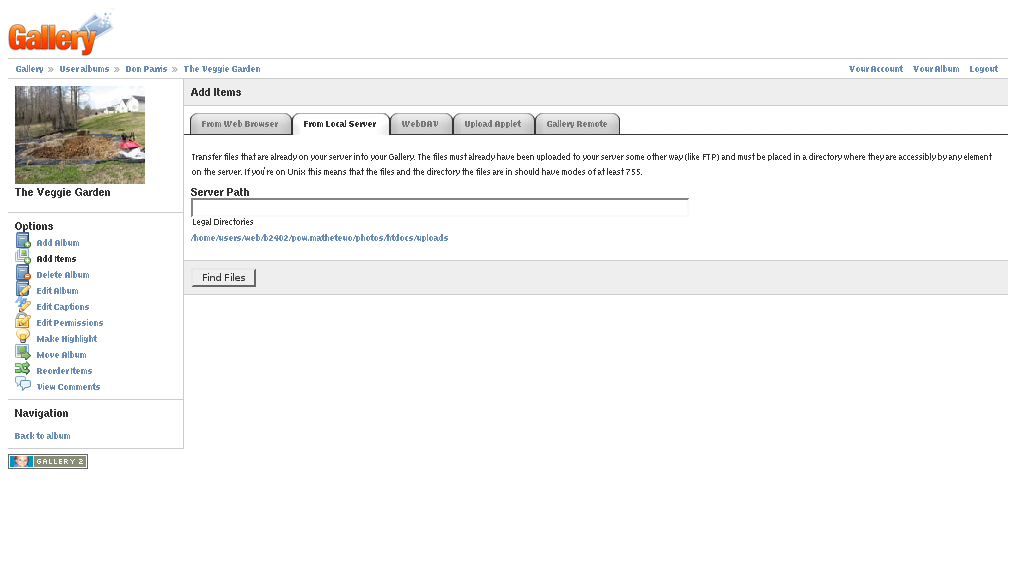
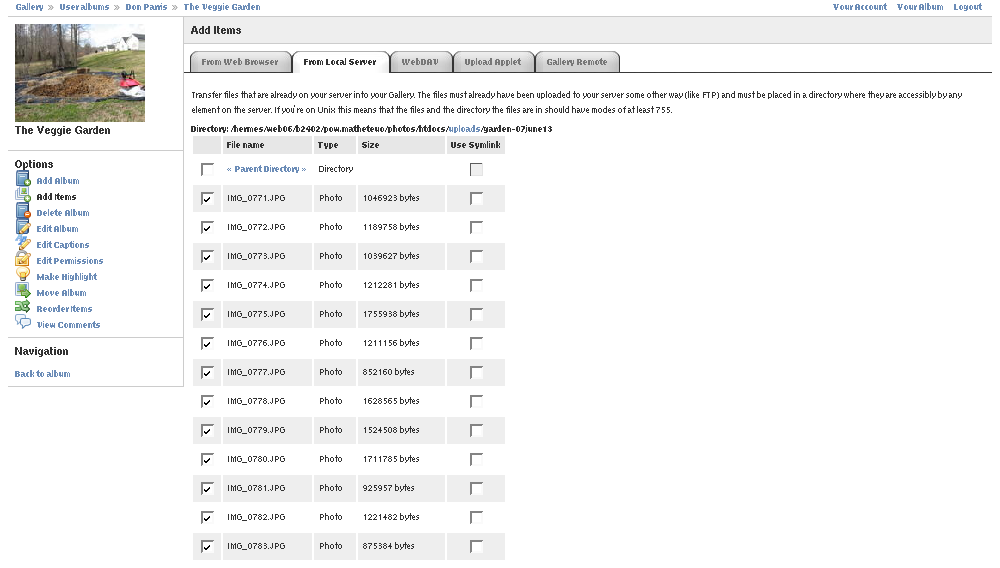
Having arrived at work, I needed only a minute or two to navigate to the website, login, and navigate to the photo album where I keep the garden photos. I chose the "Add Items" link, and then clicked the "From Local Server" tab in the resulting page. Mind you, you'll need to specify the actual upload directory using the admin module to be able to use this utility. Any directory in your web space should work. It's handy to have when you're dealing with lots of photos, but do limit who can use it. The upload directory is public and accessible to everyone who can use the utility. Anyway, we'll select the directory by clicking the only available link.


Choose the files you want to add, and click the "Add Files" button at the bottom of the page. After a minute or two, you'll see the files have been added. Guess what? We're done. I suppose I could try to stretch this brief tutorial out a bit longer - you know, in case you're looking for a book on a four-step process. The truth is, though, it really doesn't take much at all, assuming all the other pieces are already in place. Besides, the boss is watching!


I'm running Debian Etch with a KDE environment, and used a Canon Powershot A540 camera to take the photos. If you're really curious, either about Gallery2 or my veggie garden (well, it looks more like a jungle now), you can always check 'em out. And yes, there really are over 160 photos detailing my expansion project and leading right up to the present, including the huge-monongous cucumber I found hidden in one of the vines. And, if you really think about it, gardening and system administration share at least a few things in common. For example, careful planning and proper implementation are vital to success!

  Nav
» Read more about: Story Type: LXer Features, Tutorial; Groups: Debian, KDE, Linux

» Get new stories by e-mail: nightly or as they are published

« Return to the newswire homepage

  Related stories
» More like this

Comments (18)

Love Those Garden Photos

You lucky duck, Don. Harvesting cukes already! :-) My garden is producing tons of lettuce right now which would go well with your cukes.

From a fellow gardener, Barbara
Thanks Barbara! I just polished off some fried zucchini today. A little cornmeal, a bit of black pepper, a touch of oil, and plenty of heat - Ummmm. My Pa told me to shut up when I reported picking my first cukes and squash. He's in West Virginia, and his squash were just breaking ground good. :-) I confess to a full pint 'o pride where the garden is concerned - it's my second attempt at a serious garden.

Honestly though, I just thought it was cool to be able to take the images straight off the camera to the web like that. I still haven't had time to import them into Digikam.
Nice piccies. My Dad would be jealous of your garden. :)

My picture sequence is a bit more complex. I Shoot in RAW so my piccies have to be processed before I can dump them to the gallery (which needs to be rebuilt now that I have a fresh new server vm up...).

@ Don.

You're making me hungry! Dang, I gotta try some of that.
Thanks, Techiem2! I haven't done RAW photos yet. Maybe I should try that some time.

your dog

Dear Don

Please free your dog from the chain!

Jan
Thanks, but I am unable to offer the dog other accomodations at the moment. However, anyone willing to donate a regulation (home-owner's assoc. rules) fence and the labor to install it is more than welcome. Meanwhile, our daughter - the actual owner of the dog - is preparing to move out soon; her new home may offer a more ideal situation.
@janvl - What are you some Animal Liberationist looney?

@dcparris - There is no need for you to make excuses.
Traceyanne: I agree I have no need to make excuses. Still, I would rather build a fence. I'm just not in a position to. I also agree that no one should really tell me how to keep my dogs, as long as I don't abuse or neglect them. And no, I don't believe chaining a dog is abusive.
>And no, I don't believe chaining a dog is abusive.

Hmmm....This seems a lot like many of the discussions that go on around here.

Chaining a dog can be abusive. Depends a lot on heat, shade, availability of food, water, shelter, how long the chain is, how much time the dog spends chained, etc.

Most folks care about their animals and chain them because, well, most places don't take kindly to dogs running loose.

Deals with Microsoft can be abusive. High likelihood, in fact. However, they may also be expedient, as in Apple's deal ten years ago.
We've all missed the obvious- Apple had Steve Jobs when they made their deal with MS, and they still have him. I wouldn't put anyone running the current batch of Linux companies in the same category as Jobs. Not even close.

photo gear + Linux = pretty good stuff

Nice article, Don! I just treated myself to:

*drum roll*

- Canon EOS 30D http://www.dcresource.com/reviews/canon/eos_30d-review/

- Celestron 102mm Wide View spotting scope http://www.celestron.com/c2/product.php?ProdID=206

and of course a super-duper tripod and head to hold the beasts:

- http://manfrotto.telescopes.com/products/bogenmanfrotto-3001...

I'm using my old Canon lenses; ran out of money for buying shiny new ones. The camera fits nicely on the scope, and the tripod is steady enough for time exposures and long shots.

The camera and scope came with all kinds of cruddy windoze/mac software. Pooey on that I say- Linux has everything you need. I haven't decided yet if the quality and usability match up to Photoshop and other related apps, but I'm having a good time all the same.
Hmmm....

Micro fluid head...

Sounds so ... so ... XXX
You know what they say, dino, sex sells!

Oh, and thanks for planting that thought in my formerly clean, contented mind. ew. Now I don't even want to touch it. :)
Nice.

I'm using:

-Olympus E-500 with 14-45mm and 40-150mm lenses (kit) http://e3wwwtest.newegg.com/Product/Product.aspx?Item=N82E16...

-PQI 4GB CF Card (hey, I'm shooting RAW, that's 13MB/image) http://e3wwwtest.newegg.com/Product/Product.asp?Item=N82E168...

-Manfrotto 3021BPRo with 804RC2 head http://www.bhphotovideo.com/c/product/443891-REG/Bogen_Manfr...

-Davis and Sanford Trailblazer Monopod with Manfrotto 3229 Monopod Head (same QR plate as the 804rc2 so the plate just stays on cam all the time) http://e3wwwtest.newegg.com/Product/Product.aspx?Item=N82E16... http://www.bhphotovideo.com/c/product/5491-REG/Bogen_Manfrot...

I only launch the windows software on occasion on my laptop to check for firmware updates.

I use ufraw in batch mode to convert the raw images to jpgs, then go back and run ufraw manually on any raws that didn't auto-expose properly.

I really like my Olympus AZ300 (an ancient piece of machinery by today's standards), but it uses real film. It's much harder to delete the fuzzy shots from those!

TC: That camera seems a bit of a waste to me - I mean honestly, you spent good money on a camera that will probably never get to shoot my legs. I guess you'll just have to settle for the ho-hum shots of wildcats running loose in your yard. ;-)

tabs??? Naww.....you want split view

I do similar things all the time with konqueror, but I find that the best feature is split view. Just right click on the info bar at the bottom of the window and choose split view. You can split left-right or top-bottom. Now you have BOTH locations in one window!
Hey thanks! I hadn't tried that. That would have eliminated the need to switch tabs. ;-)

Post a comment

A free account is needed to post. Write your comment here first: your text is kept in this browser while you sign up or log in, and is waiting for you when you come back.

Your message:
|||||
10
Markdown: **bold**, *italic*, [text](https://link), - lists, > quotes, $x^2$ for math. Formatting help

Sign up and post (it is free)  or  Log in and post