
- Site menu:
- Latest Discussions
- Latest Newswire
- Archives
- Submit Story
- Story HOWTO
- Syndicate
- E-mail Alerts

Removing/Disabling The Semantic Deskop in KDE4 Running on openSUSE 13.1 Part 2
References: 1. LXer article "KMail Complexity - and a little Patience." http://lxer.com/module/newswire/view/197664/index.html 2. LXer article "Removing/Disabling The Semantic Desktop in KDE4 Running on openSUSE 13.1 (and firing up Thunderbird)" http://lxer.com/module/newswire/view/198081/index.html 3. NEPOMUK - The Social Semantic Desktop http://nepomuk.semanticdesktop.org/ 4. Akonadi, Nepomuk and Strigi Explained http://thomasmcguire.wordpress.com/2009/10/03/akonadi-nepomu... 5. Stop Press......KDE's Nepomuk Doesn't Seem To Have A Future http://www.phoronix.com/scan.php?page=news_item&px=MTYwNjM The rest of my article should be read with this little gem from Phoronix in mind. I am not an exceptionally cynical person, but I could be over this "little act". The developers were told almost from "day 1" by the users that the structure was faulty in various ways. If the sum quoted is correct, the obscene waste of $US23.3 million dollars to produce something that is now being turfed out onto the software scrap heap staggers me and leaves me very angry. Candidly, I think that replacing Nepomuk with Baloo is somewhat akin to removing a flat tyre and replacing it with a tyre that has a slow leak. Both come to the same end. In my opinion, KDE was a great DM until the semantic software was thrust into it. Introduction This second article of this two part series needs some threads of information to be drawn together. Also, as a result of the astonishing news in Reference #5, all references to Nepomuk still remain accurate for the current KDE4 versions, but future releases of KDE4 may need to be referenced to the "Baloo" package. First, there is a cluster of software packages that ultimately form (or contribute to) the operations of the KDE4 semantic desktop: Nepomuk, Strigi and Akonadi (Reference #4) but it also includes the software package KDEPIM. Nepomuk is the actual semantic software ontological library, Strigi is a "spider" which trawls the user's computer files and sends information back to Nepomuk while Akonadi stores its data in an sql cache for the use of the KDEPIM (KDE Personal Information Manager) of which the most frequently used item is probably KMail but which includes KAdressbook, KOrganiser and Kontact. (I accept that more learned readers may find the above is a rough approximation, but I think my summation should be good enough for most purposes.) The Akonadi cache contains all the data previously held in all the separate data locations of the mail client, the calendar appointment book and the address book and so it provides a single data pool for all these PIM packages and Nepomuk. Those data locations still exist and are updated by Akonadi, but cannot be addressed by any of the packages in KDEPIM. This makes very good sense for complex semantic operations, but conversely, it seriously damages the simplicity of the previous "non-semantic" KDE "Unix operated" data structures which were ideal for the single user who had very limited or simple computing requirements. Second, many users make no differentiation between the packages of KDEPIM, Nepomuk, Strigi and Akonadi and simply refer to the aggregate as the "semantic desktop". For the rest of this article, this very loose definition of "semantic desktop" will be used and will always be placed in quotation marks, but where necessary, the individual components will be so designated. Third, a modern computer usually relies on two types of software package which allow the user to communicate with the outside world: an email client and a browser. KDE4's own email client, KMail, has now been modified by the requirements of the KDE "semantic desktop" so that it can no longer directly access the "maildir" folder where the emails are actually stored. Instead, it obtains its information from the intermediate cache produced by the sql server Akonadi from the data in the "maildir" folder. Unless Akonadi is running, KMail cannot function (References #1, #2 and #4). Traditional and previously accepted Unix file operations on the "maildir" folder are therefore no longer recognised by KMail because they have not been processed via an Akonadi sql cache operation. Fourth and finally, many KDE4 users dislike the semantic desktop package because it is considered to produce considerable negative effects on computer operations (excessive activity for both the CPU and the hdd, lost hdd storage space and temporarily unavailable memory), and alternative solutions are now being proposed. These solutions include disabling of the entire "semantic desktop" package. If a user exercises his/her choice and (except for the KDEPIM package) disables the "semantic desktop" software (in this case, specifically Nepomuk, Strigi and Akonadi) in order to obtain greater computer efficiency, it leads to the instant loss of the KDE email client KMail (References #2 and #4), and so the user is immediately deprived of one of the two essential communication links through the dependencies of the "semantic desktop". This situation means that if the benefits of disabling the KDE4 "semantic desktop" are so great, then an alternative email client needs to be installed, if indeed the user wishes to retain the use of KDE4 as their desktop manager. This article deals with the installation and setting up of an alternative email client for the KDE4 desktop where the "semantic desktop" package has been disabled. A Little Background When I began writing this series of articles, my unshaken belief was that for a personal desktop or laptop, KDE in its successive iterations was, and is, one of the best desktop managers in the Linux world, especially for the individual user. Unfortunately however, the alterations in KDE4 that have produced the "semantic desktop" mean that for an individual user who has no need of such a complex and demanding desktop, the current versions of KDE4 may not be the best solutions for his/her computing requirements. I believe most of the problems now described by numerous users who dislike the latest KDE4 versions, can be attributed to the operations of its "semantic desktop" structures (Reference #2 and its dependent threads). For a large computer network, a "semantic desktop" is likely to be an extremely useful tool. It would allow almost instant location of personal and business/operational data contained in emails, calendars and personal diaries and collate all relevant information. Further, if we assume that the hardware on which the KDE4 "semantic desktop" is running are high powered network servers, the additional load of the "semantic desktop" is negligible, but this may not be so for an individual desktop or laptop. The basic problem for the individual, stand-alone user is whether he or she wants this additional complexity and computer activity........or not. The best explanation I have so far found on how the "semantic desktop" packages work is given in Reference #4. It is a complex document, but the writer has managed to separate the three "semantic desktop" components (Nepomuk, Strigi and Akonadi) and explain what each does. The Reference #4 document also explains why KMail no longer works with its own "maildir" folder - that task has been taken over by Akonadi whose cache not only acts as an intermediary between KMail and the "maildir" folder but also for the data folders of the other elements of the KDEPIM. Personally I think it's rather sad, but I now better understand where the KDE4 team is coming from and why their actions have previously caused so much additional work for the CPU and the hard disk drive. I frankly admit I have not tested the latest version of KDE4 with just Nepomuk/Strigi disabled and it is possible that the developers have managed to markedly reduce resource usage of the remaining Akonadi component, and that in turn opens the possibility of re-use of KMail - apart from the frustrations of KWallet. (Note: The Strigi component (hitherto never mentioned in these articles) of the "semantic desktop" is also automatically disabled when Nepomuk is disabled by using the Configure Desktop options). There are so many articles opposing the KDE development team's deployment of the "semantic desktop" that it is pointless to go through all of them here, however one in particular is well worth mentioning. A group of users has now produced versions of the KDEPIM package which are independent of Nepomuk, Strigi and Akonadi. While these KDEPIM packages are as yet only available for Ubuntu, it certainly indicates the depth of frustration of this group over what they consider is the negative direction now being taken by the development of the KDE4 desktop management package with respect to the effects of the "semantic desktop". You can find this site at: http://launchpad.net/~pali/+archive/kdepim-noakonadi An interesting web site was recently brought to my attention (thank you "jazz") and it confirms one of my newly formed concepts. This site contains the web document listed as Reference #3. The site contains only a single paragraph, apart from various administrative links, but the short text is so "revealing" that it is repeated here: Quoting:NEPOMUK brings together researchers, industrial software developers, and representative industrial users, to develop a comprehensive solution for extending the personal desktop into a collaboration environment which supports both the personal information management and the sharing and exchange across social and organizational relations. My perception of the above "mission statement" is that it is a brilliant piece of circumlocution that has been "cooked by a master" - and English is my native tongue. One has to admire the usage of ornamental and apparently enormously impressive words that really carry very little information about exactly what a "semantic desktop" is and does. There is however a general concept which can be gleaned from the statement and it confirms what I originally implied/suggested in the text of Reference #1: The "semantic desktop" of KDE4 (and by implication, KMail) is now primarily aimed at large networks in research, industry and social/government organisations. QED, I think. And if you really want to rejoice in circumlocution, try reading this - it's brilliant: http://nepomuk.semanticdesktop.org/Project+Objectives.html There is an idea I want to share in this background information and I am indebted to my daughter Fiona, a library technician, for this statement. She uses Windows in her daily work in a very large legal library and Linux on her personal laptop at home. She read through the text of the Part 1 published article and then emailed this response: Quoting:"Reading your article, and freely admitting not being able to understand it fully, it seems that the KDE programmers are going in the same direction as Apple and Windows. YOU WILL have this programming and YOU WILL have no choice in the matter...." From what I am seeing, I don't think I could improve on her statement. Choices to either use or disable the "semantic desktop" completely as well as choices to be able to use KMail, with or without the "semantic desktop" or KWallet, are presently lacking in KDE4. The only real choices remaining are: 1. Use KDE4 "as is"; 2. Use a very modified KDE4 that disables the "semantic desktop"; or, 3. Walk away. If you select option #3, choices still remain and one obvious one is the Trinity desktop manager, (http://www.trinitydesktop.org/) but there are plenty of alternative desktop environments such as Xfce and so on. The classic article "The Cathedral and the Bazaar" comes to mind. There is one aspect however, that I think can be cleared up. In my earlier article (Reference #2) I indicated that I had concern that KMail was just the "tip of the iceberg" and that numbers of software packages in KDE4 might be affected by the disabling of the "semantic desktop". I am quietly confident that with what I now know, this is not the case. The "semantic desktop" is currently only "seriously interactive" with the data of the KDEPIM packages via the Akonadi cache, and those are defined in the introduction to this article. Disabling of the "semantic desktop" should, from all I am able to understand, therefore only affect that relatively small package cluster and leave the remainder of the desktop software untouched. All of this is leading to the fact that this article follows on from Part 1. In that article, I showed that KDE4 (and especially its KDEPIM package) is subject to the operations of a "semantic desktop" comprising Nepomuk, Strigi and Akonadi, but as far as I am concerned (and for many others) this "semantic desktop" is an unwanted encumbrance on KDE4. In the previous article, I explained how to wholly disable the semantic desktop, but in so doing, the use of KMail as an email client was also lost. This article will demonstrate how you can replace the disabled and deleted KMail with Thunderbird as the email client. Installing Thunderbird 24.3 The test computer remains the Toshiba Satellite A660 laptop described in Part 1. The operating system of openSUSE 13.1 and its version of KDE remain the same. Prior to this section of the series, the laptop system had KMail and KWallet deleted, and Nepomuk and Akonadi were disabled fully. As noted previously, the desktop was operating in folder view, classical menu for the application launcher and all window effects were off - this form of display was purely for my own convenience. Prior to installing Thunderbird, the laptop was connected for the first time to the internet and all patches and upgrades for openSUSE 13.1 were installed. No other software was added; however in order to ensure the internet was connected correctly, the Firefox browser was started and it was confirmed as running perfectly. The first step was to install Thunderbird and to do this, YaST was opened and version 24.3 of the software was installed on the system. All installation was done from the internet repository and as well as the Thunderbird package, other additional files were added to the system to make a total of approximately 90Megabytes download. After completing the installation, YaST was closed. The software package automatically puts an item in the Application Launcher Menu under Internet and selecting this item starts the Thunderbird package and the user is presented with the information window shown in Figure 1 below. 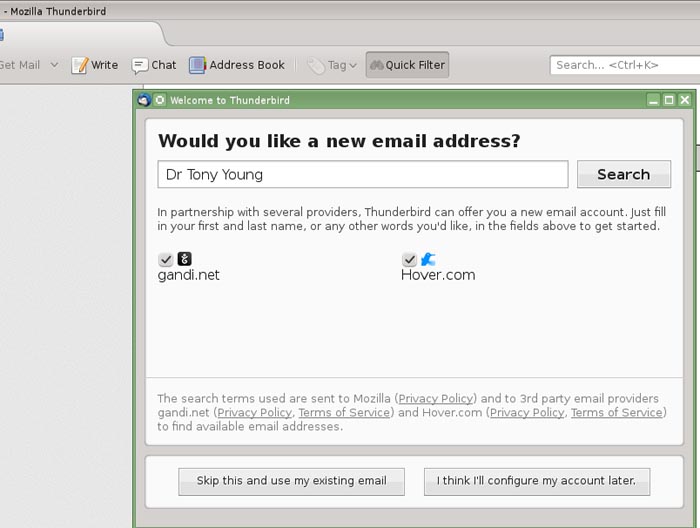 Figure 1. The opening window of Thunderbird 24.3 The user now has the choice of using his/her existing email address and password, or the additional option of setting up an entirely new account under a different email provider. In my particular case, I wished to retain my normal email account and therefore selected the lower left option. Once this is selected, Thunderbird immediately moves to a second option as shown in Figure 2 below. 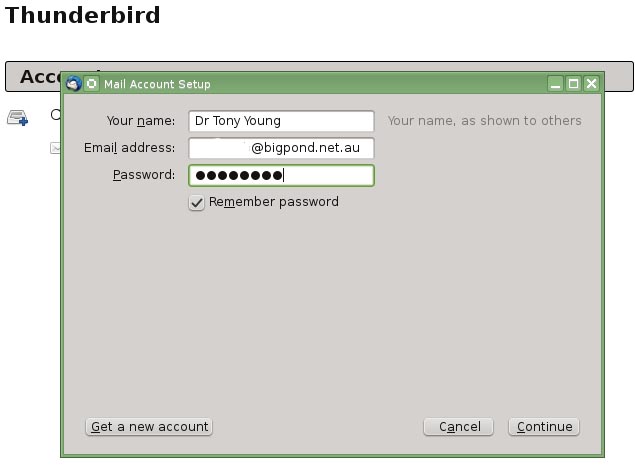 Figure 2. Email address and password insertion. My personal email address has been partially deleted for privacy purposes, however this window indicates the style of password insertion that was once used so very successfully by KMail when it was aimed specifically at the independent user. It always works and Thunderbird retains this simplicity. To ensure that the password for the POP3 server is permanently held in Thunderbird's storage, the "Remember password" box must contain a "tick". I found that once Thunderbird had the information in the three entry areas above, it began automatically to try to find the mail server on which my account is held. This in turn led to an interesting situation which needs some explanation. In a previous paper, I indicated that I had Thunderbird "up and running" in as little as two minutes, and indeed that was the case. However, I am now aware that this very short period resulted from the fact that the computer on which I was testing Thunderbird had previously had a working installation of KMail installed. As a result, the correct names for the mail server and its settings were already present in some KMail datafile to which Thunderbird gained access. In the case of the present new installation, KMail had never been set up and therefore that datafile did not exist. What then happened was that in the large blank area of Figure 2, Thunderbird indicated it was searching for the information, but after about 2-3 minutes I stopped the process by selecting "Continue" and Thunderbird then presented the following window in Figure 3 so that the account could be set up manually. 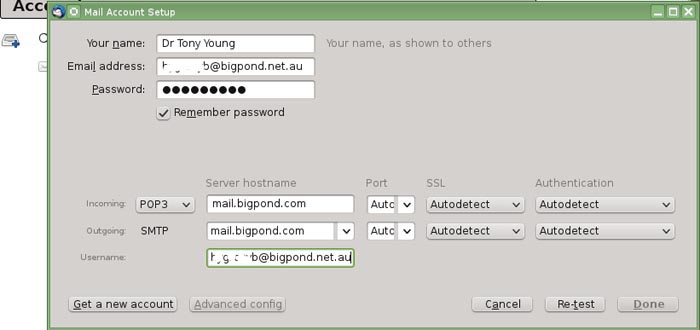 Figure 3. Manual setup of Thunderbird The setting up window is fairly straight forward and Thunderbird will proceed to try to set the account up automatically once you have given the details as indicated above. There is however one very silly trap which is purely a matter of my own situation. And it is displayed very nicely in Figure 4 below. 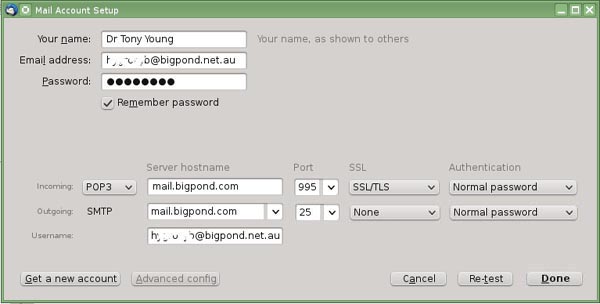 Figure 4. Mail Account Setup window showing all details. It is always recommended that you use secure transmissions wherever your ISP supports them. After completing the information as shown in Figure 4, I pressed the "Re-test" button and was extremely surprised to receive the information that either my user name or password was incorrect. I replaced both and got the same message and then after a bit of head scratching realised what had happened.....The answer lies in the Outgoing line which is labelled as SMTP. At the moment, this shows a required Authentication of "Normal password"......however my ISP email server does NOT have this requirement. It was the matter of a moment to select "None" from the drop down menu on that line and Thunderbird instantly acknowledged that all was well and proceeded to the window as shown in in Figure 5. 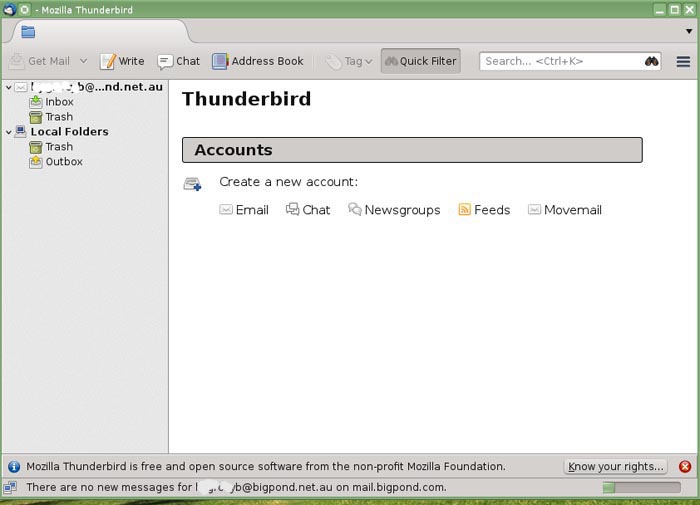 Figure 5. The opening window of the Thunderbird 24.3 email client. As can be seen, the window "sort of looks" like KMail, but the user has only just started to "whip this very nice email client into shape". The side menu tree always remains....I haven't looked for an option that would remove it, but one probably exists. But in any event, I cannot imagine any email users would want to remove the best general search tool of the Thunderbird client. If you select "Inbox", the view will immediately re-orient itself to show email lists in the upper half and the contents of the selected email in the lower half.....just like KMail. An example of what you will get is shown in Figure 6. 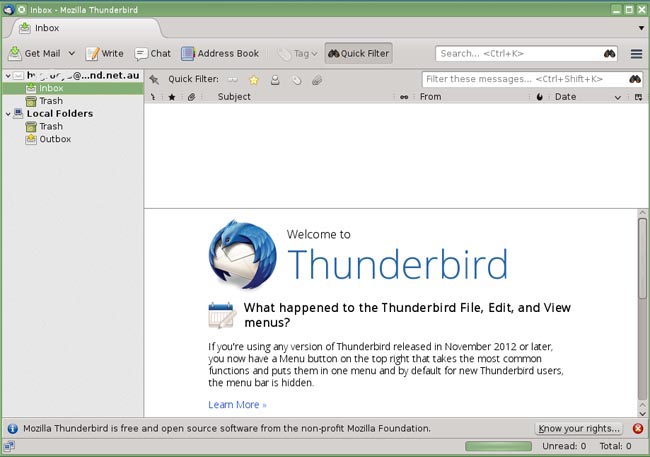 Figure 6. The simple working view of Thunderbird showing top area for email lists and lower area for email contents. Note that the software tells you that the main menu bar is hidden by default. There is however one last thing to do before the user begins to really set the software up exactly as they desire, and this is shown in the last image of Figure 7 below. 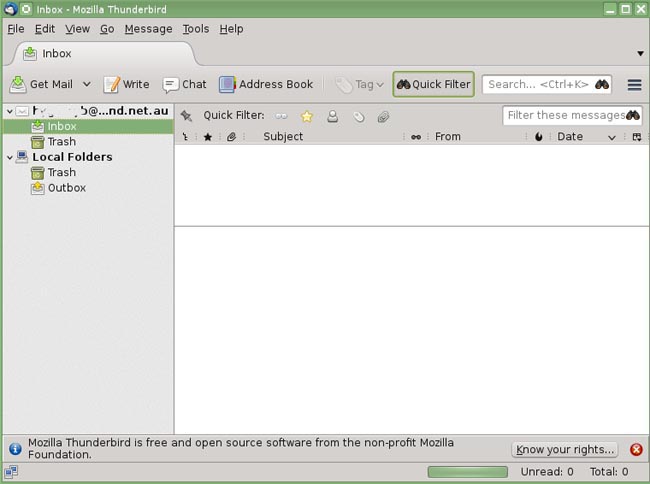 Figure 7. Thunderbird with main menu bar displayed. To obtain the main menu bar, place the cursor in the blank grey area above the line that contains the "Address Book" option and right click.....A drop down menu will be displayed and you can select to permanently display the Menu Bar.......Once you have this bar in place, you have access to all of Thunderbird's drop down menus, options and layouts. I have already "played" with this aspect and have confirmed that I can produce a Thunderbird layout that has almost no differences between it and the layout that I prefer to use in KMail. I leave it to the reader to enjoy ferreting out the options for this remarkably good piece of software.....I'm impressed. Thunderbird may not do exactly what KMail does, but if you cannot have KMail, then I think Thunderbird is a darn good replacement and it is simple and effective to use. Once Thunderbird is in place and the "semantic desktop" software removed, KDE4 should go like a "scalded cat" as that dreadful old saying is. One last thing: I found there was a last little hangover from my removal of Nepomuk, Strigi and Akonadi. KMail, of course, had been removed, but not the other parts of the KDEPIM. I found that Kontact and the other members of the KDEPIM began to put up opening windows with a graphic that showed that they were trying to start Akonadi. You begin to understand a little more why so much of the computer's resources is taken up by the KDEPIM and the "semantic desktop" because the other members of the PIM section automatically begin to do their work whether you asked them to do so or not. I suspect the easiest way (and I haven't tried this yet) would be to disable them using the Configure Desktop startup options.......or you might try simply uninstalling them as each pops up because each of the items is like KMail - it consists of a single file in the openSUSE 13.1 repository and provided there are no dependencies, each should be able to be easily and completely uninstalled. And there we are. And After All of This, The Real "Semantic Desktop" Problem is CHOICE I firmly believe that any reader should be in no doubt whatsoever that: The issues that I (and others in the threads) have raised in this two part series will have not the slightest effect on the KDE4 development team (and its aims) for the foreseeable future. The arguments raised by all of us will be ignored or set aside by the KDE4 developers as of little or no consequence in their march to produce a "semantic desktop". It would produce too much "loss of face" to do otherwise and they are also convinced that the path they have taken is wholly correct. Whether or not they alienate any of their own users in the process of that march is irrelevant; the production of the "semantic desktop" is the only goal in front of them and they have devoted too much of their time and resources to stop now. It's simply not going to happen. One is almost tempted to suggest that there could be a large, hidden "corporate structure" of some form pushing/advising/backing the KDE4 team in order to get the desired network structure out of the developers - that suggestion is pure hypothesis but the Nepomuk "mission statement" and the Phoronix article, (References #3 and #5) do give some credence to the idea. There is ample evidence that many KDE users are unhappy with the direction KDE4 development has taken. If you really want to do it, then: 1. Yes, you can disable the "semantic desktop" software; 2. Yes, you can remove KWallet; and finally, 3. Yes, you can remove KMail and replace it with Thunderbird. But I am compelled to ask the KDE4 team: Why should you have to do so in the first place ? More to the point, why should "we the users" have to replace an excellent inbuilt email client and personal information manager just to satisfy YOUR desire to produce a "semantic desktop" ? One could argue that all I have done in this article is prove the point that it is possible, but should all that hassle be necessary when it is all done and dusted ? Why should any KDE user have to force such alterations and settings onto KDE4 when they should be made available by the software itself through offering a series of user choices ? And I think that is the real crux of the present situation as my daughter Fiona so penetratingly implied: CHOICE has been taken away from KDE4 and if you are going to use KDE4, YOU WILL do as the developers have decided for you - just like Apple and Windows. This is no longer the "bazaar", this is the "cathedral". As a consequence, you are no longer free to: 1. Reject the use of KWallet password storage facility without any penalty from other KDE4 software; 2. Reject the use of the "semantic desktop" components of Nepomuk, Strigi and Akonadi and still retain the full use of the KDEPIM complex of software so that KDEPIM then accesses its normal data files under traditional Unix operations. The present structure of KDE4 has been developed to produce only the single, "semantic desktop" outcome that is desired by the developers. And of course, we know that that they are free to make that choice, but in so doing, they deprive the rest of us of our choices. Of course, we are free to use, or not use, KDE4 - under the conditions they impose of course. But from the point of view of the KDE4 developers, they have given us just one slightly modified choice: Apart from being able to disable Nepomuk using the Configuration Desktop controls, we are only free to use their entire developed package "as is", .........or not, and if we disable any more of it, we must accept the consequences and lose highly desirable computing facilities. I'd mention here too that despite anything stated by fans of the KDE4 "semantic desktop", its activities MUST have a detrimental effect on the operations of KDE4 as far as the CPU and other computing components are concerned. We can assume that the Akonadi server is constantly running in order to update its sql accessed cache; we also know that components of the KDEPIM are constantly active whether they are being used or not; and finally, we know that unless they are disabled, the Nepomuk/Strigi component is constantly active and ready to produce results to a query. No matter how you twist the logic, this MUST and DOES produce loads on the CPU that previously did not exist; further hdd space has to be taken up by the cache that is required by the Akonadi server, and finally, at least some memory must be utilised for all these operations. It is no wonder that users report that removal of the "semantic desktop" improves computer operations. It may be possible to reduce these negative effects, of course, but some will ALWAYS be there. From my perspective, the situation has become much clearer. I am finally asking myself whether or not KDE4, as it has become, is the desktop that is suitable for my needs. Certainly, I can force it into the structure I want, but is it truly worth the trouble, when there are other desktop managers that will give me what I want with far less difficulty ? It remains a large problem question. Perhaps my concerns are shared by very few people.....in which case, the "semantic desktop" of KDE will become the standard format of the software....But my present feeling is that there is so much dislike for the complex DM that has now been produced that it will drive the uptake of alternative desktop managers rather than KDE4 even if "big network" takes it up.. I'm not happy if that is the outcome either because KDE is still my preferred DM, but that's my present view of the matter. On the other hand, I have confirmed that removing the entire "semantic desktop", KWallet and the KDEPIM package can be done without excessive penalty, and that Thunderbird can be installed as a direct replacement of KMail. A KDE4 user thereby retains the use of his/her most desired DM, has markedly reduced CPU, memory and hdd usage and still has an excellent email client option. Very, very, very satisfying. I have no doubt that there will be other FOSS packages that replace Kontact and KAdressBook. Perhaps there is ultimate choice after all, for we can exercise our own choice NOT to do what the KDE4 developers want, even against the restrictions of their own software. The bazaar rules again. Acknowledgement My sincere thanks to the KDE4 team whose unceasing march to the "semantic desktop" made all of this possible - and necessary. I've learned an enormous amount from my three articles on KMail and the "semantic desktop" and for that I acknowledge their "assistance", even if they never knew that they had given such help. If I hadn't been so irritated with their development path, I'd never have either written these articles or bothered to work my way through their incredibly complex packages. I must also congratulate the KDE team for having finally recognised that the Nepomuk portion of their "semantic desktop" is so poor (Reference #5). It's what the users were saying more and more loudly. However the decision to immediately move onto Baloo as the semantic software leaves me concerned that sooner or later, the same position will be reached. Assuming the accuracy of the sum quoted, $US 23.3 million is an incredibly large amount of money to be discarded onto the software scrap heap. Note: Interestingly, a recent poll conducted by FOSSForce (http://fossforce.com/2014/02/kde-tops-desktop-poll/) indicated that 70% of their respondents preferred KDE as their desktop manager. It would have been very worthwhile asking further questions in order to find out how that 70% user base deploys KDE4 and the usage of KDEPIM/KMail, KWallet, Nepomuk and Akonadi. |

|
|
Comments (32)
Dumbing-down
When so many people complained for so long that Linux based systems were "hard to use", it's no surprise that things are "dumbed down" to make them more marketable to the vast hordes of unwashed.
This is a mistake, of course, because people generally don't like being talked down to.
I recommend as an alternative, a usable default.
For example, the lead-in screens for TDE (KDE3) on first log-in, asks multiple times "how do you want this to look" before finally getting to the desktop. This appeals to power users, and people who already know what they like. To the average user, it's confusing because they have no context.
Microsoft followed the pack and delivered "themes" because people liked that. With Win8, they violated their previous experience and gave everyone the Fisher Price interface, which is insulting.
So here's my suggestion: A _relatively_ simple default, multiple "themes" so the new user can see what kind of customization is possible, and then the "everything and the kitchen sink" available for those that want it.
...but then, that's what KDE and GNOME used to be, isn't it?
This is a mistake, of course, because people generally don't like being talked down to.
I recommend as an alternative, a usable default.
For example, the lead-in screens for TDE (KDE3) on first log-in, asks multiple times "how do you want this to look" before finally getting to the desktop. This appeals to power users, and people who already know what they like. To the average user, it's confusing because they have no context.
Microsoft followed the pack and delivered "themes" because people liked that. With Win8, they violated their previous experience and gave everyone the Fisher Price interface, which is insulting.
So here's my suggestion: A _relatively_ simple default, multiple "themes" so the new user can see what kind of customization is possible, and then the "everything and the kitchen sink" available for those that want it.
...but then, that's what KDE and GNOME used to be, isn't it?
this may be ironic, but as a commandline user i have no problem with the dumbing down of the gui. on the contrary i think i i even like it because i find a complex commandline much easier to master than a complex gui. (the commandline has a history feature where i can search to find complex commands that i did before. if a command gets very complex i can save it in a script and repeat it easily. try that with a gui, any gui.)
as a result i use a gui only for things that require one, like image editing, photo archival etc. i use gimp with a complex gui for example, or inkscape. also the developer tools in webbrowsers. but when it came to kde i found that all those features the kde 3 desktop had at the time just got in my way. i'd accidentally click somewhere that would hide a toolbar or panel i was using and than i'd have to figure out what happened and how to fix it. firefox used to have the same problem with buttons to easily hide toolbars. this was a big problem for my mother and my grandmother.
so i can see both sides of the issue. there is an argument to be made for each side. i'd also consider that the developers don't feel the pain. as a developer i can set the defaults to my liking so that i don't need any customization for the application i am developing.
greetings, eMBee.
as a result i use a gui only for things that require one, like image editing, photo archival etc. i use gimp with a complex gui for example, or inkscape. also the developer tools in webbrowsers. but when it came to kde i found that all those features the kde 3 desktop had at the time just got in my way. i'd accidentally click somewhere that would hide a toolbar or panel i was using and than i'd have to figure out what happened and how to fix it. firefox used to have the same problem with buttons to easily hide toolbars. this was a big problem for my mother and my grandmother.
so i can see both sides of the issue. there is an argument to be made for each side. i'd also consider that the developers don't feel the pain. as a developer i can set the defaults to my liking so that i don't need any customization for the application i am developing.
greetings, eMBee.
> if a command gets very complex i can save it in a script and repeat it easily. try that with a gui, any gui.
There used to be a utility for Windows that would do exactly that. It would capture you screen actions, mouse clicks, etc,, and record them to be duplicated later.
There used to be a utility for Windows that would do exactly that. It would capture you screen actions, mouse clicks, etc,, and record them to be duplicated later.
prolly macro recording. Lotta individual programs include such a function.
The nice thing about a GUI is you can poke around and discover functionality. This mitigates the weakness of the CLI, where most of them still have not grasped the notion of good documentation, so there is a steep learning curve in simply hunting down information on how to do things, and what you can do. That is the wrong kind of learning curve.
But, even after decades of GUIs, they still have not developed an understanding of useful basic concepts. Like doing more than one thing at a time. For example, the main application menu in most desktop environments disappears after you hunt through the dang thing to find the app you want to launch, and then launch it. Well hello, on my fancy 21st century super-duper multi-user multi-tasking Linux system I like to run multiple apps at the same time. Or configuration dialogues with multiple options that disappear after you click one thing. Web apps are the leaders in noxious one-thing-at-a-time dialogs. Click, wait, click, wait, click, wait....
Another chronic weakness of GUIs is no consistent undo, like eMBee mentioned. If something goes haywire there should be an obvious "oops go back" button. KDE and GNOME are huge offenders in this regard. Oh let's face it, GNOME is a huge offender. KDE has lots of right-click context menus and tons of functionality, and a lot of reset buttons, but the overall flow is inconsistent and you spend way too much time trying to find things.
My biggest gripe is Porthole GUIs. WTF is it with devs who think we don't need to see nice browsable lists of options, but rather have to click through multiple levels with one or two items per level? They're like fussy little file clerks who have papers so hyper-organized that no file folder has more than a couple of items in it. I know that UI is hard, but it seems that bad habits are adopted with ease while sensible ones never see the light of day.
But, even after decades of GUIs, they still have not developed an understanding of useful basic concepts. Like doing more than one thing at a time. For example, the main application menu in most desktop environments disappears after you hunt through the dang thing to find the app you want to launch, and then launch it. Well hello, on my fancy 21st century super-duper multi-user multi-tasking Linux system I like to run multiple apps at the same time. Or configuration dialogues with multiple options that disappear after you click one thing. Web apps are the leaders in noxious one-thing-at-a-time dialogs. Click, wait, click, wait, click, wait....
Another chronic weakness of GUIs is no consistent undo, like eMBee mentioned. If something goes haywire there should be an obvious "oops go back" button. KDE and GNOME are huge offenders in this regard. Oh let's face it, GNOME is a huge offender. KDE has lots of right-click context menus and tons of functionality, and a lot of reset buttons, but the overall flow is inconsistent and you spend way too much time trying to find things.
My biggest gripe is Porthole GUIs. WTF is it with devs who think we don't need to see nice browsable lists of options, but rather have to click through multiple levels with one or two items per level? They're like fussy little file clerks who have papers so hyper-organized that no file folder has more than a couple of items in it. I know that UI is hard, but it seems that bad habits are adopted with ease while sensible ones never see the light of day.
Quoting:Or configuration dialogues with multiple options that disappear after you click one thing. Web apps are the leaders in noxious one-thing-at-a-time dialogs. Click, wait, click, wait, click, wait....
Must have picked up that practice from the people who write the menus on DVDs. It's annoying enough when starting to watch a movie but at least I may only have to reload an option menu once and then never again for 90 minutes or so. It's completely obnoxious to have to go through that exercise on a computer interface multiple time.
Quoting:My biggest gripe is Porthole GUIs. WTF is it with devs who think we don't need to see nice browsable lists of options, but rather have to click through multiple levels with one or two items per level?
Ah... my "favorite"? Giving the user dozens (even hundreds) of options that they have to navigate through by scrolling and only able to see 2-3 at a time ensuring that they'll scroll by so fast that it takes you far, far longer than it should take you to make a selection. Or my all-time favorite: making you select a month from a list but only displaying 11. Really? Screen real estate was such that you could only display Jan-Nov? And... no... in neither case are you allowed to manually type in the selection. You must select from the menu.
Don't get me started about user interfaces that insist on using a non-configurable font that's too tiny to comfortably read by anyone with less than 20:10 vision or the current fad of medium gray text on a brilliant white background. At least KDE lets me change those things. Web pages are another matter. Making unvisited and visited links the same color or the gray-on-white text are my personal favorites. Override many web site's colors and you often lose the ability to easily navigate areas of some of the web site. Genius.
Somewhere there are former "human factors" scientists spinning in their graves in response to the poor usability of many "modern" computer interfaces.
> 2. always works (meaning the user is not considered qualified to administer a system, the software must try to anticipate all cases)
Personally, I do not consider the "always works" classification as dumbing down. One of the things I like about professionally produced code is that it starts off in a working state. You can go from there much more easily from a position of little knowledge and pick up what you need on the way.
For a positive example of this, see package management on most of the good distributions. It never fails to amaze me the shenanigans that Windows users have to go through to get software onto their machines. For my Mint, if it is in a repo, then a single CLI command will suffice. Failing that, is a deb file is available, it is hardly more effort. And the package installs a complete and running application ready for use. Despite what some say, most builds from source are failrly straight forward, but it is generally not my preference, if for no other reason that updates are automatically forthcoming.
However, looking at a system like MySQL. Sure the server and client tools install from a package, but look around at the number of Getting Started tutorials on how to even access it, to get it available over a network, sorting out permissions, just to get to the point of being able to create a database locally and adding a table to it. It beggars belief that these fundamental usability issues are still here for a key piece of open source software. That there are *so* many people on forums asking the *same* questions indicates that there is something wrong that needs to be fixed.
Writing a database well is hard. Installing it in an immediately usable state is not.
Personally, I do not consider the "always works" classification as dumbing down. One of the things I like about professionally produced code is that it starts off in a working state. You can go from there much more easily from a position of little knowledge and pick up what you need on the way.
For a positive example of this, see package management on most of the good distributions. It never fails to amaze me the shenanigans that Windows users have to go through to get software onto their machines. For my Mint, if it is in a repo, then a single CLI command will suffice. Failing that, is a deb file is available, it is hardly more effort. And the package installs a complete and running application ready for use. Despite what some say, most builds from source are failrly straight forward, but it is generally not my preference, if for no other reason that updates are automatically forthcoming.
However, looking at a system like MySQL. Sure the server and client tools install from a package, but look around at the number of Getting Started tutorials on how to even access it, to get it available over a network, sorting out permissions, just to get to the point of being able to create a database locally and adding a table to it. It beggars belief that these fundamental usability issues are still here for a key piece of open source software. That there are *so* many people on forums asking the *same* questions indicates that there is something wrong that needs to be fixed.
Writing a database well is hard. Installing it in an immediately usable state is not.
Some times I whittle the future
> most of them still have not grasped the notion of good documentation,
So true!
While I'm primarily a CLI guy, I'll freely admit it took me years to get the drift of man pages. Even today, they still pretty much suck. I jes ran across one that had a lot of command options, but never lableled them as such. I'm thinking, are these the options of which it refers? Or?.....
Seems like it's not until some really savvy blogger throws up a howto on a specific command do newbs finally understand how that command is used. Fortunately, there are now a lot of intermediate Linux users who really do want share the wealth and educate less than clueful newbs.
So true!
While I'm primarily a CLI guy, I'll freely admit it took me years to get the drift of man pages. Even today, they still pretty much suck. I jes ran across one that had a lot of command options, but never lableled them as such. I'm thinking, are these the options of which it refers? Or?.....
Seems like it's not until some really savvy blogger throws up a howto on a specific command do newbs finally understand how that command is used. Fortunately, there are now a lot of intermediate Linux users who really do want share the wealth and educate less than clueful newbs.
Tony's research and how he was able to explain what it is that is going on so even the layman such as myself understand are amazing. These two articles together are a treatise into what could be done better by the KDE team, by any team. There is no reason why any user should have to go through what he did to get something rather simple to work the way he wants it too..call me crazy but it shouldn't be that hard.
I posted this in the other thread related to this article.
I posted this in the other thread related to this article.
Semantic desktop and web is the future
I know that user's experiences with this semantic stuff have been difficult, and a lot of people don't see the benefit. I don't see the effort or funding as having been wasted. As I said when I wrote about this some time ago, plain-text searches are plainly inadequate. They depend too much on humans manually tagging non-text storage objects like photos, and audio and video files to make them search-friendly. As we accumulate terabytes of stuff search is going to become a huge problem. It already is-- how many of us have perfectly-organized multimedia archives where we can find what we want without a lot of hassle?
The other key part of the semantic desktop is 'web of association'. This is why Nepomuk wants to index every last little thing on your system. To quote my own self:
The key concept is making knowledge processable by the computer. I hope they keep working on it. Google has made a lot of progress in semantic search, but of course they keep everything under wraps, and fling token bits of code over the fence when they feel like it.
KDE 4: Leader of the Semantic Pack https://www.linux.com/learn/tutorials/498660-kde-4-leader-of...
The other key part of the semantic desktop is 'web of association'. This is why Nepomuk wants to index every last little thing on your system. To quote my own self:
Quoting: The idea is to make the computer form the types of associations that we make every day. I'll wager everyone has an Auntie Em or Uncle Henry who bootstraps their memories in this fashion: "When did Cousin Ellen lose her mind and go to work for the Infernal Revenue, instead of keeping her honest accounting job? Well, that was back when Grandpa Jones broke his hand and couldn't play the mandolin anymore, and Fred and Ethel just had their third baby and had to sell the sports car, and that baby boy is all grown up now and just had his 23rd birthday, so it was back in September 1988 when Ellie went to work for the bad guys."
Nepomuk aims to make possible the same web of associations to our files and their contents that we make in our heads all the time. The possibilities are vast: what if Nepomuk could catalogue audio file lyrics, recognize song snippets, incorporate image-recognition, figure out who the musicians in a song or the actors in a movie are? It's not so far-fetched as Google and others are working on these technologies now.
The key concept is making knowledge processable by the computer. I hope they keep working on it. Google has made a lot of progress in semantic search, but of course they keep everything under wraps, and fling token bits of code over the fence when they feel like it.
KDE 4: Leader of the Semantic Pack https://www.linux.com/learn/tutorials/498660-kde-4-leader-of...
Ridcully, you've done some glorious work dissecting all this stuff. Thank you.
Thankyou Tuxchick, I appreciate the compliment very much. I always come back to a set of very simple ideas. KDE4 is a great DM. The semantic desktop is a superb concept, and particularly useful for large networks in business, government, education, research....etc. No denying it. The problem with many users is that they neither want not need it, but at the moment KDE4 has been designed as "one pattern fits all users", or at least that's my impression. And so, choice to use KDE4 as an individual wishes has been lost.
How they would implement it I have no idea, but choice to use or not use the semantic desktop (with no penalty on the user who chooses not to use it) would solve all the problems.
As to the work in dissecting all this stuff.......I confess that at times I felt like throwing my hands in the air and calling for several bottles of single malt.....anything to get away from it. LOL. And the other part is editing.....It sat in the OpenOffice edit folder here for a week or so before I began to upload it. No matter what you did, you found that there was another conflict later on........and then to have the breaking news of Nepomuk just as you put it in the Edit queue......exited stage left screaming hysterically. I should tell you though.....? You've been there and done that all too often yourself. Even after it was on LXer, Jdixon, bless him and thankyou Jdixon, told me of an error on one of the images which needed to be fixed pronto.......It was.
That's enough of a rant.......But looking back, great experience and overall, I enjoyed it. I wonder what I will think about next ? As long as people enjoy my perspectives on things, I will try to keep writing. Thanks again.
Tony
How they would implement it I have no idea, but choice to use or not use the semantic desktop (with no penalty on the user who chooses not to use it) would solve all the problems.
As to the work in dissecting all this stuff.......I confess that at times I felt like throwing my hands in the air and calling for several bottles of single malt.....anything to get away from it. LOL. And the other part is editing.....It sat in the OpenOffice edit folder here for a week or so before I began to upload it. No matter what you did, you found that there was another conflict later on........and then to have the breaking news of Nepomuk just as you put it in the Edit queue......exited stage left screaming hysterically. I should tell you though.....? You've been there and done that all too often yourself. Even after it was on LXer, Jdixon, bless him and thankyou Jdixon, told me of an error on one of the images which needed to be fixed pronto.......It was.
That's enough of a rant.......But looking back, great experience and overall, I enjoyed it. I wonder what I will think about next ? As long as people enjoy my perspectives on things, I will try to keep writing. Thanks again.
Tony
Tony, thank you for the absolutely great work you've published here. I appreciate it and I want you to know that I do.
You've hit on a lot of things that had me nodding my head, but the major things are actually the simplest things. And remember, I do this with the new and most often young user in mind.
Right off the bat, Linux is a new and strange environment to the kids we present it to. Let's just focus on those from 14 - 18 for now. This has been a pet peeve of mine for years. The convoluted, nonsensical and unnecessarily difficult-to-pronounce names of the various components of the OS and the apps within.
Nepomuk, Semantic Desktop, Akonadi server? Right away we've presented these kids with the equivalent of giving them support documentation in a foreign language, Naming these components should keep simplicity in mind. I mean, we use KDE on most of our reglue computers now because of how much it's improved. It's absolutely wonderful, but it can be the best computing environment in the world, but if you are scaring away your users at first blush, what have you accomplished?
ewww - ewwww pick me pick me. I know, I know, I know...
Nothing. You've accomplished nothing.
Step 1 for us. go into system settings and completely disable Nepomuk in Desktop Search...for the younger kids anyway. If we leave it running for older kids we disable portable storage indexing. We also warn them that it might be sluggish at first, but then again, my all time favorite search tool, Google Desktop Search could bog your machine down for a couple of days if you left it indexing all the time.
Don't get me started on Google Music Manager. That's best left for when you sign off at night. it has all night to chomp and chew through that.
We also teach them how to use Kfind to search for files and how to use the search feature in Dolphin. Oh, and a note to the KDE guys... why do we gotta put an * at the beginning and end of the search string in Kfind? A lot of people report that they don't have to do that but every flavor of KDE I've used this past year demands it. I cussed and fussed about how much kfind ksucked. A simple dab of internet ink at each end of the search term? Who knew??? I know I drove TA crazy with my kvetching about that.
Step 2 for us is to set these kids up with a Gmail account and google calendar. We also show them the Kmail suite but we do our best to talk them down from a client unless they just really need one. So all that indexing and chomping and chewing isn't necessary for them to get to a system they can use right away.
You've hit on a lot of things that had me nodding my head, but the major things are actually the simplest things. And remember, I do this with the new and most often young user in mind.
Right off the bat, Linux is a new and strange environment to the kids we present it to. Let's just focus on those from 14 - 18 for now. This has been a pet peeve of mine for years. The convoluted, nonsensical and unnecessarily difficult-to-pronounce names of the various components of the OS and the apps within.
Nepomuk, Semantic Desktop, Akonadi server? Right away we've presented these kids with the equivalent of giving them support documentation in a foreign language, Naming these components should keep simplicity in mind. I mean, we use KDE on most of our reglue computers now because of how much it's improved. It's absolutely wonderful, but it can be the best computing environment in the world, but if you are scaring away your users at first blush, what have you accomplished?
ewww - ewwww pick me pick me. I know, I know, I know...
Nothing. You've accomplished nothing.
Step 1 for us. go into system settings and completely disable Nepomuk in Desktop Search...for the younger kids anyway. If we leave it running for older kids we disable portable storage indexing. We also warn them that it might be sluggish at first, but then again, my all time favorite search tool, Google Desktop Search could bog your machine down for a couple of days if you left it indexing all the time.
Don't get me started on Google Music Manager. That's best left for when you sign off at night. it has all night to chomp and chew through that.
We also teach them how to use Kfind to search for files and how to use the search feature in Dolphin. Oh, and a note to the KDE guys... why do we gotta put an * at the beginning and end of the search string in Kfind? A lot of people report that they don't have to do that but every flavor of KDE I've used this past year demands it. I cussed and fussed about how much kfind ksucked. A simple dab of internet ink at each end of the search term? Who knew??? I know I drove TA crazy with my kvetching about that.
Step 2 for us is to set these kids up with a Gmail account and google calendar. We also show them the Kmail suite but we do our best to talk them down from a client unless they just really need one. So all that indexing and chomping and chewing isn't necessary for them to get to a system they can use right away.
Thanks Ken......and hey, in good "Strine", no worries mate !!
My first reaction straight off is that the articles weren't written for your particular newcomer users.......They were written "for" reasonably experienced Linux users and "at" the developers in particular. I'm not surprised or upset in the slightest that what I have had to say in the articles is of little use to you in your daily work with getting computers to kids - or a newcomer for that matter; but I am very pleased that you in particular seem to have enjoyed reading it. Newcomers are all exposed to a plethora of articles of varying degrees of technicality, and if what I wrote in those articles wasn't applicable to them, I'd expect them to turn the page to another article............and fairly quickly...and without any damage except to say: "Another highbrow article - gimme something simpler."
However, as to accomplishing nothing, I wouldn't quite say that. Those articles will definitely be in the hands of the KDE4 developers by now. They might not like them, but they will have been read. They won't react publicly, but the material will be digested.......and Oh yes.....there will be a reaction, but you and I will not see it for what it is. I didn't want to lead a torch and Molotov waving crowd of Linux discontent against the "hallowed halls of KDE", but like Martin Luther did to start the Reformation, I most definitely DID want to nail a large notice of discontent on their front door......with suggestions for improvement. In that respect, I think I did just that and I am sure they heard the nails banging into the door.
Good to hear from you Ken.......and thanks again for your kind comments.
My first reaction straight off is that the articles weren't written for your particular newcomer users.......They were written "for" reasonably experienced Linux users and "at" the developers in particular. I'm not surprised or upset in the slightest that what I have had to say in the articles is of little use to you in your daily work with getting computers to kids - or a newcomer for that matter; but I am very pleased that you in particular seem to have enjoyed reading it. Newcomers are all exposed to a plethora of articles of varying degrees of technicality, and if what I wrote in those articles wasn't applicable to them, I'd expect them to turn the page to another article............and fairly quickly...and without any damage except to say: "Another highbrow article - gimme something simpler."
However, as to accomplishing nothing, I wouldn't quite say that. Those articles will definitely be in the hands of the KDE4 developers by now. They might not like them, but they will have been read. They won't react publicly, but the material will be digested.......and Oh yes.....there will be a reaction, but you and I will not see it for what it is. I didn't want to lead a torch and Molotov waving crowd of Linux discontent against the "hallowed halls of KDE", but like Martin Luther did to start the Reformation, I most definitely DID want to nail a large notice of discontent on their front door......with suggestions for improvement. In that respect, I think I did just that and I am sure they heard the nails banging into the door.
Good to hear from you Ken.......and thanks again for your kind comments.
Well, i 4 1 , did learn a lot with these articles/discussion.
It will definitely help me to avoid talking nonsense if a discussion ever comes up.
My Thanks to all who wrote/contributed.
Y'know what Francy. ? That is just about the nicest compliment I could have been given....thankyou. I also learned a heck of a lot from it all.....From bare bones in the KMail article to fleshing it out in Part2...It's been a great journey and the threads also give an enormous amount back. It's marvellous to be part of such a fantastic and well motivated team of LXer.
The breadth of experience (and opinion) has always been one of the primary reasons I keep coming back to LXer.
That "community" thing.
That "community" thing.
The way you say it slows the desktop to a crawl, it keeps sounding to me like the"symantec desktop".
I can see some benefit in what Nepomuk is trying to do. The problem I have with it is that it requires /so much/ processing power that it almost mandates that everyone have an N-core CPU (with N being at least 2 and preferably much higher) for it to work without getting in your way and preventing you from getting other work done. Probably best to be running a kernel with virtual machine capabilities so you can allocate one of those cores exclusively for all the indexing your semantic desktop wants to do without bringing the rest of your computer to its knees. It's great that Google is working on this kind of thing. The trouble is that we're not Google. We aren't going to have a roomful of computers working on indexing our "stuff". When the average consumer is going to the local electronics store and buying 1-, 2-, 3-TB drives that they are filling up with music, photos, whatever, I'll bet they're not realizing that their computer is going to have to be left turned on all the time to allow their desktop to rummage around in all that data to index it on the chance that, one day, they'll want to find that photo of Aunt Millie taken on Thanksgiving Day of some unknown year. I sure didn't realize that when I moved to KDE 4. I couldn't find the kill switch for nepomuk fast enough.
The other annoyance that this series of articles brings up is the hidden tying of services to applications. I'm always a little POed when I find that I have zero choice when I install a package and I'm forced to install a slew of extra stuff that I don't need or, when there are multiple packages providing a given service, my ability to choose among those different packages is taken away. Try installing a word processor without a printing subsystem. That should not be a mandatory service. I rarely ever need to print out or send physical copies of documents any more. I need to install printing software in order to even /have/ a word processor. But even worse is that my choice of printing subsystem is taken away from me. Want LibreOffice? You must have CUPS. Does some of my selected software need a database? If so, why is MySQL shoved down my throat? (<sarcasm>Because I really like having to run MySQL on my system because I later decided to install a new package when there's already a perfectly good PostgreSQL database running.</sarcasm>) If I'm going to be forced to install an additional service, why not allow the user to choose which one of many packages provide that service? As in: "Hey... the package you've request requires a database. You have already PostgreSQL installed but you may choose one of these others if you like." or "You're installing a word processor. If you want to be able to print you'll also need to install one of the following packages." Hey... a guy can dream, can't he?
Finally (I've certainly rambled on long enough)... great series of articles. I'd already figured out how to keep nepomuk from consuming all of my CPU cycles and have (also) switched to Thunderbird. Pity I can't do something about akonadi as I rely on Korganizer on a daily basis. Well, I already am doing something about it: the project to get Horde up and running on our home network is now almost ready to come off the back burner and get into the implementation phase.
The other annoyance that this series of articles brings up is the hidden tying of services to applications. I'm always a little POed when I find that I have zero choice when I install a package and I'm forced to install a slew of extra stuff that I don't need or, when there are multiple packages providing a given service, my ability to choose among those different packages is taken away. Try installing a word processor without a printing subsystem. That should not be a mandatory service. I rarely ever need to print out or send physical copies of documents any more. I need to install printing software in order to even /have/ a word processor. But even worse is that my choice of printing subsystem is taken away from me. Want LibreOffice? You must have CUPS. Does some of my selected software need a database? If so, why is MySQL shoved down my throat? (<sarcasm>Because I really like having to run MySQL on my system because I later decided to install a new package when there's already a perfectly good PostgreSQL database running.</sarcasm>) If I'm going to be forced to install an additional service, why not allow the user to choose which one of many packages provide that service? As in: "Hey... the package you've request requires a database. You have already PostgreSQL installed but you may choose one of these others if you like." or "You're installing a word processor. If you want to be able to print you'll also need to install one of the following packages." Hey... a guy can dream, can't he?
Finally (I've certainly rambled on long enough)... great series of articles. I'd already figured out how to keep nepomuk from consuming all of my CPU cycles and have (also) switched to Thunderbird. Pity I can't do something about akonadi as I rely on Korganizer on a daily basis. Well, I already am doing something about it: the project to get Horde up and running on our home network is now almost ready to come off the back burner and get into the implementation phase.
I couldn't agree more Francy and Bob. What drew me to LXer and kept me was the amount of knowledge in the threads related to the newswire posts. The threads are more informative than the articles themselves in my continued experience (these two articles being exempt of course). :-)
Tony's research and how he was able to explain what it is that is going on so even the layman such as myself understand are amazing. These two articles together are a treatise into what could be done better by the KDE team, by any team. There is no reason why any user should have to go through what he did to get something rather simple to work the way he wants it too..call me crazy but it shouldn't be that hard.
Tony's research and how he was able to explain what it is that is going on so even the layman such as myself understand are amazing. These two articles together are a treatise into what could be done better by the KDE team, by any team. There is no reason why any user should have to go through what he did to get something rather simple to work the way he wants it too..call me crazy but it shouldn't be that hard.
Scott, in all fairness, Tony is a Doctor, and he plays one on the Interwebs.
"...and he plays one on the interwebs"........Huh ????? I've just reached the senile age of 71 and I'm not with it this morning Gus3, so you wit went right over my head. Look, by way of explanation (and I suspect you threw that line above just to get me in), when I write a paper in my "research world of mycology", the fact that I have a PhD is extremely important as it lends a bit of authority to my statements, but honestly, apart from that it's like Mr, Mrs etc.....just a title. Doesn't mean I am not very, very proud of it....It took me roughly 25 years of part time study to get it.......so I guess I like to take it out and wave it around a bit, even if it truly means nothing in the Linux world. Just consider it a foible of advancing years.....after all, you only get a single chance to be proud of it. There, 'nuff said. Send rain please. :-)
You can have some of the rain (and high winds) we're about to get here.
As for the line, take a look here.
And as for the title "Doctor of Mycology," that indicates to me that you know how to conduct in-depth research and experiments, and present your findings coherently to your audience. (As opposed to a Doctor of Philosophy, who sometimes can't even be understood by his/her fellow philosophers.) I'll take your stuff over Michael Larabel's, or even my own. My stuff may be fun to write, but yours is fun to read.
As for the line, take a look here.
And as for the title "Doctor of Mycology," that indicates to me that you know how to conduct in-depth research and experiments, and present your findings coherently to your audience. (As opposed to a Doctor of Philosophy, who sometimes can't even be understood by his/her fellow philosophers.) I'll take your stuff over Michael Larabel's, or even my own. My stuff may be fun to write, but yours is fun to read.
Gotcha Gus3........shows how much "back in the woods" I am. But in mitigation I plead iggorance of American tv shows.......LOL.
Rain accepted with pleasure......we may get thunderstorms this afternoon.....cross my fingers.
Just a minor correction, what I have really IS a Doctor of Philosophy degree, but in the pure research area of mycological taxonomy - which allows me to identify species of the higher fungi (mushrooms and toadstools etc.) and yes, it did involve considerable field work, research, writing etc.....which all helps. But unfortunately, I can't wear the title of "Doctor of Mycology".....at best you can say that it is a PhD, IN the research area.....I'll wear that as long as you can stand it. But thankyou...I rather gathered a lot of people enjoyed what I was writing, but like any mere writer, it's always great to get feedback.
Rain accepted with pleasure......we may get thunderstorms this afternoon.....cross my fingers.
Just a minor correction, what I have really IS a Doctor of Philosophy degree, but in the pure research area of mycological taxonomy - which allows me to identify species of the higher fungi (mushrooms and toadstools etc.) and yes, it did involve considerable field work, research, writing etc.....which all helps. But unfortunately, I can't wear the title of "Doctor of Mycology".....at best you can say that it is a PhD, IN the research area.....I'll wear that as long as you can stand it. But thankyou...I rather gathered a lot of people enjoyed what I was writing, but like any mere writer, it's always great to get feedback.
>>>>what I have really IS a Doctor of Philosophy degree,
Oh Dear, would I love it to sit right in front of you. I am starving for a good conversation. I live in an environment where Kindergarten is considered an achievement. ( i'm joking of course, but it feels that way more often than not )
Oh Dear, would I love it to sit right in front of you. I am starving for a good conversation. I live in an environment where Kindergarten is considered an achievement. ( i'm joking of course, but it feels that way more often than not )
Hi Francy.........Well, we could talk about toxic fungi, fungi and their importance in forestry, spinning and dyeing wool, beekeeping, propagating tubestock cuttings and setting them into the plantation, removing possums from a hen house and carpet snakes in a kitchen, what is the best single malt whisky.......Anything except computers - unless you really wanted to of course. :-) Oh yes, and the kookaburra colony that has adopted us and now considers we are its property. LOL....in one sense, I guess we are.....How's that
Hmmmm.......thinking......thinking.......thinking.........I'll let you know :-)
@rnturn:
It is not always possible to do that because databases unfortunately vary in features and especially SQL dialects.
But since this is in reaction to an article mentioning Akonadi I just wanted to make sure to point out that exactly this kind of choice is built-in there. My currrent information is that there are three supported databases: MySQL (probably also MariaDB, don't know for sure), PostgreSQL, and SQLite.
Quoting:Does some of my selected software need a database? If so, why is MySQL shoved down my throat? (<sarcasm>Because I really like having to run MySQL on my system because I later decided to install a new package when there's already a perfectly good PostgreSQL database running.</sarcasm>) If I'm going to be forced to install an additional service, why not allow the user to choose which one of many packages provide that service?
It is not always possible to do that because databases unfortunately vary in features and especially SQL dialects.
But since this is in reaction to an article mentioning Akonadi I just wanted to make sure to point out that exactly this kind of choice is built-in there. My currrent information is that there are three supported databases: MySQL (probably also MariaDB, don't know for sure), PostgreSQL, and SQLite.
Clarfications
Haven't read the other two threads yet, so some of that might already have been corrected.
While it is certainly nice to read about history now and then, the reference to the recent Phoronix report made it look like it described the current situatuon.
Maybe an update could add a clarification at the beginning of the article that the content describes a setup from a couple of years back, i.e. when file indexing was handled by Strigi. Readers find it odd that their systems do not contain the described components and look for missed updates, when in fact their systems are current.
Btw, the reference to the Phoronix article made me laugh :-) You should rightfully be angry with them to post such nonsense and disguise it as an article. You are probably not alone who were lead to believe that the NEPOMUK research initiative and the Nepomuk-KDE software were the same thing. One must admit that is quite a feat on manipulative writing on Michael Larabel's part!
Anyway, lets look at the article itself.
One thing that is probably a misinterpretation of concepts and their relationship is that "KDE4's own email client, KMail, has now been modified by the requirements of the KDE "semantic desktop" so that it can no longer directly access the "maildir" folder where the emails are actually stored."
The concept of indirect access through an arbiter is no related to semantic desktop at all. The requirements for semantic search could have also easily provided by KMail directly, in fact that is what Tracker does when KMail is the email program handling the user's email.
I've already commented on the other article but a repetition cannot hurt: the main reason for having each backend accessed by one dedicated process is a result of a combination of more than one program needing access to the same data with concurrent access to files not being well supported across different file systems.
Before the external arbiter KMail itself needed to be the arbiter, meaning all programs, e.g. Calendar, needing access to "KMail's data" needed to go through KMail. Depending on whether KMail is always running or not, this lead to situation when KMail would suddenly appear "out of nowhere" because it was needed as an access arbiter or functionality provider. The developers thought that it would be better to separate the UI so that it would only be needed when the users themselves interacted with their email, but of course that is a matter of debate, some users might prefer to have their mail UI lauched even when they do not need it right now.
It is understandable that a misinterpretation at such a fundamental level will lead to wrong conclusions, for example that deactivating semantic desktop would somehow also deactivate email handling capabilities. The only affected email related functionality of such a disablement is the loss of email search. Mail receiving, reading and composing functionalities do not require search and remain unaffected.
Of course basing email search on semantic search would not be necessarily required either, the assumption at the time of decision making was based on the common sense principle that softare specialized in something (in this case search) would yield better results than an attempt of implementing it by developers with experience elsewhere. Common sense, it seems, does not always work out :-)
While it is certainly nice to read about history now and then, the reference to the recent Phoronix report made it look like it described the current situatuon.
Maybe an update could add a clarification at the beginning of the article that the content describes a setup from a couple of years back, i.e. when file indexing was handled by Strigi. Readers find it odd that their systems do not contain the described components and look for missed updates, when in fact their systems are current.
Btw, the reference to the Phoronix article made me laugh :-) You should rightfully be angry with them to post such nonsense and disguise it as an article. You are probably not alone who were lead to believe that the NEPOMUK research initiative and the Nepomuk-KDE software were the same thing. One must admit that is quite a feat on manipulative writing on Michael Larabel's part!
Anyway, lets look at the article itself.
One thing that is probably a misinterpretation of concepts and their relationship is that "KDE4's own email client, KMail, has now been modified by the requirements of the KDE "semantic desktop" so that it can no longer directly access the "maildir" folder where the emails are actually stored."
The concept of indirect access through an arbiter is no related to semantic desktop at all. The requirements for semantic search could have also easily provided by KMail directly, in fact that is what Tracker does when KMail is the email program handling the user's email.
I've already commented on the other article but a repetition cannot hurt: the main reason for having each backend accessed by one dedicated process is a result of a combination of more than one program needing access to the same data with concurrent access to files not being well supported across different file systems.
Before the external arbiter KMail itself needed to be the arbiter, meaning all programs, e.g. Calendar, needing access to "KMail's data" needed to go through KMail. Depending on whether KMail is always running or not, this lead to situation when KMail would suddenly appear "out of nowhere" because it was needed as an access arbiter or functionality provider. The developers thought that it would be better to separate the UI so that it would only be needed when the users themselves interacted with their email, but of course that is a matter of debate, some users might prefer to have their mail UI lauched even when they do not need it right now.
It is understandable that a misinterpretation at such a fundamental level will lead to wrong conclusions, for example that deactivating semantic desktop would somehow also deactivate email handling capabilities. The only affected email related functionality of such a disablement is the loss of email search. Mail receiving, reading and composing functionalities do not require search and remain unaffected.
Of course basing email search on semantic search would not be necessarily required either, the assumption at the time of decision making was based on the common sense principle that softare specialized in something (in this case search) would yield better results than an attempt of implementing it by developers with experience elsewhere. Common sense, it seems, does not always work out :-)
Post a comment
A free account is needed to post. Write your comment here first: your text is kept in this browser while you sign up or log in, and is waiting for you when you come back.
Your message:Markdown: **bold**, *italic*, [text](https://link), - lists, > quotes, $x^2$ for math. Formatting help
Sign up and post (it is free) or Log in and post
1. removing user choice (the software makes the "right" choices for the user)
2. always works (meaning the user is not considered qualified to administer a system, the software must try to anticipate all cases)
3. shield the user from complexity (by creating an even more complex underlying infrastructure)
A few examples of this "dumbing-down" trend come to mind:
- KDE has dumbed-down its destop environment much to the dismay of high-functioning users like the author of this article.
- It might surprise some, but I put the implementation of the grub2 boot loader into the Dumbing-down category. I used to have mastery of the boot loader and I was able to configure systems with arbitrarily complex multi-boot environments with a handful of lines of configuration. If there were issues at bootup time that needed fixing, these issues could be corrected with console entries during the bootup. Now, most major distributions have adopted a dumbed-down approach where a complex layer of scripting makes your decisions for you. Unfortunately, that layer is not available at bootup time, so if you have bootup issues, you are on your own. It is supposed to "always work" and sometimes it does. However, if your multi-boot objective is more complex, your case might not be handled (see the numerous bug reports filed with the distros) and your only recourse is to try to reverse engineer the overly complex underlying infrastructure. We've lost the simplicity and utility that we once had in our boot loader, and instead we now have a dumbed-down offering where the software makes the "right" choices for us (mostly).
- Microsoft has chosen to give us the ultimate extreme example of Dumbing-down with Windows 8. I've personally never used that OS, but I have walked by some Win8 UI's at computer stores and, correct me if I got this wrong, but the whole UI is now boiled down to a screen full of big block pictures, and $diety forbid that you should be capable of using a mouse, now you can point to a big block picture with your finger. I don't know about you, but I would be insulted if I were told that my computer skills were reduced to that level.
By the way, Ridcully, I enjoyed reading your excellent article series, and I feel the pain you expressed as a high-functioning computer user in a Dumbed-down world.