- Site menu:
- Latest Discussions
- Latest Newswire
- Archives
- Submit Story
- Story HOWTO
- Syndicate
- E-mail Alerts

LXer Book Review: Pro Linux System Administration
The only downside of the book is that it becomes terser as it goes along. Part 1 and half of part 2 are quite thorough. They explain what you are doing, why you are doing it, differences between distributions and possible gotchas. But as the book moves up the application stack these explanations become shorter and in some cases amount to little more than an installation walk-through. I think it would have been better to focus on fewer alternative applications and dive deeper into those. Part 1: The BeginningThe book starts with an introduction to Linux and free software in general and discusses various major distributions. It then settles on Red Hat Enterprise and Ubuntu Server edition. The rest of the book focuses on these two distributions. A good choice in my opinion since these two distributions represent two different lineages of Linux. The Red Hat examples also work on CentOS and the Ubuntu examples also apply to Debian and its many family members. There is also the distinction that Red Hat Enterprise ships with a GUI and many GUI configuration tools while Ubuntu Server is administered purely through the command line. After you are shown how to install Linux on top of LVM you are taught the basics. How to work with files, permissions, users and groups both from the GUI as from the command line. It then dives right into the guts of Linux by showing you how the boot process goes, how run-levels and services work and how you can troubleshoot problems that you are likely to encounter. Chapter 6 introduces networking and firewalls and that is where things start to get more complicated. The authors have come up with a nice example network consisting of a Linux gateway, a main server, a wired and wireless network with several clients and branch offices which will connect over VPN. Unfortunately networking is never an easy subject and here the promise of only “some experience required” breaks down a bit. Still, it’s explained pretty thoroughly, as are the next chapters on package and storage management. 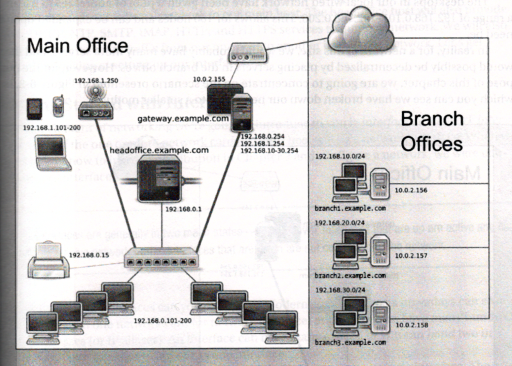 The example network used throughout the book. I did notice a few technical errors and omissions in these chapters. For example, when explaining how to manage networking with the `ip` and `ifup|ifdown` commands, the authors do not mention that ifup and ifdown does much more on Ubuntu, like mounting network shares from fstab. Also the section about LVM on RAID fails to mention that you need to blacklist your raw disks used in the RAID array in the LVM configuration. If you don’t blacklist these then LVM may try to construct the volume groups from the raw disks instead of from the RAID. Luckily such issues are few and far between. Part 2: Making It Work for YouThe second part of the book moves away from the details of system administration itself and onto providing services and application that your users can actually use. First up is more networking. DNS, DHCP, NTP and such. Then e-mail using Postfix with Dovecot sitting on top to provide IMAP and POP3 and SpamAssassin to keep your mailboxes clean. The chapter on setting up the AMP part of LAMP (Apache, MySQL and PHP) is well done but skimpy on the details of setting up PHP. The half a page section on PHP just gives you a list of packages to install and nothing more. No mention is made of configuration or the possibility of running PHP through fcgi which makes it possible to run PHP applications under separate user privileges. Chapter 12 describes file and print sharing using both Samba and more Linux oriented services like NFS4 and Cups. It also touches on document management using KnowledgeTree. I found several issues with this chapter. First off the information on NFS4 is skimpy, in contrast to the extensive explanation on Samba. It misses important details on NFS4’s new pseudo file system that needs a root directory and requires mount binding if you want to export directories outside the NFS4 export root. Another thing it misses is how to share printers with Linux clients. The book only explains printer sharing over Samba to Windows clients and not directly with Cups to Linux clients. The section on installing KnowledgeTree could also be better. It shows you how to install it using its massive stack installer which contains its own Apache, PHP and MySQL. I would have preferred and explanation that shows how to setup KnowledgeTree on the LAMP stack from the previous chapter. The same applies to installing Zimbra in chapter 15. The rest of the book is pretty well organized and thorough, with chapters on backup and recovery, resource monitoring, virtualization, LDAP and more networking fun with OpenVPN. This ties together the main office and all the branch offices in the example network from part 1 of the book. There is even a chapter on automated installs and
configuration management using Cobbler (or Kickstart/Preseed) and Puppet. ConclusionI really enjoyed “Pro Linux System Administration”. It's thorough, it covers a large amount of topics and does not pin you to just one distribution. The credo of “only some Windows and networking experience required” is a bit over the top, but anyone reasonably experienced with Windows System Administration should be able to use this book. It is also well suited to people who have some Linux experience but who want to know more (like me). Some of the chapters are a bit shallow and feel more like an installation walk-through but this is more than made up for by the depth of the rest of the book. All-in-all I rate it 8 out of 10 points. Book information
|

Comments (3)
If you have saved your LVM configuration to /etc then there is no problem because LVM will only search the devices you specify. In that case the RAID device will be missing and LVM won't start. Which is less bad than LVM eating up your RAID by writing to the raw disks.
@Steven: It depends on what you want to know. For a general all-round sysadmin book I can recommend this one, but if you're only interested in specific topics then there are probably better books out there which covers just the topic you want in more depth. The parts where this book lacks some information is high up the application stack, such as KnowledgeTree or Zimbra itself. The direct user-facing applications. Anything below there (from the system itself to backups, configuration management, provisioning, networking, mail/web services, etcetera) is well covered.
I've used the book myself already to set up Postfix/Dovecot/SpamAssassin/Fetchmail on my home server so I can IMAP my e-mail from all my computers. The only parts not covered by the book were the ManageSieve server for server-side filtering and importing my local Thunderbird MBOX files into Dovecot.
Post a comment
A free account is needed to post. Write your comment here first: your text is kept in this browser while you sign up or log in, and is waiting for you when you come back.
Your message:Sign up and post (it is free) or Log in and post

|
|
Also, it's funny you mention blacklisting, RAID and LVM: I didn't do that but never encountered any errors. Maybe just lucky?