
- Site menu:
- Latest Discussions
- Latest Newswire
- Archives
- Submit Story
- Story HOWTO
- Syndicate
- E-mail Alerts

Ubuntu's Linux Wireless Utility Easier than Windows
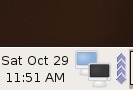
Recently, I bought a Linksys Wireless - B PCI adapter for one of my Linux boxes after consulting a compatibility list. Linksys changed the WMP11 chip in this revision and it just didn't work with my system. I started searching around on Google and discovered that some people got it to work using ndiswrapper. I prefer using wireless-G cards and access points so I went to Fry's and looked around for a Linux compatible card. I found a Hawking HWP54G for $14.95 and decided to try it even though it didn't mention Linux anywhere on the box. Intuition influenced me to choose this card. I put it in my little AMD Sempron based box and discovered it had a Texas Instruments ACX 111 54Mbps Wireless Interface and a Ralink 2500 chipset. Both SUSE 10 and Ubuntu 5.10 recognized the card and attempted to load drivers for it. But, they didn't work. Searching further, I wound up at a tutorial on Sourceforge and found a tutorial for getting wireless cards to work with Ubuntu.That made me wonder if ndiswrapper was in the Ubuntu repositories. So, I did a search in Synaptic Package Manager and found not only the ndiswrapper but a GUI configuration Utility. I downloaded ndisgtk, ndiswrapper-utils and just in case the ndiswrapper-source. I didn't know what to expect. I wound up with a menu item as you can see in Figure 1. 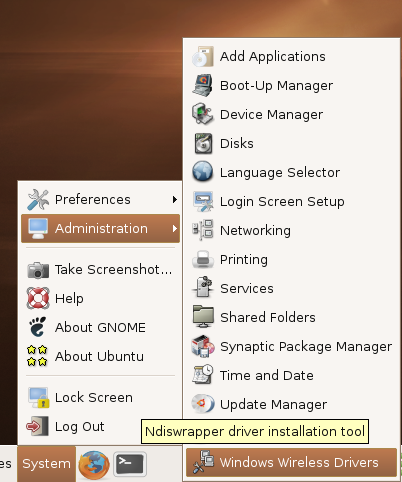 Figure 1 - Ubuntu Windows Wireless Drivers Icon. I looked at this with some skepticism. I figured my luck with these buckeroo's would lead me to the Linuxant web site where I would pay $19.99 for one of their wireless driveloaders. I had already downloaded the 30 day trial and it worked fine. Imagine my surprise when I clicked on the icon, followed the steps and wound up with a driver for my wireless card. Figure 2 will give you an idea of what I saw. 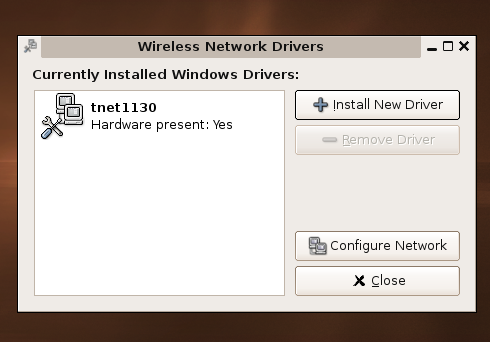 Figure 2 - Ubuntu Currently Installed Windows Wireless Drivers. The suspense started to build now that I had to configure the network and see if it would really work. So, I deactivated my eth0 card, unplugged the Cat 5 cable and configured my wlan0 card. In three steps, I was up and running, connected to the Internet and doing just what I wanted to do - throw away that ugly wire. Figure 3 shows you what appeared on my gnome panel.
OK. So, I didn't recompile the kernel and I didn't attempt to configure the drivers and do a modprobe, etc. Afterall, one project does have source code for this chip. The ACX100/ACX111 wireless network driver project. You'll also find a nice guide called Craig's ACX100/111 Guide for Linux. I actually followed Craig's instructions and they work. To add injury to insult, the tutorials mentioned above work nicely. I really prefer the CLI method of doing things. I'm a glutton for learning Linux and any straight up command line instructions work for me. But hey. So many people have dedicated themselves to making Linux a user-frriendly, advanced desktop that I thought you might like to see what our buddies over at Ubuntu and the gnome project have done. Afterall, it works and it's easy and friendly. So, enjoy! (y'all.) postscript: Take a look at Say NO to Windows NDIS Linux compatibility layer cludges! for a counterpoint of view about NDIS. |
|
|
Comments (29)
I tried a TI 111 card in SUSE
Where there is a native linux driver for rt2400 and rt2500 based cards ( which is quite a few ).
I've used this successfully with a Belkin card on Ubuntu 5.04
Including the fact that it is now built in for Ubuntu 5.10 Breezy Badger as standard. Haven't tried it though as I now run Ubuntu 5.10 on a PowerPC (emac) and sadly wireless usage there is a different kettle of fish.
I ended up buying a wireless to ethernet adapter from Belkin for £50 and just using a short ethernet cable from the standard port to the adapter and that works a treat.
grrr musical chipsets!!!
Nice article, BTW. I tested a very early Ubuntu release and was underwhelmed. Even now I am downloading the current Kubuntu- it's getting a lot of positive attention.
Publicly posting this sort of information is a good idea, I'll start keeping track. Some sites like http://www.hpl.hp.com/personal/Jean_Tourrilhes/Linux/ and http://tuxmobil.org/wireless_unix.html are pretty good, but not always up-to-date. The Autopsy pages on http://www.linksysinfo.org/modules.php?name=Content&pa=showp... are fun and informative for Linksys products.
The list seems pretty complete.
ummm... seen this done that
Nice that Ubuntu Finally Catches up...
It already has 50% of that finished...it uses apt
I've never had a dependency in a year and a half yet :) Can't say the same for my Ubuntu box.
Oh, and stopped looking like Windows. ;-)
*ducks*
Checking the logs for wpa_supplicant showed that tons of bugfixes were going in in connection with madwifi which explained my better luck.
Distros can't solve these upstream issues which are still unfortunately pretty common still. I am tempted to suggest to the Ubuntu folk that since they want "rad laptop support" they seriously fund the wireless and wpa driver writers. It would be money very well spent I think.
Who cares what it 'looks like'... Truthfully most distros GUI's using gnome or KDE 'look' somewhat like Windows, even though that's pretty easy to change.
Take a look at this if you don't believe what I'm saying: http://opensourceversus.com/modules.php?op=modload&name=News...
See the emoticon?
It would be nice to get my USB adapter to work.
Did you hear the one about the computer geek?
That's not funny!
;)
myJoke("Oh my God! That bowling ball! It's my wife!!!")
except HumorException, e:
print "%s: Ha! Ha!" % e print "No Anchovies, Please..."
else:
scratchHeadError("What was that?") print " For more info, see http://www.guntheranderson.com/v/data/noanchov.htm "
Geeks do have a sense of humour. It's just the rest of the world that has the wrong one ;) .
Works perfectly, thank you!
thanks :-)
HWP54G Now Works Natively With Ubuntu
:) Thanks Alex
Windows Wireless Drivers for Linksys WMP11
Hello,
I'm quite new to all this so thanks for your patience. I've been using Ubuntu 6.06.1 for a couple of years (since it was new?) on two computers; one with a direct internet cable connection, one without. Everything has always gone swimmingly with the cable connection but I've never been able to connect via a wireless adapter to our Linksys BEFW11S4 router. I've searched the forums in vain for solutions (including Ndiswrapper, which I've never successfully managed) but found the solution to my problem yesterday thanks to Tom Adelstein at http://lxer.com/module/newswire/view/46385/ . The GUI application he writes about there (Windows Wireless Drivers) worked exactly as he described and I'm now up and running (albeit very slowly) with a Linksys WMP11 PCI Adapter. Tom, I couldn't find a direct contact for you at LXer--thanks a million for this tip if you read this. When I've finished downloading and installing two years' worth of Ubuntu updates I mean to wipe Windows from this drive and FINALLY be free at last...finally, thanks a million to all the contributors to the Linux community for the fact that I've eventually been able to find a solution to nearly every Ubuntu problem I've encountered in the last to years via the internet. Long live Ubuntu.
Quoting:Tom, I couldn't find a direct contact for you at LXer--thanks a million for this tip if you read this.
I am glad that Tom's article helped you get your wireless working, it has helped many others as well.
Tom Adelstein was our E-i-C a couple of years back but he has not been seen around these parts for some time now. He does write an occasional article for the Linux Journal website though, you could try there.
Regards, Scott
Post a comment
A free account is needed to post. Write your comment here first: your text is kept in this browser while you sign up or log in, and is waiting for you when you come back.
Your message:Sign up and post (it is free) or Log in and post