
- Site menu:
- Latest Discussions
- Latest Newswire
- Archives
- Submit Story
- Story HOWTO
- Syndicate
- E-mail Alerts

Five Tired Old Myths About GNU/Linux
Where I'm Coming FromAdrian Kingsley-Hughes wrote a piece over at ZDNet addressing what he views as "five crucial things the Linux community doesn't understand about the average computer user". I'll examine each of his points, and hopefully help him see things a little differently. Frankly, the biggest reason people aren't switching to GNU/Linux has a lot more to do with the pervasiveness of the Microsoft brand than any of the issues Adrian raised. On the whole, users aren't all that dissatisfied with WindowsAdrian suggests that "There are millions of users out there who just get on and use their PCs without any real difficulty." That may or may not be true. He doesn't offer any evidence to support his claim, so it's really difficult to address. However, I have encountered numerous people in my own daily life who have experienced tremendous difficulty with the Windows operating system. What's more, I personally know several hundred people who have encountered numerous other people facing difficulties with Windows. There are two more likely reasons why people haven't switched to GNU/Linux. One is brand recognition. People buy Macs, not because they don't want GNU/Linux, but because a Mac is the only alternative many know about. I have met people who think - literally - that the only name in computer software is Microsoft. In other words, many people don't know about GNU/Linux to consider it as an option. Even so, Macs at least have FreeBSD at their core. The other reason is that people have been conditioned to exect less from a software vendor. The lack of interoperability has led to a monopoly, which in turn has led to decreased competition and, subsequently, quality. Perhaps the Microsoft security model has improved with Vista, but an awful lot of the current model seems to dwell on DRM as much as protecting users. Too many distrosWhat are you smoking over there? Sure, some people fear choice. They fret and break into cold sweats over choices. But that doesn't apply to everyone. And people need to remember that the lack of choice has hurt them badly over the last 20 years. Honestly, though, I haven't heard all that many people complaining about not being able to choose a GNU/Linux distro. I can't recall the last time a newbie posted a note sayin, "I can't figure out which distro to choose. I'm off to reinstall Windows". People want certainty that hardware and software will workThis one blows my mind. I wish like hell someone - anyone - would name the hardware vendors as the culprits here. I would fire off an e-mail to Kodak and Canon, but Dell ignored me until recently. Chances are, so will these mega-corporations who pay scant attention to journalists, let alone customers. Hardware manufacturers blame the lack of interest from consumers. Meanwhile, Windows users don't care if something works with GNU/Linux until they try to switch. But because they rarely bother to ask, the vendor sees no demand. Of course, maybe they figure the companies will ignore them, too. And I won't mention all those printers people spend up to a week trying to get working with Windows, despite being advertised as "plug-n-play". I can tell you that iAudio advertises all their portable audio players as working with GNU/Linux. I saw some USB keys as well - maybe the same ones you're thinking of. So that's at least two of the 5. What's more, my digital cameras from Canon and Kodak - along with most other devices I own - work out of the box with GNU/Linux, even though there is no advertisement to that effect. There are over 100 vendors in the LXer Pre-Installed Linux Vendor database that will sell you a computer with GNU/Linux pre-installed. Most, if not all, of them ensure the box works before they ship it. While it might be daunting for some to learn new applications, many of the GNU/Linux apps mimic the Windows apps closely enough that most people can figure out the basics fairly easily. And yes, I know some people have real difficulty adjusting to new applications. Some people also make it a bigger deal than it needs to be. Migrating some application data would be a bigger challenge, depending on the application. As far as most people are concerned, the command line has gone the way of the dinosaurO.k., now that I have gotten up from rolling in the floor with laughter... Is your name Rip Van Winkle? The truth is, there are some people who prefer the command-line, but hardly anyone is actually trying to migrate people from the Windows GUI to Bash. Every distro aimed at desktop users includes a GUI by default. You would have to be absolutely shnockered to suggest that anyone is seriously trying to promote the CLI as the default desktop environment. Well, o.k., maybe the Bash folks have setup spreadbash.org to do just that. But they're a minority. Linux is still too geekyFrom Adrian's own post: "But there are dark corners that absolutely reek of Linux geekdom cliquiness that average users aren't going to feel at home in (I don't feel at home there). Ubuntu updates are one such area where you need a high level of know-how to understand what's going on.What the Ubuntu dev team need to do is find, I don't know, 100 people who aren't Linux geeks and stick them in front of the OS." 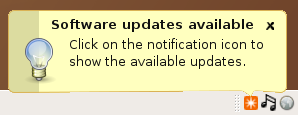 Are we talking about the same thing? After this, you get a list and most people simply confirm the update. What part of this is so challenging to you? Please excuse me while I go guffaw some more. Had you argued that people sometimes have to resort to the command-line to fix hardware issues, I would have let you slide. But even that is better than searching through the Windows registry. Had you mentioned that Upgrading to the next version of Ubuntu might be tricky in some cases, I might have seen your point. But Ubuntu Update? Get real! Seriously, if you're going to write lame arguments about the underwhelming uptake of GNU/Linux on the desktop, the least you could do is link to some lame sources - Microsoft's "Get the Facts" site comes to mind - to back up your claims. That way, you don't come off like you went to sleep in 1999 and just woke up 10 minutes ago. Sure, GNU/Linux has its issues. Half of them have to do with businesses being unwilling to develop libre codecs, drivers and software. Another sizable portion has to do with "brand recognition". Frankly, that one is as big as any of the others. |

|
|
Comments (55)
Great analogy
A lot of people assume because they can use a computer they know how they work or how to install and configure one correctly. Most people couldn't install any OS on a computer, and get t right. You only have to look at the massive Windows aftercare business and army of IT monkeys needed to keep Windows running, to see that it's not a trivial task to keep Windows up and running.
I find the shell comment funny, as I sit next to IT at work and I hear them daily telling windows users to press Start > Run then type cmd then type command line things to fix their Windows PCs..
I keep one Windows XP system, which I use only to perform updates and map installs for my Garmin GPS. That's not the fault of Linux, but Garmin and their lack of cooperation with Linux users. It's also used for three games, which my game playing wife refuses to give up. Of course, she also has LInux games she wouldn't give up, too!
I suppose the Windows advocates feel they can continue to scare potential Linux users with the "hardware compatibility" issues, so long as they never mention specific hardware which won't work with Linux.
Many hardware vendors are often cheap and don't write good drivers if they write them at all. Try installing Windows XP pre-SP2 on a SATA only system - it's not possible out of the box.
At work the Windows guys are amazed that I don't spend hours installing Linux boxes, they have to prepare them first then spend hours installing... I turn up boot off the first disk, have one reboot part way through, and it's done, Red Hat Enterprise took about 1hour yesterday including tinkering with the GUI, Debian Etch a week or so ago was even quicker.
I started using Windows at version 2. It ran from two floppies. Maybe I should start a blog about how tough it is to use Windows based on my experiences with Windows 2.
One positive thing is that the Windows bloggers have finally given up the argument that you have to compile all of your software when using Linux.
Linux is great when you're using something that works right out of the --- ummm --- download.
It's not quite so great when you're using something that you can find a driver that somebody has developed out on the internet, but still ok.
It sucks when you have a piece of hardware that ain't supported no way no how.
In that case, you probably feel like a lot of Vista users.
Oh yeah...and I nearly forgot....I've also downloaded and installed LaCie for my LightScribe DVD burners.....
Say what? I didn't know that existed... thank you!
I found it almost usable with a lot of promise in 1993. At that time I was using commercial *nix at work and Macs for desktop apps. By 1994 I was using Linux almost full time at home and *nix at work. By 1995 I gave up Macs for word processing and other office tasks.
I've had to deal with Windows some at work (about as little as I can get away with), and find it almost entirely frustrating... I've never used Windows at home, so where most people find Windows to be what they are used to, I am backwards. The Windows way is unfamiliar and awkward to me.
Is Linux perfect? Of course not, nothing ever is. Do I find Linux less aggravating than Windows, yes, absolutely.
Like most other IT guys (I suspect), I have a bunch of home users (friends, family, managers at work etc) that I provide home PC help to. Most of these guys use Windows. Very few of them would have any idea *whatsoever* how to fix any problem they come across on Windows.
The couple of people I have been able to move to linux, have become more and more independant - and the times that I do need to fix something, I can usually SSH to their PC over the 'net and fix it (that's right - using the dino-CLI).
On the hardware compatibility side, I've experienced more hard related hassles with Windows lately than linux. We have a laptop at work that's a couple of years old (P4 3ghz, 1gb ram, onboard Intel graphics etc). A fresh Windows XP or Vista install 'out of the box' doesn't detect the screen correctly, nor the network card, modem, sound, usb, card reader etc etc. I had to download the drivers for these from another machine, burn them to CD and copy them over (I couldn't even use a USB key as the USB devices didn't work either!).
Installing Ubuntu on this machine was a piece-of-cake. Aside from the modem (which is a win-modem and I don't actually use it from linux anyways), I only needed to add the widescreen resolutions to xorg.conf and the rest worked 'out of the box'.
I believe that, for most basic devices, the days of windows providing better hardware support than linux, have come to an end. In my personal experience anyway.
Just one example: A few hours ago, my wife asked if I had the HP printer connected to her XP machine. I said no, here let me do it. Turns out that, since the last time I had to re-install Windows, I had not installed the printer drivers.
The printer drivers _would_not_install_, because her system uses Chinese characters and the HP installer chokes with "non standard character in path". XP's driver search function is completely broken, it cannot even scan the CD for the driver files.
Compared to the KDE Control Center and CUPS printing module, XP is worse than useless, it's _unusable_.
"[T]he days of windows providing better hardware support than linux, has come to an end."
I couldn't agree more. There really is only one hurdle left, that manufacturers either stick to published standards, publish their own interface specifications, or release Linux native drivers. With Windows, the manufacturers must write and suppore their own. Linux compatibility doesn't _have_ to cost them a thin dime in development costs.
Myth about GNU/Linux
Now I connected it to my Kubuntu-box, within 1 hour I had it working with Kino, even emails get answered within half a day.
Updating WinXP almost always wants to reboot the system, Kubuntu almost never. Both have automated updates (it is easier that way).
So as a user Linux has become more easy than windows is my experience. I once updated from Win98 to WinXP pro that was a disaster, lost about 4000 files.
Updating Ubuntu 5.10 to 6.06 was a breeze. Took me just 3 hours and a half mostly for the download and then 2 or three minor things did not work that were really easy to fix.
The main problem is that for example canon does not bring linux-drivers. So I do not buy canon-printers any more, I now have an HP and am perfectly satisfied.
I know linux since 1999, it was not that bad in those days, even with a good working GUI, now it is simply a superior product from which MS could learn a thing or two . . .(-million!)
Jan
I also try them out with Linux first, because as you say, it's usually plug and play. Normally a new camera will be detected properly by name and "just work". That doesn't happen with Windows.
In the last 18 months I can only think of one bad experience. I bought an ATI TV Wonder 200 card at Best Buy and it didn't work. Later I found that the card was detected incorrectly by the kernel, and after a simple fix, it works without needing a driver with any Linux distribution.
FWIW, even if there are not 'official' Canon printer drivers for Linux, I have had no trouble getting Canon printers to work under Linux including color printing. I am currently using an iP6000D which is a very nice printer, and the ink cartridges are very reasonably priced compared to many other brands.
True, but under "official support" (like when calling Dell (servers) and Canon) back and forth, the only answer is "not supported." Too bad for Canon.
I'm biased towards Canon stuff - I used to work there years ago.
Anyways, with Feisty, I can now even print double-sided, from each tray and I've been able to scan since Edgy. So, linux is definetely getting better - even for 'unsupported' devices. :-)
1 - It is very difficult to know how to pronounce it, should it be pronounced GANOO or as 'NU or as G N U - Confusion about brand naming is a big no no in any market place. People saying LINE-UX rather than linux is also a bad thing. Ford have this problem in the UK with a car they called KA - The media still take the mickey out of the name some 10 years after its launch.
2 - It sounds geeky - GNU is not a common word, and putting the name of an animal in front of a brand name seems a little Weird - Imagine if M$ had called their latest OS RHINO/Windows rather than Windows Vista - Whatever you think of the product, you have to admit the name is catchy - GNU/LINUX could never be described as catchy.
3 - It highlights the inability of the community to understand the importance of product placement and branding. It is inability that really holds Linux Back. Why does GNU need to be in the name, sure they make a kernel into an OS, but then so does Xorg but we don't call it XORG/GNU/LINUX do we? - The product needs a good name and a good logo. I think Linux and Tux meet that requirement whereas GNU/Linux is not the sort of name anyone could get excited about in a positive way.
It makes me think it is purely a brand issue that everyone who has touched a computer in the last ten years has probably encountered Windows. It's familiar.
I think branding is well understood by Linux vendors. The problem is starting way back from the position of the entrenched opposition who also have nice high towers with machine gun posts to keep you pinned down where they can.
I think it has nearly zero effect because nearly nobody calls it that.
Cheers!
When I introduce people to it I refer to it as just Linux because I know it is easier to remember than GNU/Linux. Anyone who takes the time to learn more about Linux comes to know that it is also called GNU/Linux as well.
I understand too that the GNU developers deserve credit for their work but anyone who actually uses Open Source Software is already giving them the respect they deserve by using and telling others about the software they use.
Oh by the way, my boss is letting me dual boot Debian 4.0 and XP on my work machine, I am installing it today!
Another goal achieved, to get people at work to see it running and working..
Scott
Quoting:GnuLinux
I think RMS never cared about marketing (he probably does know what is or totally irrelevant to him). Otherwise he would have found a much better name. I personally rarely use Gnu/Linux.
May be RMS should start calling it GLinux. That should work and take care of the problem.
You're probably right there. The whole GNU/Linux thing seems odd to me because I don't view the name as the place to give credit for contributions. You might say GNU/Linux if there were other versions of Linux, otherwise I don't see the point. Unfortunately, I came to the party too late to have a right to an opinion on the matter.
Not unhappy with Windows, eh?
I need to tell you about the server I use with one of my partners.
It's an HP server, about a year and a half old.
Very nice piece of equipment. Dual core xeon running at 3.4 ghz, with a second slot available. Hardware SCSI raid, with three drives in place. Hot-swappable redundant power supplies, hot-swappable disk drives, hot-swappable fans -- and lots of them. The whole thing can be easily and quickly disassembled without tools.
I'm not telling you this to brag or to make you wish you had one, or even to review the hardware. I'm telling you this because of how we got it.
My partner has been working with small manufacturers for several years now. This machine was a Windows 2003 server owned by one of his clients. The client finally got so exasperated at Windows that he pulled the plug and replaced it with a Mac server (he already had Mac desktops). Not needing the box, he gave it to my partner. It now runs Ubuntu. We are very happy with it.
Nah. The box's original owner understands the difference very well. He just made the choice to go Mac. WIth nothing to run on it, the box became expendable to him.
No doubt! A co-worker asked me for some help with a winpc recently. When I started asking questions about software/OS they didn't have a clue! Too many pc users don't know the difference between the office suite, browser and OS. So often, the response is along the lines of "I don't know, I just click the 'button' and it goes."
It's sad, but hey! I'm doing my part to help shine the light of knowledge into the dark recesses of computer ignorance in my little community.
Here's my winders gripe for the day..
We just setup a new XP Pro laptop at the college for someone who works from home. We set everything up, installed the same model printer, etc. Then we brought her in to setup her other stuff like her silly iPod and whatnot and showed her how to hook it all up. So she goes home and...her printer won't work. Windows is trying to reinstall it. So I tell her to go ahead and login as admin and let it. She logs in as admin, lets windows reinstall the printer, and it finally works. Of course windows had created a new printer instance which she had to use. Same model printer, same usb port, different physical printer. And just because of that windows has to reinstall the drivers and make a new printer instead of just using the already created instance of the printer. What is up with that?
Not that I don't understand that any Windows gripe requires an outlet...
What happens if you hook up a usb printer to linux, set it up in cups, then replace it with the identical model on the same port?
I know that Win95 would reboot itself during first boot after keyboard change for no adequately explained reason.
Here are some possibilities:
1) WinXP is reading a serial number from the printer ROM.
2) WinXP is using its famous existential PnP to enumerate devices differently on each boot.
3) The 2 printers BIOS's are a different revision.
4) The printer is a "Software" or "Win" printer and has a buggy driver.
5) The printer is a "Software" or "Win" printer and has a non-buggy driver.
--
Famous Linux USB printer lore:
If Linux 2.6 USB driver gets an "unknown" USB printer error, it will return "printer on fire" to the OS. See
drivers/usb/class/usblp.c in the source.
With all these new Ubuntu users coming on line, there's a distress lawsuit just waiting to happen. I wonder if Dell knows...
Use
grep -r -i "on fire" *
on the source code to see what all can "burn" in Linux.
Yes, this more-or-less what I meant by a serial number in the printer. No, the controller chip is on the system, not the printer.
>>I've seen windows regard identical models of the same memory stick as new hardware and set about installing them. I think the difference could be that the linux kernel has support enabled and sees all e.g. usb memory sticks as a usb memory stick rather than windows thinking it is usb memory stick 0001.
Hmm, this is similar to the enumeration issue I spoke of. But not quite. Sys device (like USB controller) enumeration occurs on boot. USB device enumeration is hot-plug, and can occur at any time, I believe.
In Debian, you can keep track with lspci and lsusb to see what happens.
In Windows, you cannot.
[17372955.748000] usb 4-1: new full speed USB device using uhci_hcd and address 3 [17372955.936000] usb 4-1: configuration #1 chosen from 1 choice [17372955.940000] drivers/usb/class/usblp.c: usblp0: USB Bidirectional printer dev 3 if 0 alt 0 proto 2 vid 0x04E8 pid 0x323A
Too many distros?
The most common question on the forums.computeractive.co.uk linux section is "Which distro should I install, I'm confused?" I'm not suggesting that Linux become just the one distribution, but the sheer number is offputting to newcomers. You're right that Linux is much better suited to the ordinary user than it was, hence Computeractive decided to run an OpenSource Academy recently at http://www.computeractive.co.uk/2173591. You're also right that it's hardware venders that must take some of the blame for lack of hardware support. Still, we can take comfort from the fact that when devices are not supported in a new version of Windows, it is Microsoft that takes the heat from readers than too, it's not just Linux. Kind regards Tim
1. The author of the blog was saying that Windows users stick with Windows because there are too many Linux distributions. That's different from saying that too many distributions cause confusion.
2. The criticism should instead be on the hurdles faced by a new Linux user due to poor documentation. We've talked elsewhere about the stupidity of lists of Live CD's and distro choosers.
The real problem is that you do a search on Google and up comes a document of someone saying, "Well, I don't recommend Linux distributions, because the beauty of Linux is that you have choice." They then proceed to ramble for six pages about software freedom and the Microsoft tax and how stable Linux is as a server OS. One nice thing about the Ubuntu phenomenon is that newbies focus on one distribution that largely works, has great forums, and has much good documentation.
1. Different but related. Turns out choice is a good thing, but only up to a point. Too many choices tend to frustrate us, especially if we lack the information to make what we consider to be an informed choice. It wouldn't surprise me at all to learn that it discourages some people from dipping their toe in the water.
2. Yes. Re:Ubuntu -- it ain't nothing special so far as distros go, but people flock to it. That is enough to make it special.
the command line
OK, now I'll explain, the various BASIC-type programming languages (Ruby, TK, Perl (ugh) ) all have easy command line methods to execute a program as a function. Gee - simple integration. I understand about 10 programming languages and don't use them; instead I just (simply) "integrate" using one of the BASIC-type languages against an existing program's CLI.
This is the way grasshopper! So please do not denigrate the CLI - CLI with a BASIC-type language is the greatest advance with programming since sliced bread. Yes, Windows also uses CLI - they aren't stupid.
Uh, Ruby Rocks!
By the way, my Kodak camera didn't work "out of the box" - I had to turn it on and THEN plug in the USB cable (both in Linux and Windows) - not very impressive Kodak guys. Naturally Linux was blamed on the web - yeah, another device that "doesn't work under Linux".
Quoting:yeah, another device that "doesn't work under Linux".
I kept my Kodak Easyshare on top, and it worked just fine.
Lindsay: I suggest following traceyanne's advice - keep the camera on top. I'm not sure if trying to use it under Linux is problematic due to some bug in the software, or if weight of the computer has something to do with it.
Too geeky, indeed
When I upgraded my Ubuntu box to Feisty I noticed that desktop items for my hard drive partitions changed behavior, once again. The behavior already changed when I upgraded from Dapper Drake to Edgy Eft. This made me look into the issue.
While doing so I noticed a lot of people have problems here.
For example, one guy added a second hard drive to his box, with four partitions. He entered the data into his fstab -- and don't say this isn't already geeky! -- but only the first partition showed up in the 'Computer' location. All other partitions don't show up. However, he's able to mount them all using the command line. The problem is still not solved.
Another guy with years of experience had a different problem: He used many partitions and didn't want them to show up in on his desktop. Additionally, he didn't wanted them to be mounted automatically after log-in. The obvious reason was that these icons cluttered his desktop.
Getting rid of this behavior included editing obscure XML configuration files deep in the system to make HAL behave correctly. He didn't even understand what was wrong because he had no idea about HAL being responsible for the desktop icons.
I was able to help him but just because I spent hours of googling for the correct information a few days earlier. Funny enough, we just found a workaround, but no proper solution to his problem.
I'm sure, there are many more examples to be found in every proper Linux forum about stuff that just works under Mac or Windows but requires editing XML files to get stuff behave correctly.
Linux -- and even Ubuntu -- still has places that are really, really geeky.
Additionally, is shows that there are occasions where users are lost who are afraid of using the command line.
OTOH, I had a keystroke logger on my Windows box. Fixing the problem required making changes to the registry (whatever the heck that means). You are warned to be extremely careful when editing the registry. You should always make a backup of your registry. Of course, you get the tool to make a backup of your registry with XP Professional but not XP home. At that point I saw no further reason to stick with Windows.
The point of my post is that you have given an example that applies only to the most advanced users. I have given an example that is not only important (keeping icons off the screen is not quite as high a priority as removing a keystroke logger) but also likely to affect a large percentage of Windows users. To make matters worse, the Windows users most affected by security problems are those least able to handle them, or even know they exist.
We can always cook up examples, but if I have a choice, I will set up my mother's computer with Ubuntu rather than Windows any day. It really does "just work" once I set it up. She can do the updating. She can run the programs she wants. There is close to zero maintenance. "Geekiness" is optional with Linux for a typical user who just wants to do basic web surfing, email, and word processing. The same cannot be said for Windows.
My Windows partition automatically shows up on my Linux desktop. When my Linux partition automatically shows up on my Windows desktop, then you might have a point. Until then, Linux is easier and less geeky for me.
Windows isn't less geeky, it's more familiar.
Would you switch to an operating system that is as secure as Windows? Probably not. It needs to have better security than Windows before you consider switching.
Likewise, Linux needs to be less geeky and needs to have better usability than Windows. So i still think the original author has a point, although his example was really a clueless choice.
For the core problem wasn't yet adressed: Under Windows, user can get applications for all walks of life: According to John Cherry, initiative manager for Desktop Linux (DTL) at Open Source Development Labs Inc. (OSDL), about 35,000. Thus, Windows is still the better option for most people -- despite their low security record --, because there are the applications that people need to get stuff done and the games to have fun.
So, who cares, whether Windows cannot mount Linux partitions? That's not a problem for the vast majority of Windows users. Mounting Windows partitions, however, is a problem for many Linux users. If Linux isn't better in solving problems than Windows, there's no incentive to switch.
@dcparris: The problem with these 'old' arguments is that some of them are still valid, from the point of view of many people. But I agree that the Ubuntu Update example was foolish.
I hear you. The problem is, I have given Ubuntu to folks who are non-geeks - they manage quite well, and ask very few questions. The only technical difficulty the one family has is a grown daughter who keeps spilling liquids into the keyboards. In fact, they prefer it over the Windows boxes they occasionally use (library, community college, etc.). So whether it's myth or reality probably depends more on the individual user - and probably more for those more familiar with Windows than these folks. I think if you knew this family, you would better understand the comment above about Windows being more familiar to people. Ubuntu was their first real computer experience.
To me, most of those arguments really are myths. But we may just have to disagree on that. :-)
So I had a Mac. Editing the resource fork, adding sounds, changing icons, lots of fun. Very geeky.
Windows. The registry is a wasteland, undocumented, barely understandable to people who mess with it all the time. Exceptionally geeky.
Linux has HowTos. They mention (gasp!) the command line. But they do it with copy/paste-able examples. How geeky is copy/paste?
But really, I'm sure TRS-80 command-line BASIC would seem geeky to someone whose only experience with a computer is, "If it's not right up front on a menu, I don't understand it."
I fully expect that there are going to be lots of Ubuntu-newbies going forward who are just as clueless of the underlying technology as Windows-newbies or Mac-newbies.
And I must echo the other folks here who said, "Anyone who is adding disk drives and worrying about partitions is _NOT_ a "newbie". They may be early in the learning cycle, but that's not the same thing.
Post a comment
A free account is needed to post. Write your comment here first: your text is kept in this browser while you sign up or log in, and is waiting for you when you come back.
Your message:Sign up and post (it is free) or Log in and post